Solved
single click event fires rule twice
single click event based on CSS selector fires rule twice in Adobe launch. I tried bubbling but didn't work. Any custom code to restrict it to one time firing?
single click event based on CSS selector fires rule twice in Adobe launch. I tried bubbling but didn't work. Any custom code to restrict it to one time firing?
Are you sure the trigger is coming from the same rule?
Try turning on debugging... in your Browser's console you can turn on debugging by using:
// Turn ON Debugging
_satellite.setDebug(true);

// Turn OFF Debugging
_satellite.setDebug(false);
This should show you which rules are triggering on your click
The other possibility is that you have multiple Events on the same rule, and multiple of them align to your element:

As in, both "CSS Selector 1" and "CSS Selector 3" match your element, making the rule trigger twice.
Example:
You can combine CSS Selectors into one big string to simplify this, by using:
(You can combine multiple selectors using comma)
Or you can add a Condition to the rule for "Max Frequency":
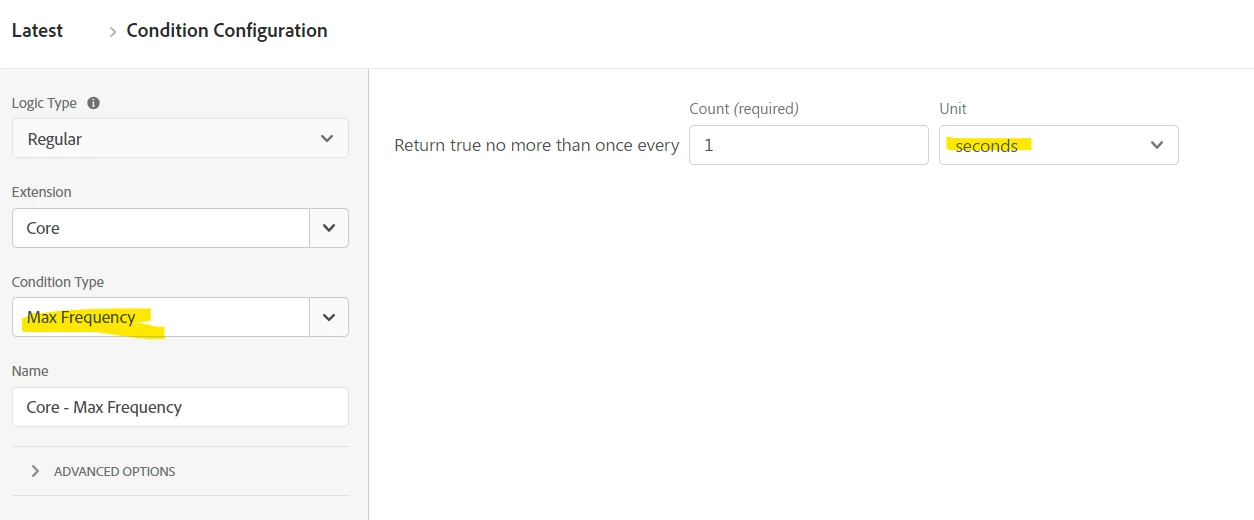
Using 1 Second should be enough, as CSS click selectors on the same element will be within milliseconds or one another, and this will allow additional subsequent hits on the same page (if the user isn't navigated away) to continue tracking.
Enter your E-mail address. We'll send you an e-mail with instructions to reset your password.