Showing unrelated value of evar60 when breakdown evar13 | Community
Skip to main content
Level 2
June 27, 2024
Question

Showing unrelated value of evar60 when breakdown evar13
  • June 27, 2024
  • 3 replies
  • 1307 views

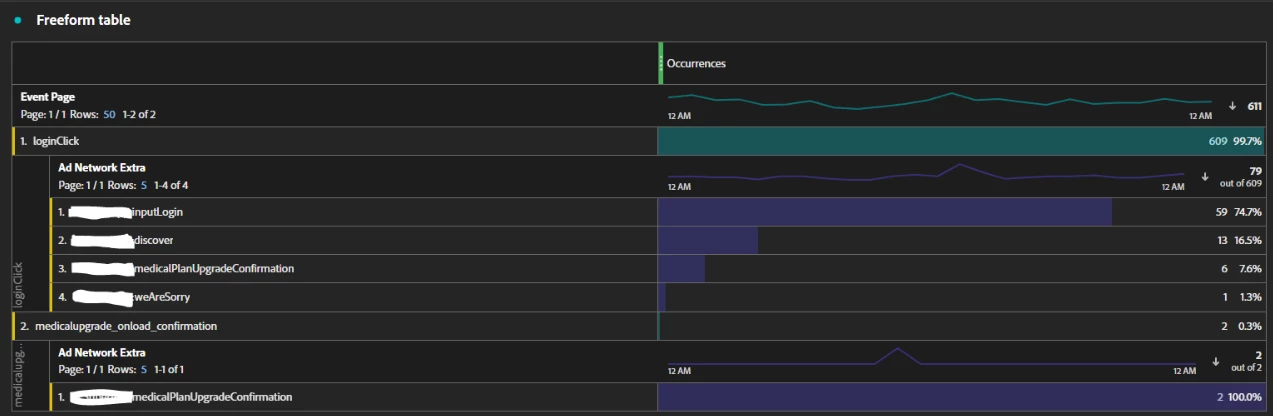
 hi guys, i have a question for freeform table. As capture image above, i trigger 2 pageName (pageName config as evar13). We also see that in this image has break down section: Ad Network Extra (this one config as evar60). The query time on Jun 26, 2024. My question is why is the value of evar60 medicalPlanUpgradeConfirmation display on pageName evar13: loginClick. In my logic code evar60: medicalPlanUpgradeConfirmation only trigger when user trigger the medicalupgrade_onload_confirmation. And why the amount of occurrences on each Page is different: loginClick is 6 and medicalupgrade_onload_confirmation is 2

for more information: i trigger Adobe tag with React Native framework.

Thank guys!

This post is no longer active and is closed to new replies. Need help? Start a new post to ask your question.

3 replies

bjoern__koth
Community Advisor and Adobe Champion
June 27, 2024

HI @daniel_99 

bear in mind that eVar values persist across pages (if their expiration is not set to "Hit"), so setting an eVar value on pageA will persist it across pageB, pageC, ... unless you overwrite it on those pages.


Same for multiple events on that same page. If your eventA is setting eVar99 to value "foo", this eVar value will persist on eventB, eventC, etc. on that same page.


Maybe this is what you are seeing in your case? If so, maybe consider using a prop instead of an eVar that will only be applicable for a single server call.


Cheers

Cheers from Switzerland!
Ankit_Chaudhary
Community Advisor
Community Advisor
June 27, 2024

Hi @daniel_99 

Occurrences will provide the number of times a value is set in an eVar along with the number of times it persisted until expired or overwritten by another value, if the eVar 60 is set to expired on a visit then it's value will persist on multiple pages resulting which is available to you in screenshots, to check only the instances(no of times a value being set with specific pages) try replace the occurrences with the instances of eVar60.

bjoern__koth
Community Advisor and Adobe Champion
June 27, 2024

Good addition @ankit_chaudhary !

Cheers from Switzerland!
Jennifer_Dungan
Community Advisor and Adobe Champion
June 27, 2024

I think both @bjoern__koth and @ankit_chaudhary got this... but I just want to add a visual of persisted values.


Let's say that eVar1 (Page Name) has a standard expiry of "Visit", and eVar2 (Click Action) also has a standard expiry of "Visit", and eVar3 (Marketing Campaign) also set to "Visit"

Note that all eVars have their own "Instance of" metric associated to when they are explicitly set.


Visit:

  • Page 1 (Home Page - coming from "Email" campaign)
    • eVar1 is set to "home"
    • eVar2 is not set
    • eVar2 is set to "email"
    • Occurrences is triggered
    • Instance of eVar1 is triggered
    • Instance of eVar2 is not triggered (as nothing has been set)
    • Instance of eVar3 is triggered
  • Page 2 (Product Page)
    • eVar1 is set to "product"
    • eVar2 is not set
    • eVar3 maintains the value of "Email"
    • Occurrences is triggered
    • Instance of eVar1 is triggered
    • Instance of eVar2 is not triggered (as nothing has been set)
    • Instance of eVar3 is not triggered (as nothing has been set)
  • Action on Page 2 (Add to Cart)
    • eVar1 is not set, but maintains value of "product"
    • eVar2 is set to "add to cart"
    • eVar3 maintains the value of "Email"
    • Occurrences is triggered
    • Instance of eVar1 is not triggered (as nothing has been explicitly set, the value here is maintained due to the expiry)
    • Instance of eVar2 is triggered
    • Instance of eVar3 is not triggered (as nothing has been set)
  • Page 3 (Cart Page)
    • eVar1 is set to "cart"
    • eVar2 is not set, but due to the expiry is maintaining the value of "add to cart"
    • eVar3 maintains the value of "Email"
    • Occurrences is triggered
    • Instance of eVar1 is triggered
    • Instance of eVar2 is not triggered (as nothing has been explicitly set, the value here is maintained due to the expiry)
    • Instance of eVar3 is not triggered (as nothing has been set)
  • Action on Page 3 (Purchase Event)
    • eVar1 is not set, but maintains value of "cart"
    • eVar2 is set to "purchase"
    • eVar3 maintains the value of "Email"
    • Occurrences is triggered
    • Instance of eVar1 is not triggered (as nothing has been explicitly set, the value here is maintained due to the expiry)
    • Instance of eVar2 is triggered
    • Instance of eVar3 is not triggered (as nothing has been set)
  • Page 4 (Purchase Success)
    • (eVar1 didn't get set properly)
    • eVar1 is not set, but maintains value of "cart"
    • eVar2 is not set, but due to the expiry is maintaining the value of "purchase"
    • eVar3 maintains the value of "Email"
    • Occurrences is triggered
    • Instance of eVar1 is not triggered (as nothing has been explicitly set, the value here is maintained due to the expiry)
    • Instance of eVar2 is not triggered (as nothing has been explicitly set, the value here is maintained due to the expiry)
    • Instance of eVar3 is not triggered (as nothing has been set)


There are times when you want the values to be maintained, like in the case above with Campaign (eVar3)... when the purchase occurs, you want to be able to associate that purchase to the campaign that drove the user to your site (i.e. the Email campaign).


The Page Name (eVar1) however could go both ways... in one case, not having to repopulate the Page Name on your actions is nice, it maintains the value.. however, if the Page Name fails, like in the case of Page 4; then you end up with an incorrect value. (personally, I keep my custom Page Name to "Hit" expiry, and explicitly set it on all pages and actions so that if something fails, I can see where and resolve it, and don't risk having incorrect names on my pages).


The Click Actions however, definitely should be "Hit" expiry, as they only pertain to those actions. Unless of course you want to see the last action even several pages away, but if you want to do that, I would suggest applying a custom attribution model in your freeform table, rather than carrying forward a click action in this manner.

Daniel_99Author
Level 2
June 28, 2024

hi @jennifer_dungan, according to your example, I have a small question as follows: On Page 3, we have set the value for evar1 to "cart", so when displaying the total number of occurrences of evar1 of Page 3 (emphasis on only Page 3 and not with any other page), evar1 will be displayed. All three are "home", "product" and "cart", right?

For example, the dashboard will display the following:
Page 3:

  evar60:

  1. home
  2. product
  3. cart

Am i correct?

Thank you!


Jennifer_Dungan
Community Advisor and Adobe Champion
June 28, 2024

No, eVar1 on Page 3 will only show the occurrence of the value that was set (i.e. "Cart"...


Now, if you were to use a custom attribution of Participation, you would see more than 1 value.... 


eVar1 on Page 3 is "cart" (that was the last value that was set within the visit attribution)


The visit attribution just means it will continue to hold the last set value until the visit is over, or a new value is set.


A participation model (only available in custom attribution) would look at all values that participated.