Set Classifications and Processing Rules for a query string parameter but not in "campaign" | Community
Skip to main content
Level 2
July 1, 2022
Solved

Set Classifications and Processing Rules for a query string parameter but not in "campaign"

  • July 1, 2022
  • 2 replies
  • 1005 views

We have to add a new query string parameter setting for upcoming campaigns but need to keep the campaign classifications active. 


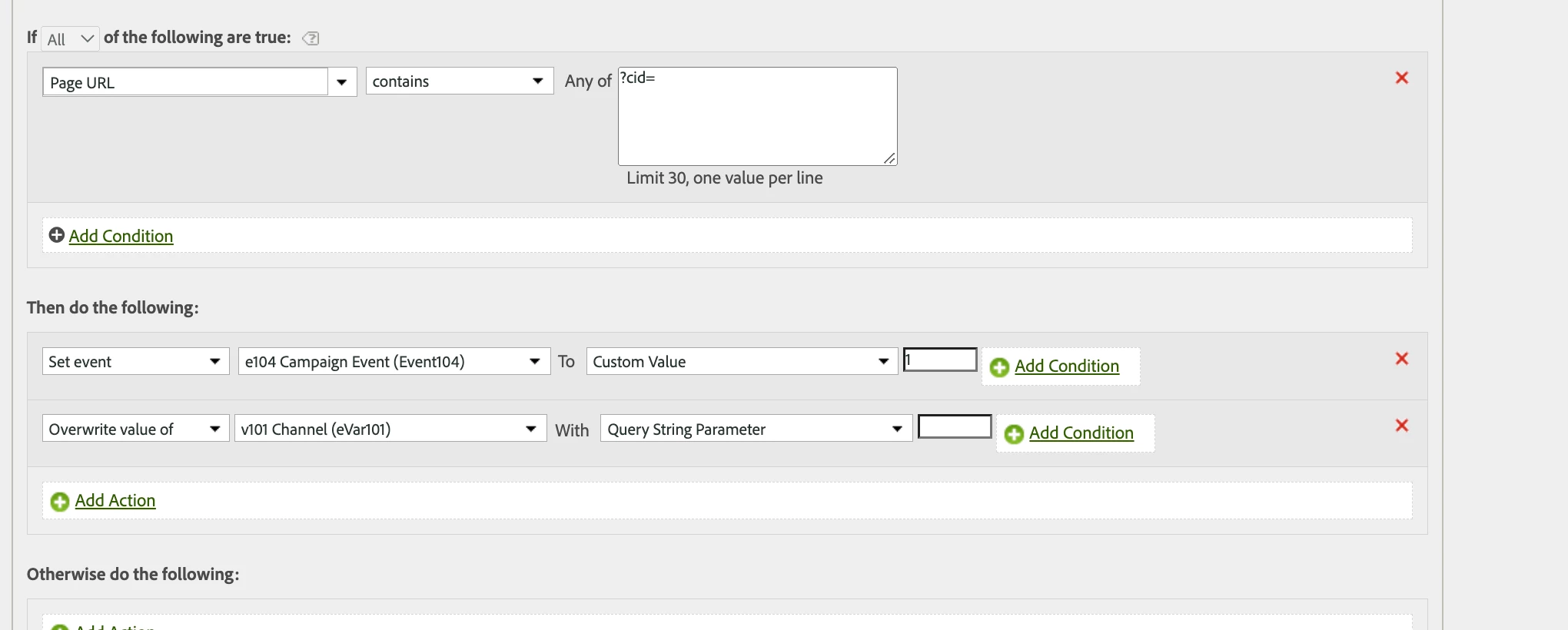
I'm having a hard time figuring out what to put in the part where I'm overwriting the value of v101 with the query string parameter [what goes in here? the ?cid= or the regex that I made for the parameters when I set up the conversion classifications? ]. Pic below. 


Thanks ahead of time for the help 🙂


This post is no longer active and is closed to new replies. Need help? Start a new post to ask your question.
Best answer by Jennifer_Dungan

Honestly, I would be tempted to move the logic for this into your Implementation (I assume you are using Adobe Launch).


In Launch you can pull out specific query strings into different Data Elements and apply logic to them.... here in Processing Rules I believe all query string values will be grabbed... so you could look for specific values in the "in line" conditions (by this I mean the "+Add Condition" that is directly next to specific line - but you can only have one rule here, and you may not be able to cover all the options you need)...


I don't know what values are expected... and since there is always the risk of Google search / Discovery / Showcase / etc adding multiple UTMs to your URLs, I don't know if you could reasonably "exclude" all potential values, and I don't know if you have anything in your cid which is always there to trigger a positive rule....


In Launch you can create a data element to pull the value of only CID and pass it to v101, you could modify your processing rule to say if "v101 is set", then "set event104" (or you could move that logic in to Launch as well). This provides a lot more control, but it is a shift in implementation....  I wish I had a "magic bullet" solution.
2 replies

Jennifer_Dungan
Community Advisor and Adobe Champion
Jennifer_DunganCommunity Advisor and Adobe ChampionAccepted solution
Community Advisor and Adobe Champion
July 1, 2022

Honestly, I would be tempted to move the logic for this into your Implementation (I assume you are using Adobe Launch).


In Launch you can pull out specific query strings into different Data Elements and apply logic to them.... here in Processing Rules I believe all query string values will be grabbed... so you could look for specific values in the "in line" conditions (by this I mean the "+Add Condition" that is directly next to specific line - but you can only have one rule here, and you may not be able to cover all the options you need)...


I don't know what values are expected... and since there is always the risk of Google search / Discovery / Showcase / etc adding multiple UTMs to your URLs, I don't know if you could reasonably "exclude" all potential values, and I don't know if you have anything in your cid which is always there to trigger a positive rule....


In Launch you can create a data element to pull the value of only CID and pass it to v101, you could modify your processing rule to say if "v101 is set", then "set event104" (or you could move that logic in to Launch as well). This provides a lot more control, but it is a shift in implementation....  I wish I had a "magic bullet" solution.

yuhuisg
Community Advisor
Community Advisor
July 4, 2022

In the last action, you want this:

Overwrite value of v101 Channel (eVar101)  With Query String Parameter cid

Your regex would be used with Classification Rule Builder, which is another tool in AA.