Segments as Breakdowns - Data Warehouse API | Community
Skip to main content
June 14, 2023
Solved

Segments as Breakdowns - Data Warehouse API

  • June 14, 2023
  • 2 replies
  • 608 views

I am trying to pull reports from Data Warehouse that use multiple breakdown dimensions, including segments, but am not able to add segments as a dimension. Found this old thread suggesting it is not supported in Adobe Analytics 1.4 API, is that still the case?


If it is still the case, how could I use Adobe Analytics 2.0 API to get the same reports with multiple breakdowns including segments as a dimension?

This post is no longer active and is closed to new replies. Need help? Start a new post to ask your question.
Best answer by Jennifer_Dungan

Workspaces are built using API 2.0.. if you can create a report there that does what you need, you can actually get a copy of the API calls to use "as-is" or manipulate to your desired need.


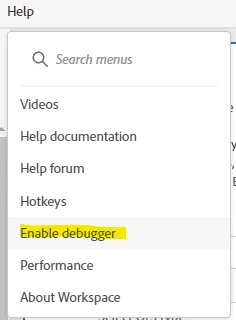
First, enable debugging on your Workspace:


Now, you will see a new icon on your tables:


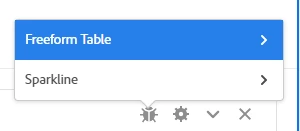
Click on this, and you will be presented with options for the Freeform Table or the Sparkline (you will want the table):


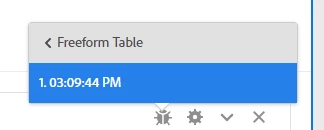
Now, when you click on that, you will be presented with timestamps of API runs, when you choose any of these, a page will open up showing you the API request (in multiple formats) that was run to retrieve data:


You can copy that request and use it as needed....


But can I ask what the final use of the data will be? Would a scheduled project (in CSV format) work? Or a Scheduled Report Builder report?

There are many ways to get the data, ones that might be less effort than the API....

2 replies

Jennifer_Dungan
Community Advisor and Adobe Champion
Jennifer_DunganCommunity Advisor and Adobe ChampionAccepted solution
Community Advisor and Adobe Champion
June 14, 2023

Workspaces are built using API 2.0.. if you can create a report there that does what you need, you can actually get a copy of the API calls to use "as-is" or manipulate to your desired need.


First, enable debugging on your Workspace:


Now, you will see a new icon on your tables:


Click on this, and you will be presented with options for the Freeform Table or the Sparkline (you will want the table):


Now, when you click on that, you will be presented with timestamps of API runs, when you choose any of these, a page will open up showing you the API request (in multiple formats) that was run to retrieve data:


You can copy that request and use it as needed....


But can I ask what the final use of the data will be? Would a scheduled project (in CSV format) work? Or a Scheduled Report Builder report?

There are many ways to get the data, ones that might be less effort than the API....

January 8, 2025

Hello, i'm facing the same need. Were you able to resolve this issue using Adobe Analytics 2.0 API?