Segment total doesn't patch item total | Community
Skip to main content
Damonwhall
Adobe Employee
Adobe Employee
June 14, 2024
Solved

Segment total doesn't patch item total

  • June 14, 2024
  • 2 replies
  • 1334 views

Hello folks, 


Happy Friday! I saw something that made me scratch my head that I wanted to share here.  

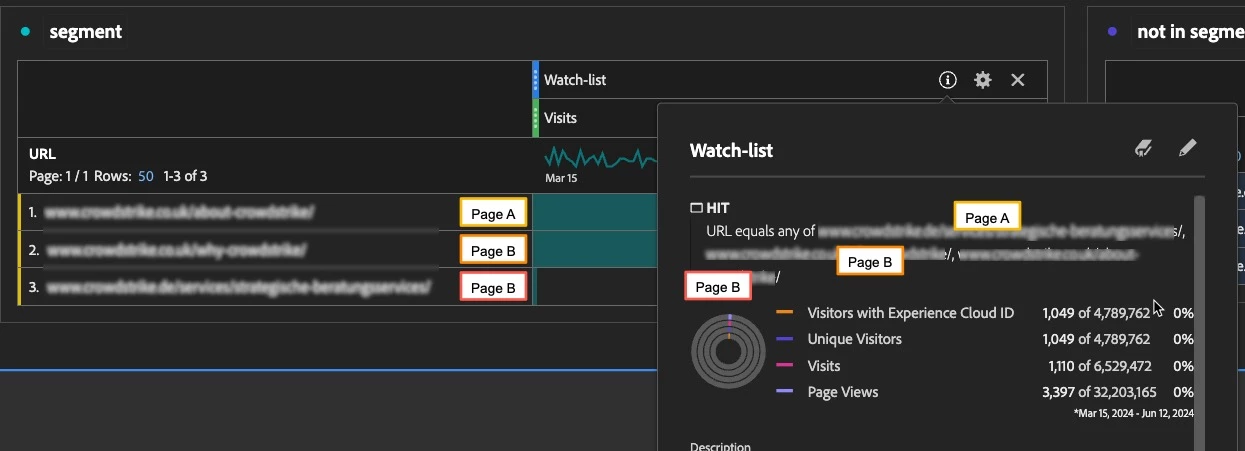
  • I created a hit-based segment that was "equals any of" 3 different URL's
  • I applied that segment to a table, and dropped the URL dimension and could see my expected URL's, their visit numbers, and the total for the table.  
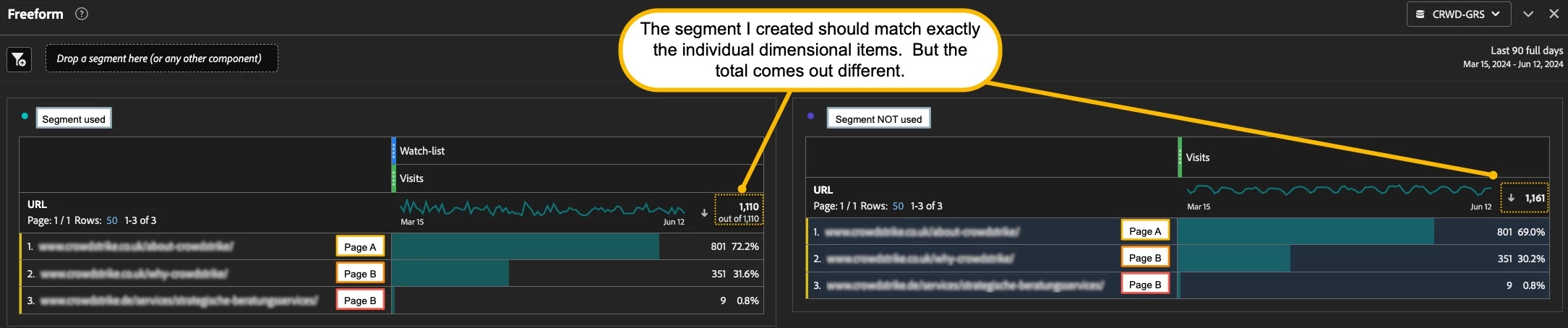
  • I then dragged those same exact URL's and place them into a new table to see what the totals are.  The totals are different.  

Why would that be the case?  See example below.  
 

This post is no longer active and is closed to new replies. Need help? Start a new post to ask your question.
Best answer by Jennifer_Dungan

Yes, you have a single segment, which is applied to the whole, which allows for de-duplication...


What I am talking about is multiple segment in the breakout area that stop the deduplication.


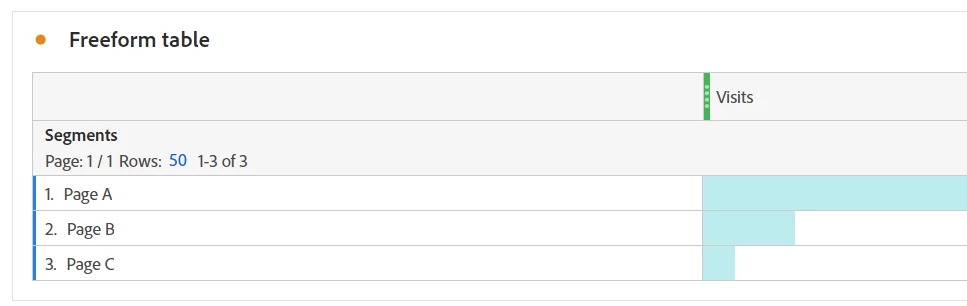
So if you were to create 3 segments, one for Page A, one for Page B, and one for Page C, and create a report like:


The total Visits will NOT de-duplicate... the same as you dragging in Page A, Page B and Page C... those all act like separate "quick segments". The total will add up to the column sum, not the proper number of real Visits that hit these pages.


Your "Segment Not Used" where you drag the pages into the table is overcounting the total visits, because they are not de-duplicated. Each page there is acting like an individual segment.


Whereas your "Segment" used, a segment that is applied to the whole is giving you the proper result.

2 replies

bjoern__koth
Community Advisor and Adobe Champion
June 14, 2024

Hi @damonwhall 

how do the numbers compare if you change it to a Visit based segment?

Cheers from Switzerland!
Jennifer_Dungan
Community Advisor and Adobe Champion
June 14, 2024

Ahhaha.. yeah, this is a little known quirk of Adobe Workspaces.. but when you add multiple segments into your breakout area, metrics like Visits and Unique Visitors stop de-duplicating in the totals... and when you drag individual values into your table, they become "quick segments" and act the same way.. the Visits / Unique Visitor totals don't de-duplicate.... this is why the totals don't match...


In the "Segment" version, if you add the totals of each page, they will add up to greater than the total, since some Visits will have hit multiple of those pages within the same visit... but if you add the totals in the "Dragged in Values" version, you will see that the total is an exact tally of each of the pages.

Damonwhall
Adobe Employee
Adobe Employee
June 14, 2024

Hello @jennifer_dungan , but in the Segment version, there is a smaller total than the "itemized" version.  Also, I'm using visits in the column.  Shouldn't that show the total visit count for a given page for each dimensional item?  That shouldn't impact the visit total.  If I hit a page 10 times in 1 session, I still should count as 1.  

Jennifer_Dungan
Community Advisor and Adobe Champion
Jennifer_DunganCommunity Advisor and Adobe ChampionAccepted solution
Community Advisor and Adobe Champion
June 14, 2024

Yes, you have a single segment, which is applied to the whole, which allows for de-duplication...


What I am talking about is multiple segment in the breakout area that stop the deduplication.


So if you were to create 3 segments, one for Page A, one for Page B, and one for Page C, and create a report like:


The total Visits will NOT de-duplicate... the same as you dragging in Page A, Page B and Page C... those all act like separate "quick segments". The total will add up to the column sum, not the proper number of real Visits that hit these pages.


Your "Segment Not Used" where you drag the pages into the table is overcounting the total visits, because they are not de-duplicated. Each page there is acting like an individual segment.


Whereas your "Segment" used, a segment that is applied to the whole is giving you the proper result.