Row percentages with in a breakdown | Community
Skip to main content
Level 3
January 14, 2021
Solved

Row percentages with in a breakdown

  • January 14, 2021
  • 4 replies
  • 3001 views

Ok bear with me here...

Row percentages with in a breakdown seem require the full metric field to be included in order to be calculated across the row. Otherwise it calculates across the entire report.


Why does the system generated percentages not match the calculated percentages?


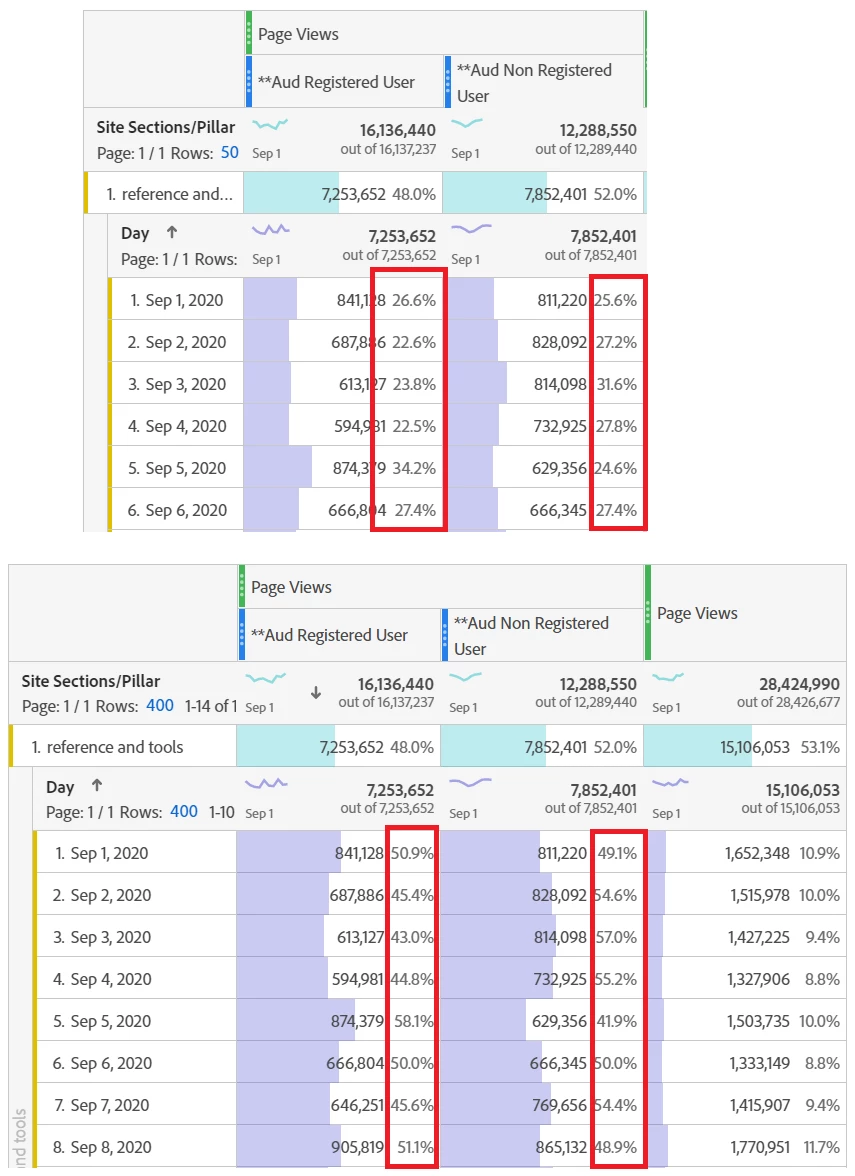
Within a breakdown, the system generated ROW percentages are actually percentages of the higher level dimension for that specific day.


See screenshots below...


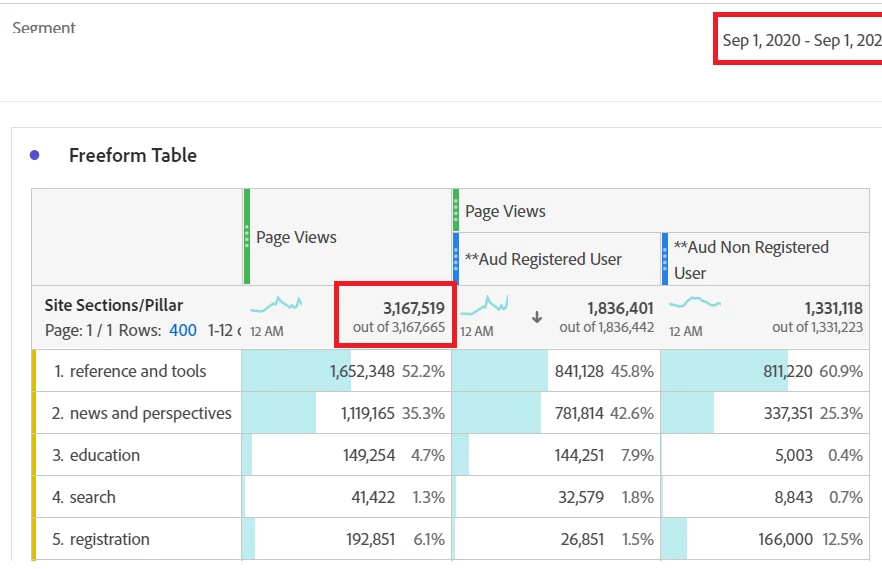
i.e. Reference and Tools breakdown for Sept 1... Aud Non Registered User Page Views shows a ROW percentage of 25.6%. That is NOT 25% of page views on 9/1 within the reference pillar. Its actually shows that the 811K page views are 25.6% of the entire page views for the entire day. (see 2nd screenshot to compare)


811,220 / 0.2561058 = 3,168,828 (This is the total page views across the site for 9/1 NOT for just the parent row)


Non Reg + Reg PV = 811,220 + 841,128 = 1,652,348 - This matches the total page views for the reference pillar for 9/1/20.


I really hope this makes sense...


Below is only 9/1 to show the total PV for the day referenced above.


This post is no longer active and is closed to new replies. Need help? Start a new post to ask your question.
Best answer by PratheepArunRaj

Dear andrewz_webmd,

Sorry, might have missed it, and thanks for adding me.

Yes, what you said is right. When we have a breakdown, rather than calculating the breakdown's metric total it is taking the metric total for the entire day.

Not sure whether it is a bug or some settings to be enabled. I tried possible ways to see some settings but was unable to see such in my short exploration.

Better to raise it with Customer Care and explain what's happening. If it is a calculation bug, they can raise it with the engineering team to fix it. But, great catch there!

Thank You, Pratheep Arun Raj B (Arun) | NextRow DigitalTerryn Winter Analytics


4 replies

Adobe Employee
January 14, 2021

I think there is a setting that controls this, though not exactly sure. You may want to reach out to Client Care for a detailed discussion.

Level 3
January 14, 2021
Correct.. there is an option to change from "calculate percentage by row" vs "by column" and i have both the high level dimension and the breakdown dimension set to "row".... but its calculating across all high level dimensions and not only within the breakdown.
Level 3
January 22, 2021

No takers? 

Level 3
January 18, 2022

I missed the 1yr mark by 4 days.... any takers on this? 

Level 3
March 22, 2022

@pratheeparunraj I'm surprised I have not heard from you on this one....

PratheepArunRaj
Community Advisor and Adobe Champion
PratheepArunRajCommunity Advisor and Adobe ChampionAccepted solution
Community Advisor and Adobe Champion
March 28, 2022

Dear andrewz_webmd,

Sorry, might have missed it, and thanks for adding me.

Yes, what you said is right. When we have a breakdown, rather than calculating the breakdown's metric total it is taking the metric total for the entire day.

Not sure whether it is a bug or some settings to be enabled. I tried possible ways to see some settings but was unable to see such in my short exploration.

Better to raise it with Customer Care and explain what's happening. If it is a calculation bug, they can raise it with the engineering team to fix it. But, great catch there!

Thank You, Pratheep Arun Raj B (Arun) | NextRow DigitalTerryn Winter Analytics


Thank You, Pratheep Arun Raj B (Arun) | Xerago | Terryn Winter Analytics
Level 3
March 28, 2022

I do appreciate the confirmation as frustrating as it may be...
