Reporting on Upcoming Expiries | Community
Skip to main content
Level 1
February 26, 2026
Solved

Reporting on Upcoming Expiries

  • February 26, 2026
  • 1 reply
  • 29 views

My data has a dimension called ExpiryDate. 

I’ve created Date Ranges like “Upcoming 3 months”, “Upcoming 12 months”.


I’d like to create a report showing the number of Customers whose expiry date will be in each of those date ranges. I’ve tried using a simple freeform table with ExpiryDate as the dimension and People metric filtered by Date Range, with unexpected results.


In our local systems, we can query our source data accordingly. Any ideas how to approach this with a CJA project?

Date Range People
Customers with ExpiryDate in Upcoming 3 Months 10,000
Customers with ExpiryDate in Upcoming 12 Months 25,000


    Best answer by MandyGeorge

    I’m going to preface this with the disclaimer that although I have access to CJA, I don’t have much experience with actual data (I only have a demo data sandbox access). 


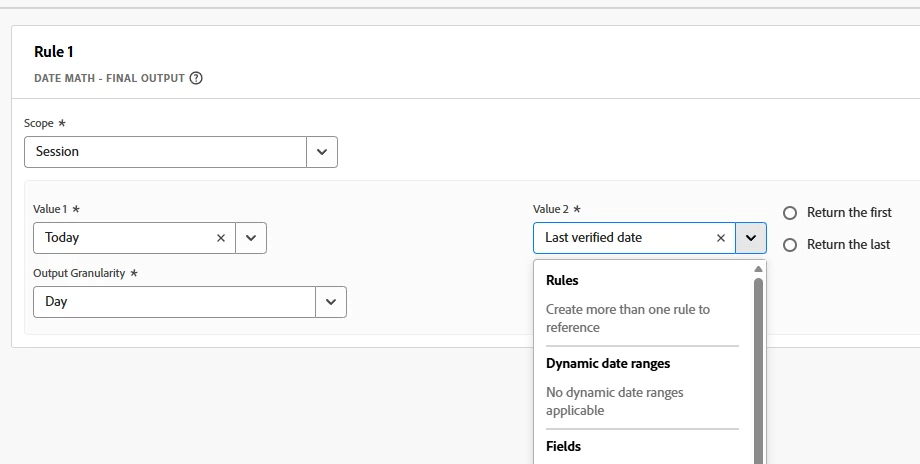
    I think you should be able to create a derived field. In the derived fields there is an option called “data math”. I haven’t fully tested it out, but it looks like it will subtract two dates and return the number of days (you can also return the number of weeks, months, etc.). 


    If you have a property capturing the expiry date, that should show up under the “fields”. Then you can subtract the current date (which shows up under dynamic date ranges). In theory, that should give you the number of dates between today (which should be the date you’re looking at the data) and the expiry date. You can then group those based on the number of days to expiry and do your reporting.


    If someone with more CJA experience wants to add on or correct this, please feel free!

    1 reply

    MandyGeorge
    Community Advisor and Adobe Champion
    MandyGeorgeCommunity Advisor and Adobe ChampionAccepted solution
    Community Advisor and Adobe Champion
    March 2, 2026

    I’m going to preface this with the disclaimer that although I have access to CJA, I don’t have much experience with actual data (I only have a demo data sandbox access). 


    I think you should be able to create a derived field. In the derived fields there is an option called “data math”. I haven’t fully tested it out, but it looks like it will subtract two dates and return the number of days (you can also return the number of weeks, months, etc.). 


    If you have a property capturing the expiry date, that should show up under the “fields”. Then you can subtract the current date (which shows up under dynamic date ranges). In theory, that should give you the number of dates between today (which should be the date you’re looking at the data) and the expiry date. You can then group those based on the number of days to expiry and do your reporting.


    If someone with more CJA experience wants to add on or correct this, please feel free!