Reporting a sales funnel using sequential segmentation | Community
Skip to main content
February 24, 2021
Solved

Reporting a sales funnel using sequential segmentation

  • February 24, 2021
  • 2 replies
  • 1310 views

Hi guys,


I need some clarification after trying to understand Adobe's sequential segmentation documentation. Basically, what I am trying to compare is the number of visitors who proceeded to purchase items after viewing Page A once (first segment) and more than once (second segment).


First segment:
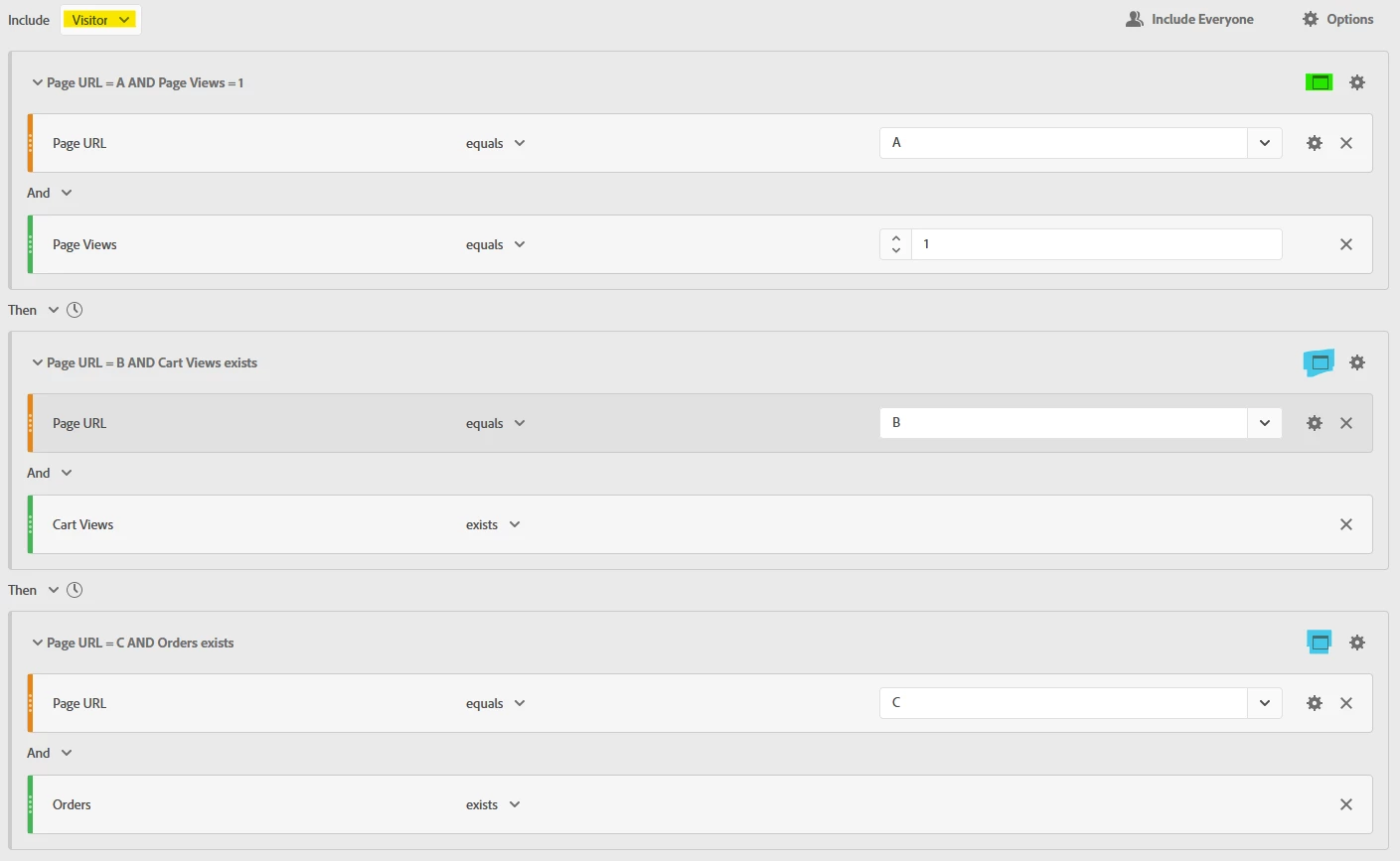
Am I right to say that for the first segment, I have to select Visitor (yellow) because this will look at the data of visitors based on their sessions (visits)? Is it right to use Hit for the second and third containers (blue)? Or should I be using Visit since it is possible for users to make purchases on separate sessions?


Second segment:
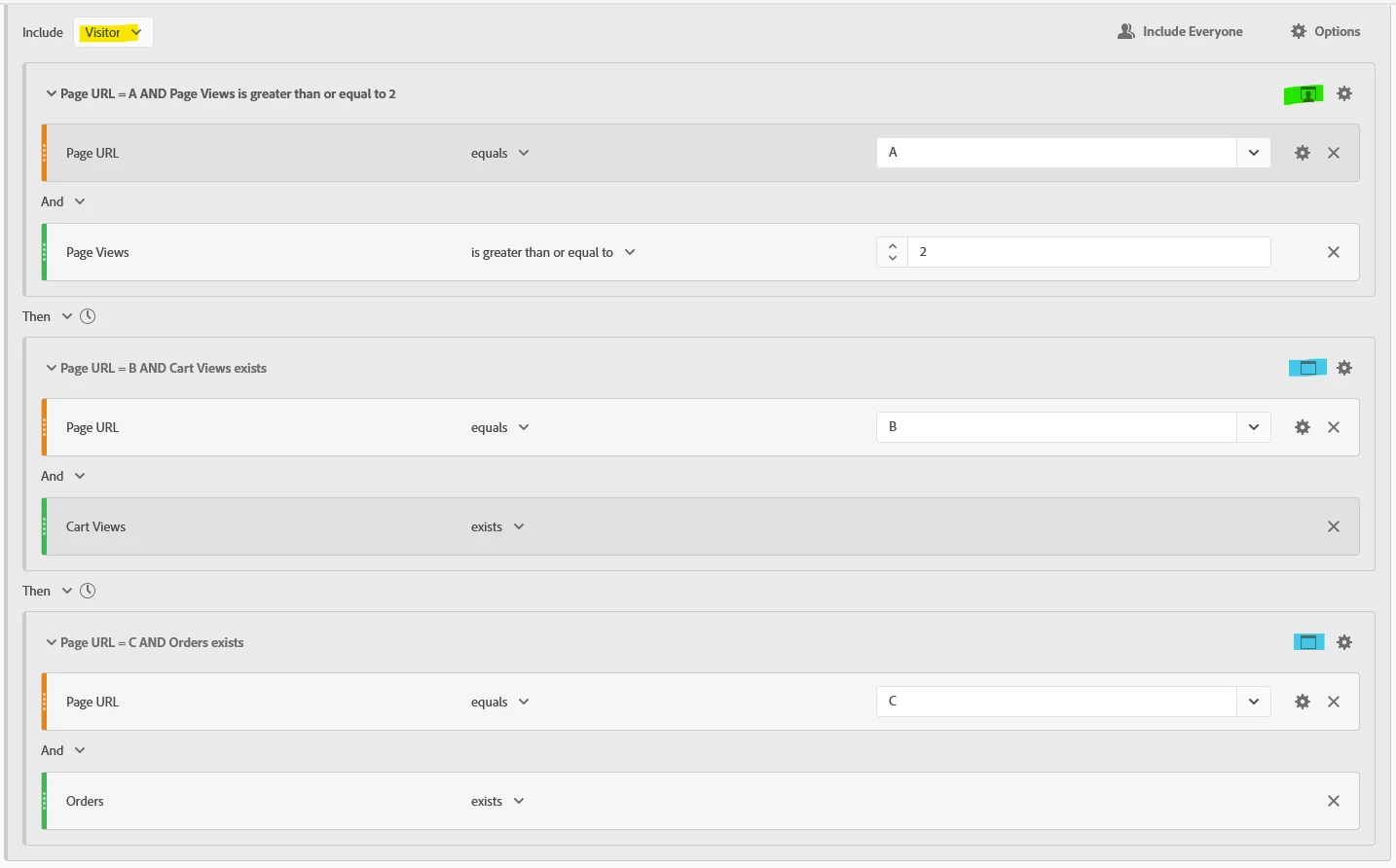
For the first container in this segment, leaving it as a Hit will show me zero data. Is it right to say that by changing it to Visit (green), this means that the pages viewed more than once occurred over different sessions (visits)? Why does Hit show me zero instead?


Looking forward to your replies.


Thanks,

Max

This post is no longer active and is closed to new replies. Need help? Start a new post to ask your question.
Best answer by yuhuisg

Your first segment will include a user journey like this:

Visitor "harry"

Visit 1:

Hit 1: Page = homepage

Hit 2: Page = A

Visit 2:

Hit 1: Page = about us

Hit 2: Page = contact us

Hit 3: Page = B, Events = scView

Hit 4: Page = X

Visit ...

Visit 5:

Hit 1: Page = homepage

Hit 2: Page = C, Events = purchase


In other words, as long as the same visitor had hits in your specified sequence even if they were in different visits, he would get included in your segment.


Your second segment will include this user journey:

Visitor "sally"

Visit 1:

Hit 1: Page = homepage

Hit 2: Page = A

Hit 3: Page = about us

Hit 4: Page = A

Visit 2:

Hit 1: Page = about us

Hit 2: Page = contact us

Hit 3: Page = B, Events = scView

Hit 4: Page = X

Visit ...

Visit 5:

Hit 1: Page = homepage

Hit 2: Page = C, Events = purchase


Notice how there were 2 hits for Page A within the same visit. Having a Hit container with 2 Page Views is an impossible condition because only 1 Page View can be tracked in 1 Hit, so that's why you get zero.


Once you are able to relate your segments with theoretical user journeys, you should be able to understand sequential segments better.

2 replies

yuhuisg
Community Advisor
yuhuisgCommunity AdvisorAccepted solution
Community Advisor
February 26, 2021

Your first segment will include a user journey like this:

Visitor "harry"

Visit 1:

Hit 1: Page = homepage

Hit 2: Page = A

Visit 2:

Hit 1: Page = about us

Hit 2: Page = contact us

Hit 3: Page = B, Events = scView

Hit 4: Page = X

Visit ...

Visit 5:

Hit 1: Page = homepage

Hit 2: Page = C, Events = purchase


In other words, as long as the same visitor had hits in your specified sequence even if they were in different visits, he would get included in your segment.


Your second segment will include this user journey:

Visitor "sally"

Visit 1:

Hit 1: Page = homepage

Hit 2: Page = A

Hit 3: Page = about us

Hit 4: Page = A

Visit 2:

Hit 1: Page = about us

Hit 2: Page = contact us

Hit 3: Page = B, Events = scView

Hit 4: Page = X

Visit ...

Visit 5:

Hit 1: Page = homepage

Hit 2: Page = C, Events = purchase


Notice how there were 2 hits for Page A within the same visit. Having a Hit container with 2 Page Views is an impossible condition because only 1 Page View can be tracked in 1 Hit, so that's why you get zero.


Once you are able to relate your segments with theoretical user journeys, you should be able to understand sequential segments better.

max_wongAuthor
February 26, 2021

Thanks for the detailed explanation @yuhuisg!


Just to confirm, that means I should change the types from Hit to Visit for the containers (marked in blue and green) in the first and second segments?


Cheers,

Max


yuhuisg
Community Advisor
Community Advisor
February 26, 2021
It depends. Changing from Hit to Visit means that a user must follow the journeys like the examples that I had provided. But if the user would actually have Cart Views and Orders in the same visit, then you'd want to nest those 2 steps in one Visit container.