Report Builder- Custom Date Stamp in Scheduled Email Subject Line | Community
Skip to main content
December 4, 2024
Solved

Report Builder- Custom Date Stamp in Scheduled Email Subject Line

  • December 4, 2024
  • 1 reply
  • 657 views

I'm using a custom date/time stamp in the email subject line of an Adobe Report Builder scheduled report.  Is it possible to include text to separate the date & time in my custom time stamp?  To get something like this-  "Report Name_04-Dec-2024 Thru 9AM"
This post is no longer active and is closed to new replies. Need help? Start a new post to ask your question.
Best answer by Jennifer_Dungan

Honestly, I went back and forth on if you wanted literal "Thru" or if that was a typo... oops.. I guess I shouldn't have second guessed myself.


So it won't accept a value in the middle?


Try adding quotes?

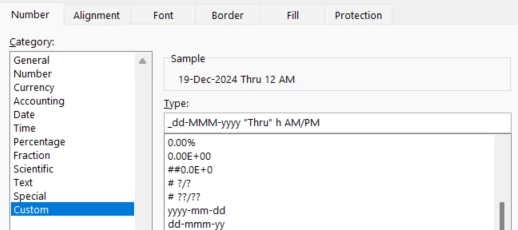
_dd-MMM-yyyy "Thru" h AM/PM


I think the "h" in "Thru" might be trying to pick up the hour? 


Note, I just tested this in a Excel Format Cell... but I would hope the same basic logic would apply???


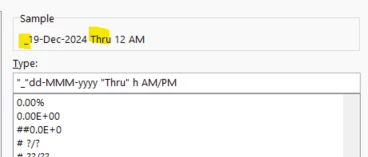
The underscore also became a space in my preview, but if I add it in quotes too....

"_"dd-MMM-yyyy "Thru" h AM/PM


Fingers crossed!

1 reply

Jennifer_Dungan
Community Advisor and Adobe Champion
December 4, 2024

Hi,


I've not tried this, but I took a quick look.


I assume you are using the Advanced Delivery options:


So, if you click on "..." next to your subject line, it will open this popup:


These are just suggestions, showing you that "MM" is a 2 digit example of the month (04), and MMM is the three letter short form of the month (Apr), or "MMMM" is the full month (April). 


You should be able to type in whatever you want using these as building blocks.. 


So change "yyyy-MM-dd" to:

"_dd-MMM-yyyy ddd h AM/PM"


I built in the initial _, and added ddd which should result in "mon" or "tue" or "wed", etc (I think that is what you meant you wanted added?)


Try that and see if it works for you?

kcolstonAuthor
December 4, 2024

Thanks Jennifer!


Was actually trying to get the 'ddd' from your example to read with the word "Thru"


So instead of "_dd-MMM-yyyy ddd h AM/PM" where ddd returns a 3-letter day of the week,

"_dd-MMM-yyyy Thru h AM/PM" so the word "Thru" returns where you have ddd


In all of the variations I've tried, the date/time stamp won't correctly format text other than the code examples from your screenshot. It also won't let me add more than 1 date/time stamp to the subject line so i can add my own text in between.

Jennifer_Dungan
Community Advisor and Adobe Champion
Jennifer_DunganCommunity Advisor and Adobe ChampionAccepted solution
Community Advisor and Adobe Champion
December 4, 2024

Honestly, I went back and forth on if you wanted literal "Thru" or if that was a typo... oops.. I guess I shouldn't have second guessed myself.


So it won't accept a value in the middle?


Try adding quotes?

_dd-MMM-yyyy "Thru" h AM/PM


I think the "h" in "Thru" might be trying to pick up the hour? 


Note, I just tested this in a Excel Format Cell... but I would hope the same basic logic would apply???


The underscore also became a space in my preview, but if I add it in quotes too....

"_"dd-MMM-yyyy "Thru" h AM/PM


Fingers crossed!