Reg Mobile Analytics | Community
Skip to main content
July 24, 2023
Solved

Reg Mobile Analytics

  • July 24, 2023
  • 2 replies
  • 971 views

Is there a way the contextdata can be collected into data elements in launch?

currently, we use processing rules but I do see Adobe launch offers us to leverage data elements but I have not been able to figure out a way to do so.

My goal is to capture contextdata into data elements so that we can then create rules directly in launch.

This post is no longer active and is closed to new replies. Need help? Start a new post to ask your question.
Best answer by Jennifer_Dungan

While I think you can grab context variable, I think at most you can do with them is concatenate them and append to the tracking call as yet another context variable... I've never seen any way to set context variables directly as props or eVars inside of the mobile app Launch (though they have added a few things in the last 3 years that they didn't have when we originally set up our apps)... I have not heard of anything...


To attach additional context data, you can use the "Attach Data" action in the Mobile Core, then write the JSON payload to attach your new context values:
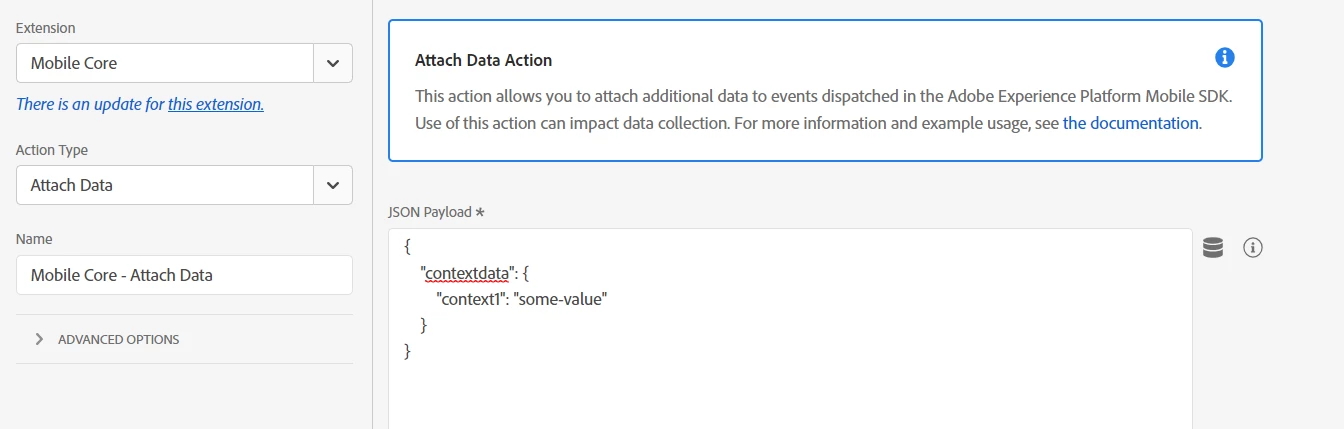
(this sample is a hardcoded value, but you can pass Data Elements with "{%%value%%}" )


It might be possible add props or eVars directly (outside of contextdata), but I've never tested this, potentially (and I do mean potentially.. this really needs to be tested), like so:

{ "&&eVar1" : "{%%My Context%%}", "contextdata": { "context1": "some-value" } }


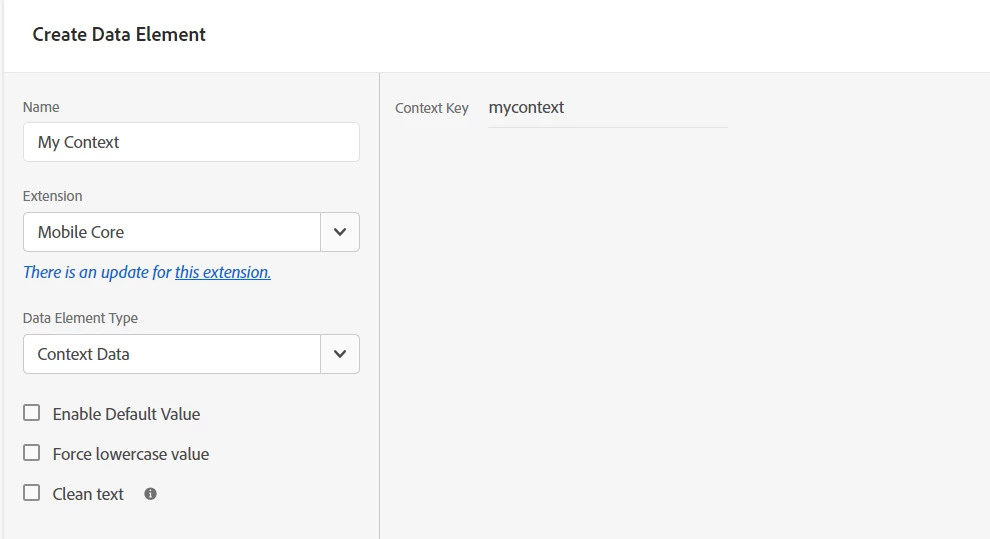
You can get your context into Data Elements like so:


Here is some more info on the Attach Data action: https://developer.adobe.com/client-sdks/documentation/user-guides/attach-data/ 


However, processing rules still might be better... Launch has no logic rules.. no "if this value is set, then do X", no "if the value is X, then do Y", etc... 


As much as processing rules is out of date and cumbersome, I think you will still have a better chance of building your app logic there then inside Launch, unless your app is very simple... 

2 replies

Jennifer_Dungan
Community Advisor and Adobe Champion
Jennifer_DunganCommunity Advisor and Adobe ChampionAccepted solution
Community Advisor and Adobe Champion
July 24, 2023

While I think you can grab context variable, I think at most you can do with them is concatenate them and append to the tracking call as yet another context variable... I've never seen any way to set context variables directly as props or eVars inside of the mobile app Launch (though they have added a few things in the last 3 years that they didn't have when we originally set up our apps)... I have not heard of anything...


To attach additional context data, you can use the "Attach Data" action in the Mobile Core, then write the JSON payload to attach your new context values:

(this sample is a hardcoded value, but you can pass Data Elements with "{%%value%%}" )


It might be possible add props or eVars directly (outside of contextdata), but I've never tested this, potentially (and I do mean potentially.. this really needs to be tested), like so:

{ "&&eVar1" : "{%%My Context%%}", "contextdata": { "context1": "some-value" } }


You can get your context into Data Elements like so:


Here is some more info on the Attach Data action: https://developer.adobe.com/client-sdks/documentation/user-guides/attach-data/ 


However, processing rules still might be better... Launch has no logic rules.. no "if this value is set, then do X", no "if the value is X, then do Y", etc... 


As much as processing rules is out of date and cumbersome, I think you will still have a better chance of building your app logic there then inside Launch, unless your app is very simple... 

AnupKAuthor
August 2, 2023

Thank you, Jennifer! Appreciate it.
Yes, I have been using processing rules and like you said these are cumbersome but effective.

However, as Adobe has provided the options to link data element to context data, was curious if we could use it.


Thanks again! Good day!

Jennifer_Dungan
Community Advisor and Adobe Champion
March 11, 2025

I should update this answer.. with the newer Edge Server / Data Stream you can actually set values directly.


Whether you use the full XDM format, and map values in your schemas, or you use the Adobe Data model, where you can set your metrics and dimensions (props, eVars, events, etc) directly, and they will go right into Analytics.