Product Name is getting trimmed | Community
Skip to main content
Level 4
September 3, 2021
Solved

Product Name is getting trimmed

  • September 3, 2021
  • 1 reply
  • 1616 views

Hi Team,


I have implemented s.product string in retail project, but product name is getting trimmed because of that multiple product ID is coming under single product. Please find the reference image below:
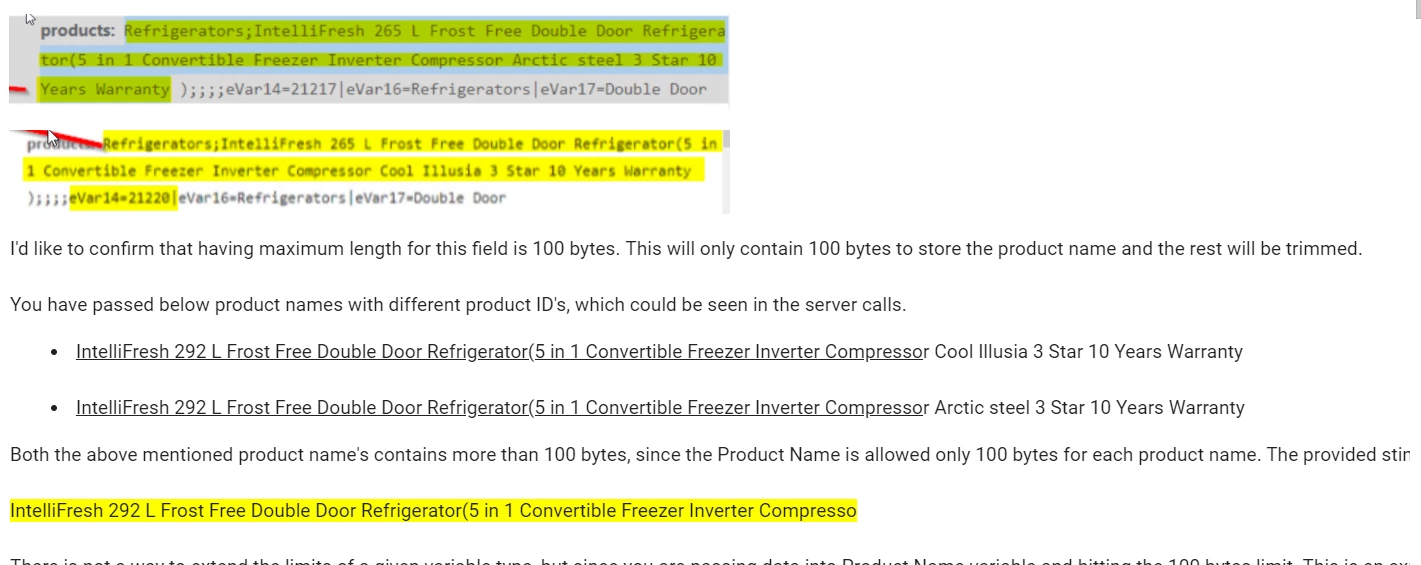
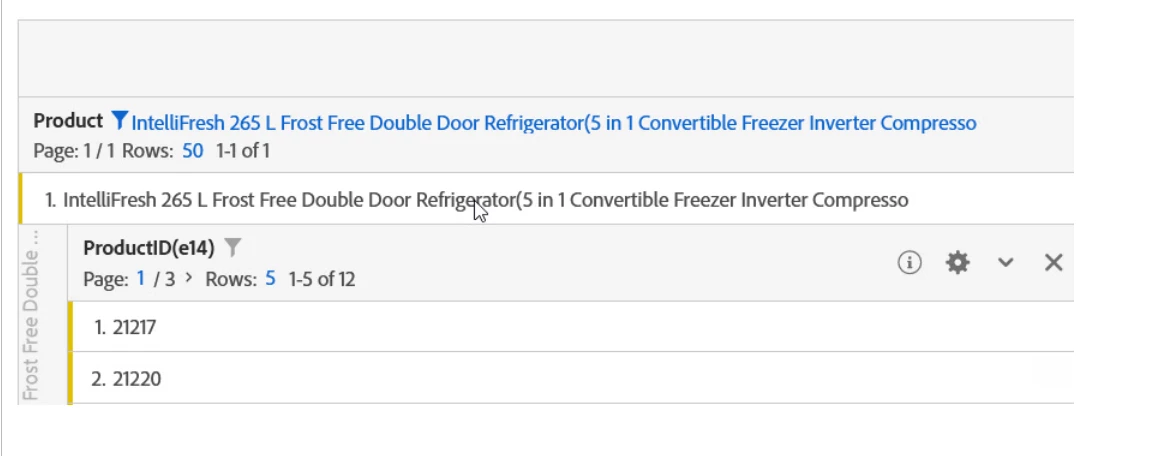


Any help will be appreciated, as I am new to tool.


This post is no longer active and is closed to new replies. Need help? Start a new post to ask your question.
Best answer by VaniBhemarasetty

Please let me know, how can I proceed with SIANT classification. Any material or video on the same will help. As I have not done SIANT classification before.


@bindukumari1990 Here is the documentation on classification importer 


https://experienceleague.adobe.com/docs/analytics/components/classifications/classifications-importer/c-saint-data-files.html?lang=en


1 reply

Brian_Johnson_
Level 8
September 3, 2021

@bindukumari1990 - The issue isn't that there are multiple product names. The issue is that the values you're passing in the "Product Name" position for each product exceeds the maximum character (byte) count, which is 100 characters (bytes). Anything after the 100th character is simply dropped during processing and is not recoverable. For full details about capabilities, schemas, character limits, etc related to the product string, check the documentation.


Here are a couple of options to deal with the issue:

  • Instead of passing the full product name/description (eg// "IntelliFresh 292 L Frost Free...") in s.products, consider passing just the unique product SKU (eg// "12345"). To get the added detail that's lost with this approach, consider one of the following:
    • In the Analytics interface, use Classifications to provide the added detail.
    • Pass the added detail in an eVar as part of the same product string entry. The eVar will support strings of up to 255 characters/bytes. 
  • Move the uniqueness to the front of the "Product Name" value. This ensures that you'll always be able to differentiate between similar products. The downfall is that you will continue to lose any detail beyond the 100th character for each product.
  • Add the unique product SKU (eg// "12345") to the beginning of the "Product Name" value. This ensures that you'll always be able to differentiate between similar products. The downfall is that you will continue to lose any detail beyond the 100th character for each product.

There are likely other alternatives, but each of the above options will help preserve the uniqueness you're after. 


Finally, whichever approach you adopt, be sure to adopt it throughout your entire implementation. Any time you're tracking product interactions (prodView, scAdd, scRemove, purchase, custom events, etc), make sure you're using the same "Product Name" value. Otherwise, you'll find yourself with a different problem.

Pablo_Childe
Community Advisor
Community Advisor
September 3, 2021

Evo great response and totally agree SIANT classification is key here.


Bindu one thing not method is this method also will allow you to is make retroactive corrections to the classified elements.(original key SKU it wont) but the other SAINT elements you eventually can.


good luck

VaniBhemarasetty
Adobe Employee
VaniBhemarasettyAdobe EmployeeAccepted solution
Adobe Employee
September 14, 2021

Please let me know, how can I proceed with SIANT classification. Any material or video on the same will help. As I have not done SIANT classification before.


@bindukumari1990 Here is the documentation on classification importer 


https://experienceleague.adobe.com/docs/analytics/components/classifications/classifications-importer/c-saint-data-files.html?lang=en