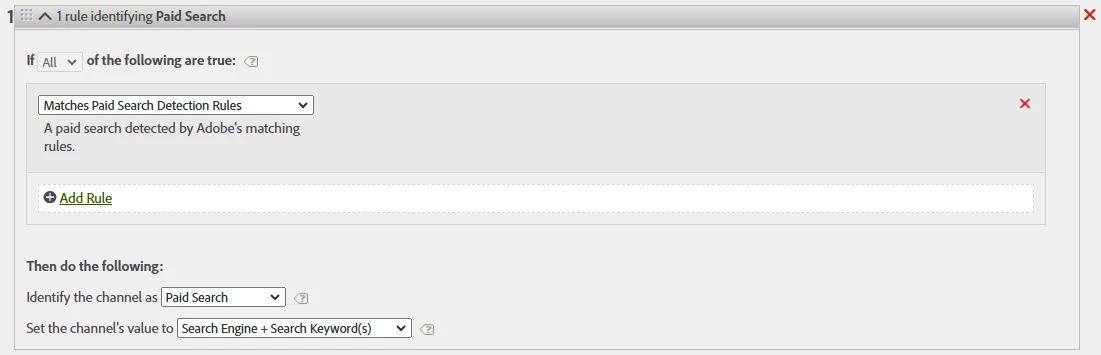
Just a little update:
I updated my Paid Search detection with cpc so now it looks like this:

And then we ran another test, where I clicked the ad from a new incognito browser so I would look like a new user and noted down the ecid for the user. But the visit still ends up in the Natural Search channel. I segmented by the ecid here so this should be my specific test visit:
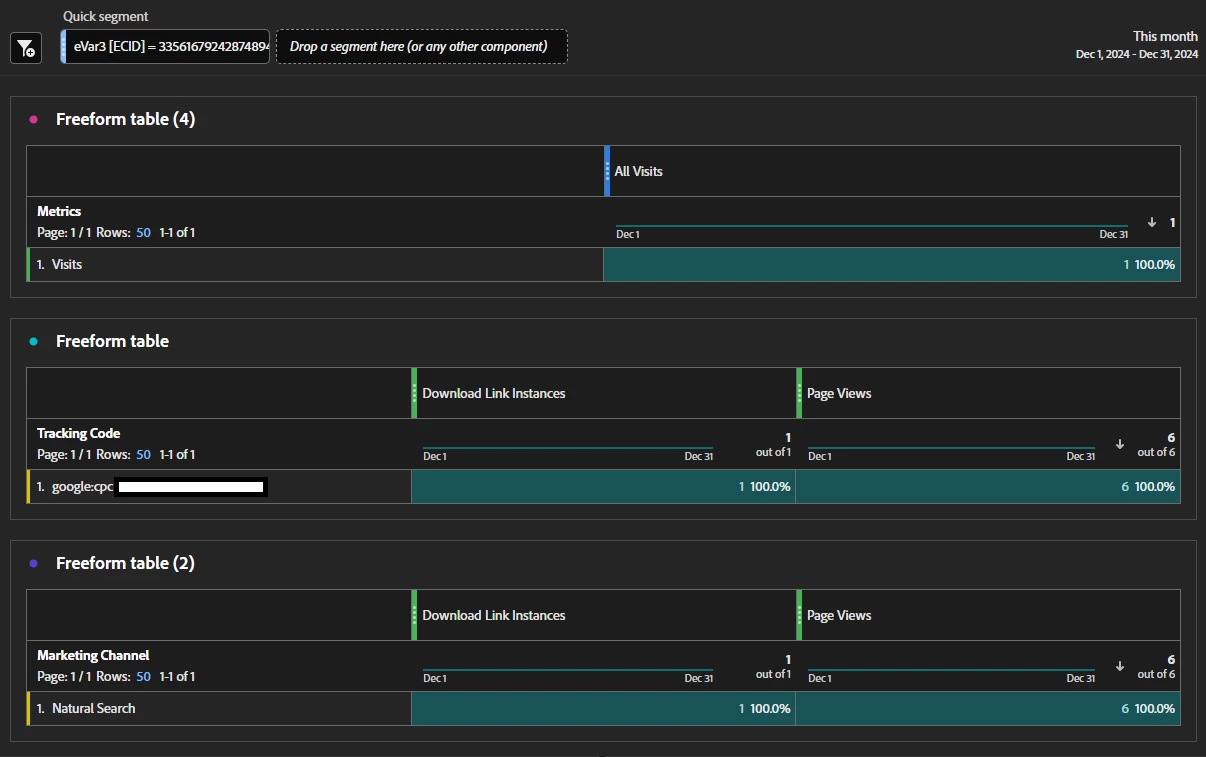
I feel a bit stuck and don't understand what I could be doing wrong at this point..
OK, there's a lot to unpack here.
The dimensions "Marketing Channel" and "Marketing Channel Detail" are last touch (within your defined attribution period, which is 30 days by default)
There is also "Last Touch Channel" and "Last Touch Channel Detail" which is the same as "Marketing Channel" but with a different name... (honestly, I am not sure why we have this twice....)
There is also "First Touch Channel" and "First Touch Channel Detail" which is the first value within that same attribution (default 30 days).
However, you are not technically locked to just seeing first and last.... you can apply custom attribution.
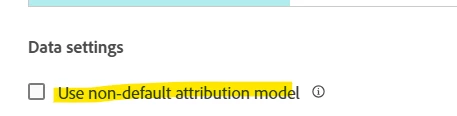
So let's use "Marketing Channel" that we know is "last touch", and use "Orders" as our metric. If you adjust the column setting, at the bottom you should see "use non-default attribution model"
If you want to see all the touchpoints, you can change the model:
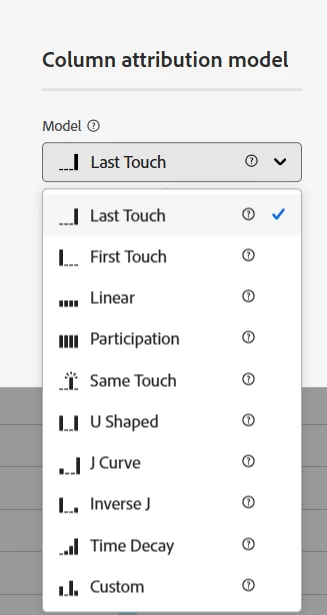
Linear and Participation will both show ALL touchpoints, the difference is how is will split and distribute the values amongst the rows (the total will remain unchanged).
But in this way, you can see everything that led to your conversion.... Or you can play with some of the more advanced functions which will distribute the attribution of different touchpoints differently (giving more weight to the beginning or the end, splitting the weight to the start and end ignoring the middle, or scaling back the attribution based on the passage of time...)
Tracking Code... this is actually found in your Conversion Variables.
Admin > Report Suite > (choose suite) > Edit Settings > Conversion > Conversion Variables.
Tracking Code is also known as "Campaign" and "eVar0":

As for the Paid Search detection, it should be picking up any cid values....
So if your paid ads all have "?cid=google:cpc:xxx:xxx:xxx"
You could strengthen the match by looking for "cid=google:cpc" (of course, this will only pick up google now.... we use UTMs, so it's easier for me to just use "utm_medium=paid", "utm_medium=cpc" and "utm_medium=ppc"... but for the most part our only paid search is in Google... so if you are the same, that shouldn't be an issue...
My concern is that we have seen a lot of Campaign URLs get indexed by Google recently... things that shouldn't indexed... so I would hate for you to potentially have the same issue...
Example, an email campaign: "cid=email:xxx:xxx:xxx:xxx" getting indexed, that link being followed from a Natural Search, and it being picked up as "Paid Search"...
And yes, now, when I said you use "Marketing Channel Instances" it was for debugging purposes... if you break these down you will be looking specifically at the time that the Marketing Channel is set..
However, I would recommend against mixing Marketing Chanel and Tracking Code; they are usually at different attributions (30 Days and 7 Days), but even if at the same attribution, there is a lot of different logic between the two that could cause confusion... this is why Marketing Channel Detail exists... if your rule is based on your campaign, you can set your campaign as the detail... if it not based on campaign (i.e. Natural Search, Organic Social, etc) then you can set the detail differently to better reflect the rule....
Example:
Visit 1 - Campaign "google:cpc:xxx:xxx:xxx"
- Page 1
- Marketing Channel set to "Paid Search"
- Marketing Channel detail set to "google:cpc:xxx:xxx:xxx"
- Marketing Channel Instance triggered
- Tracking Code set to "google:cpc:xxx:xxx:xxx"
- Page 2
- Marketing Channel maintains value "Paid Search"
- Marketing Channel maintains value "google:cpc:xxx:xxx:xxx"
- Marketing Channel Instance not triggered
- Tracking Code maintains value "google:cpc:xxx:xxx:xxx"
- ....
Visit 2: Natural Search (next day), no tracking code
- Page 1
- Marketing Channel set to "Natural Search"
- Marketing Channel detail set to "google" (assuming you are setting value to "search engine in this rule)
- Marketing Channel Instance triggered
- Tracking Code maintains value "google:cpc:xxx:xxx:xxx" (because this is still within 7 days)
Now you have a mismatch of data... your Marketing Channel is Natural Search but your Tracking Code, having no campaign to override it, still says its a paid search
Visit 3 - Campaign "google:cpc:xxx:xxx:xxx"
- Page 1
- Marketing Channel set to "Paid Search"
- Marketing Channel detail set to "google:cpc:xxx:xxx:xxx"
- Marketing Channel Instance triggered
- Tracking Code set to "google:cpc:xxx:xxx:xxx"
Visit 4 - Direct (2 weeks later)
- Page 1
- Marketing Channel maintains value "Paid Search"
- Marketing Channel maintains value "google:cpc:xxx:xxx:xxx"
- Marketing Channel Instance not triggered
- Tracking Code has no value, it's expired
Again, you have a mismatch....