
StefanSiefert
New Member
December 3, 2024
Respondido

New Report Builder for Adobe Analytics - Segments deleted/not available after upgrading with Add-In

  • December 3, 2024
  • 2 respostas
  • 725 Visualizações

I tried to convert/upgrade my (legacy) Report Bulder reports with the new Report Builder Add-In.

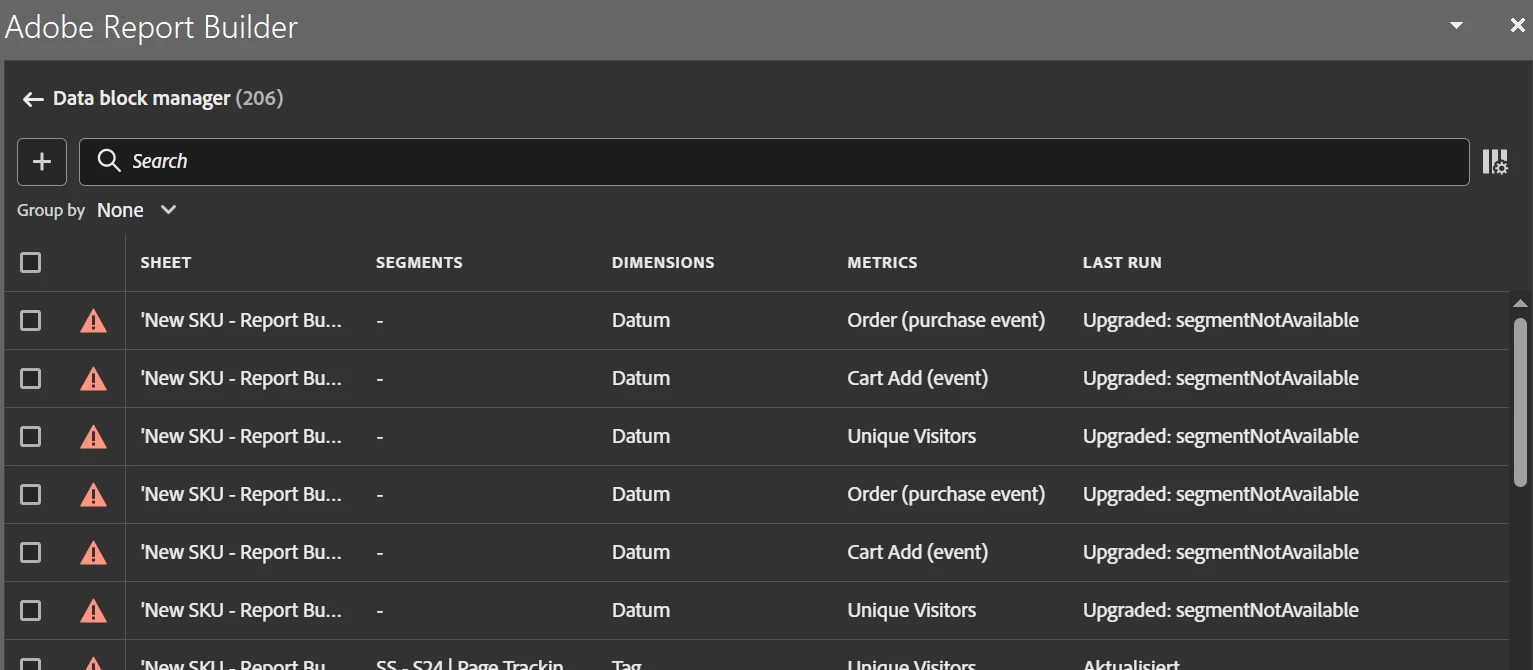
But only a few requests were converted. For the most requests all segments were deleted from the report.

Only got the error message: "Upgraded:segmentNotAvailable".


The segments are named and created by me. With legacy RB I didn't face any problems.


Thank you for any suggestions or hints for troubleshooting!


Este tópico foi fechado para respostas.
Melhor resposta por FarazHusain

Agree with @jennifer_dungan , also this could be a bug. The new report builder in built on API 2.0, maybe there could be some differences. I would suggest to log a support ticket via Admin Console such that the product team can take a further look and address this.

2 Respostas

Jennifer_Dungan
Adobe Champion and Community Advisor
December 3, 2024

I haven't attempted to upgrade any of my reports...  since the old and new Report Builder can run in parallel, I didn't have a lot of need to add that particular workload, but if I need to create a new report I will try the new one first.


That said, can you confirm that you can find all your segments in the Components area of Adobe? Maybe the segment has been accidentally deleted? Or maybe there is a bug that makes the new tool think it's incompatible?


Without seeing your report or what is in your components, we will have limited visibility... but I will do my best to help.

FarazHusain
Adobe Employee
FarazHusainAdobe EmployeeResposta
Adobe Employee
December 4, 2024

Agree with @jennifer_dungan , also this could be a bug. The new report builder in built on API 2.0, maybe there could be some differences. I would suggest to log a support ticket via Admin Console such that the product team can take a further look and address this.