Multiple Person IDs (ECIDs) for the same person in Customer Journey Analytics | Community
Skip to main content
Level 2
June 27, 2025
Solved

Multiple Person IDs (ECIDs) for the same person in Customer Journey Analytics

  • June 27, 2025
  • 4 replies
  • 949 views

Hi everyone,


I'm facing an issue in Customer Journey Analytics (CJA) where the same anonymous user (ECID) is being associated with multiple ECIDs across sessions (multiple Person IDs) — even when using the same browser and device.


Here's my configuration:

  • "Identity Map" data element type defined by Adobe Experience Platform Web SDK extension. Storage Duration: "None".
  • ECID stored in another field for debugging purposes ("identities.ecid.id"). This field is populated by a data element with Storage Duration: "Visitor". The data element is a custom code (return _satellite.getVisitorId().getMarketingCloudVisitorID().)
  • IdentityMap<ECID> as Person ID in all web datasets in CJA.


Here’s what I’ve observed:

  • The ECID is generated and stored correctly in the AMCV_###@AdobeOrg cookie.
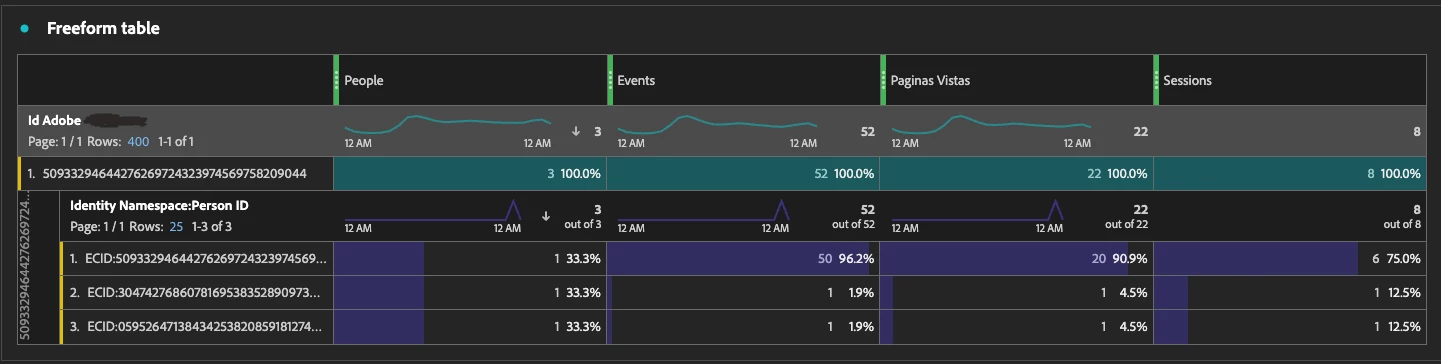
  • ECID stored in "identities.ecid.id" is unique, but in some cases (less than 1%) multiple ECIDs as Person IDs are linked to this field. Thus, a new ECID is generated even though the user is returning with the same browser and device.
  • These new ECIDs are only present in 1 event in most of the cases.
  • The data is being ingested into AEP and then into CJA via a dataset with identityMap as identity.

You can find an example below:


I suspect the issue might be related to:

  • Users clearing cookies but not localStorage, causing mismatches. Nevertheless, I have not been able to reproduce the error following this route.
  • Page components blocking/deleting the AMCV cookie unexpectedly.
  • Timing issues in the implementation of the requests to Adobe Experience Cloud Identity Service (e.g., being called too late in AMP pages).

Any insights, implementation tips, or documentation references on this issue would be greatly appreciated!


Thanks in advance!

Best answer by pradnya_balvir

Hi @jlasso71 ,


Timing issues in SDK initialization

Most common root cause

If the Web SDK initializes before the AMCV_###@AdobeOrg cookie is read, it will generate a new ECID, leading to fragmentation.

Check:

  • Is alloy("sendEvent") being called before the Identity cookie is accessible?
  • Are there race conditions in your tag execution (e.g., Adobe Launch rules firing too early)?

Custom ECID extraction has timing or access issues

You mentioned using this code:

return _satellite.getVisitorId().getMarketingCloudVisitorID();

This depends on the older VisitorAPI.js method, which can be asynchronous or delayed if the ECID isn't yet available when called

Ensure this value is accessed after the Visitor ID is fully available or better, use the Adobe Web SDK's native ECID exposure, e.g., via Alloy’s getIdentity()


Recommendations:

  •  Audit Your Launch Rules: 
    • Is sendEvent firing before ECID is read?
    • Are identityMap values set after ECID is available?
  •  Change Storage Duration
    • Set identityMap.ecid to “Visitor” to preserve ID.
  •  Use awaitIdentity: true or delay sendEvent to avoid ECID race conditions.
  •  Compare Sent ECID vs. Cookie
    • In debugging, verify whether the sent ECID (in XDM) matches the AMCV cookie value.
  •  Enable Identity Stitching in AEP
    • If you consistently capture a secondary ID (login_id, crm_id), enable identity stitching using identity graph configuration

You can refer below documents:


4 replies

pradnya_balvir
Community Advisor
pradnya_balvirCommunity AdvisorAccepted solution
Community Advisor
June 27, 2025

Hi @jlasso71 ,


Timing issues in SDK initialization

Most common root cause

If the Web SDK initializes before the AMCV_###@AdobeOrg cookie is read, it will generate a new ECID, leading to fragmentation.

Check:

  • Is alloy("sendEvent") being called before the Identity cookie is accessible?
  • Are there race conditions in your tag execution (e.g., Adobe Launch rules firing too early)?

Custom ECID extraction has timing or access issues

You mentioned using this code:

return _satellite.getVisitorId().getMarketingCloudVisitorID();

This depends on the older VisitorAPI.js method, which can be asynchronous or delayed if the ECID isn't yet available when called

Ensure this value is accessed after the Visitor ID is fully available or better, use the Adobe Web SDK's native ECID exposure, e.g., via Alloy’s getIdentity()


Recommendations:

  •  Audit Your Launch Rules: 
    • Is sendEvent firing before ECID is read?
    • Are identityMap values set after ECID is available?
  •  Change Storage Duration
    • Set identityMap.ecid to “Visitor” to preserve ID.
  •  Use awaitIdentity: true or delay sendEvent to avoid ECID race conditions.
  •  Compare Sent ECID vs. Cookie
    • In debugging, verify whether the sent ECID (in XDM) matches the AMCV cookie value.
  •  Enable Identity Stitching in AEP
    • If you consistently capture a secondary ID (login_id, crm_id), enable identity stitching using identity graph configuration

You can refer below documents:


Vinay_Chauhan
Community Advisor
Community Advisor
June 27, 2025

Hi @jlasso71 

This kind of ECID fragmentation can happen when there are race conditions or timing issues during SDK initialization. Even if the AMCV cookie exists, if sendEvent or identityMap is triggered before the cookie is fully readable, a new ECID might get generated.


A few things you can try -

  • Use 'awaitIdentity: True' in your configuration to delay the event until the identity is fully resolved.

  • Verify SDK load order: Make sure nothing is firing 'sendEvent' before Alloy has finished reading the ECID. Launch rules firing too early are a also a problem.

  • Avoid mixing VisitorAPI and Web SDK methods.

  • Set storage duration to “Visitor” for identityMap-related data elements. Right now you’ve got it as "None", which might be clearing things unexpectedly between events.

  • Check the actual ECID being sent in the network call and compare that with the cookie on the browser. Sometimes the mismatch is visible there.

If the issue still persists, and you are capturing a consistent CRM or login ID, configuring identity stitching in Platform could help unify multiple ECIDs later on.

Hope that helps!

gautham_madala
Level 5
June 28, 2025

Seeing multiple ECIDs for the same person usually means Adobe hasn’t been given enough information to stitch those visits together as a single identity. Review your identity implementation (declared IDs, namespaces, timing) and validate with CJA’s Person ID dimension and AEP Debugger to ensure correct setup.

Validate Identity Mapping in AEP Debugger-

Use the Adobe Experience Platform Debugger to confirm which IDs are being sent and whether they're properly mapped to the identity graph.

Sukrity_Wadhwa
Community Manager
Community Manager
July 8, 2025

Hi @jlasso71,

Were you able to resolve this query with the help of the provided solutions, or do you still need further assistance? Please let us know. If any of the answers were helpful in moving you closer to a resolution, even partially, we encourage you to mark the one that helped the most as the 'Correct Reply.'

Thank you!

Sukrity Wadhwa