Multiple Dimensions columns in Adobe Workspace | Community
Skip to main content
Level 2
March 29, 2018
Accepted

Multiple Dimensions columns in Adobe Workspace

  • March 29, 2018
  • 81 replies
  • 78967 views

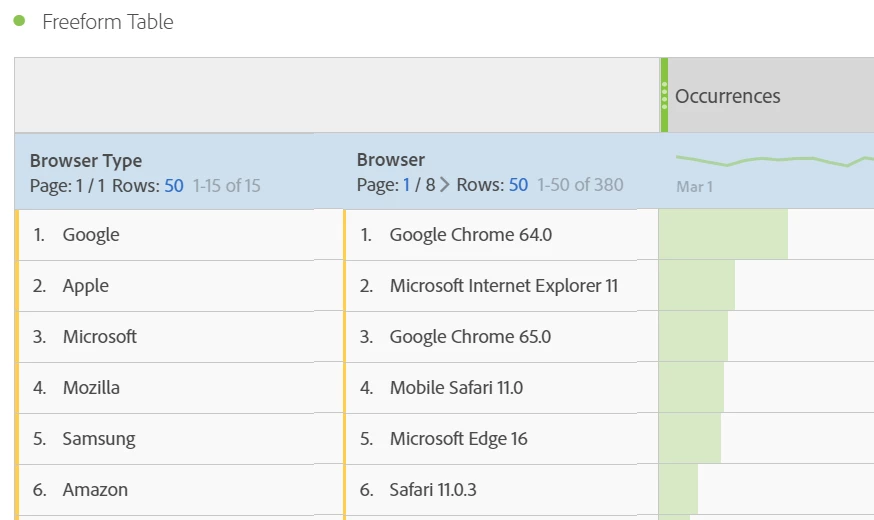
It would be great to be able to have multiple dimension columns rather than having the information stacked. Currently whenever you breakdown dimensions it stacks this on a line by line basis which makes it harder to analyse and also looks messy for the end user.

Example below
81 replies

Level 3
August 5, 2022

Yep, same here. The only way you can get around it is if you put browser type in one evar and then have browser type and browser in another separate evar.  Or for the customer wanting products.... product names in one evar and then have product name and product number concatenated in another evar. 

evar1 =  browser type

evar2 = browsertype-_-browser


Or


evar1 = product name

evar2 = product name-_-product number. 


This would be the equivalent of what I had to do for campaigns with multiple parameters. You have to make each one it's own parameter and then stuff multiple parameters into individual evars so that you can see it however you need to see it on a multiple dimension level (rows) without breakdowns.


An old coremetrics example:  cm_mmc=vendor-_-category-_-placement-_-item

evar1=vendor

evar2=vendor-_-category

evar3=vendor-_-category-_-placement

evar4=vendor-_-category-_-placement-_-item


Reports dimensional rows come out like the above, example:

evar2 report would be  GooglePLAs-_-Dresses

evar3 would look like GooglePLAs-_-Dresses-_-ShortDresses


Using filters you might have one report with multiple vendors and when you download any of the reports you can use excel "text to column" to break it apart using "-" as the delimiter. Then sort however you need. 


But this is all a pain we should not have to endure. Adobe should have the ability to display a minimum of three dimensions on one row in flat file without having to download a breakdown of hierarchy data. 


February 15, 2023

any updates on when this will be active?

New Member
March 3, 2023

Would also like to see this, it feels like a basic requirement but I guess a little complex on the Workspace side.

mrmetric
New Member
March 7, 2023

Same here, would also like to see this feature added!

Level 2
March 30, 2023

The fact that Coremetrics could do this (since pre 2004) but Adobe cannot is pretty scary

April 6, 2023

Still no updates, is this feature available ?

May 24, 2023

Bumping this... any updates at all? Is pretty essentially, especially to export onto an excel doc

June 14, 2023

Adobe any updates here? 

August 3, 2023

Yeah, we just made the move from Google Analytics to Adobe and this is one feature I am already missing. We have all kinds of reports that line up 2 or more dimensions in GA. I can't recreate any of them here. Not sure how I'm going to get these reports for my stakeholders now.

Level 3
August 4, 2023

Hi David, I had the same problem of reporting. I have a solution. Mine was a tag that took 4 parameters; here is a generic one from the old Coremetrics:  cm_mmc=vendor-_-category-_-placement-_-item. I needed to be able to show this in multiple ways to different people and as you already know you can't "breakdown" hundreds of rows one row at a time. I asked for 7 evars to be created and they look like this:

evar 1 = vendor

evar 2 = category

evar 3 = placement

evar 4 = item

evar 5 = vendor-_-category

evar 6 = vendor-_-category-_-placement

evar 7 = vendor-_-category-_-placement-_-item

I now have the ability to create reports based on how many "dimensions" I need stuffed into an evar. I can then use filters to say "starts with", "equals", "contains phrase", "does not contain phrase", etc....

Hope this helps you!