Mobile SDK - Android - Problem while importing SDK | Community
Skip to main content
Level 2
January 3, 2023
Solved

Mobile SDK - Android - Problem while importing SDK

  • January 3, 2023
  • 1 reply
  • 1730 views

I am trying to implement mobile sdk on android, basically following the standard steps 
1. Created an empty activity in android studio with Java 
2. Created mobile property in launch

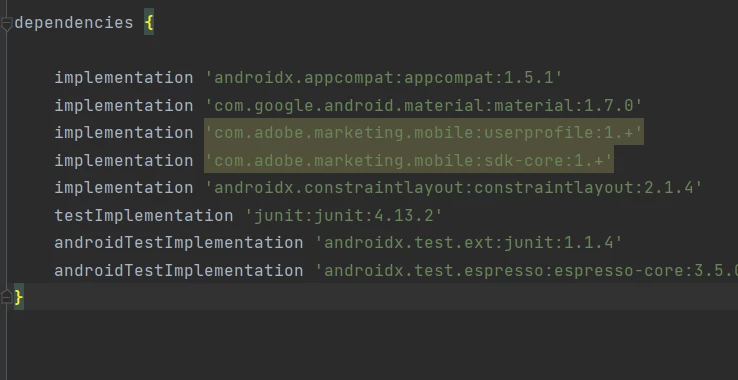
3. Copied the dependencies and pasted in gradle

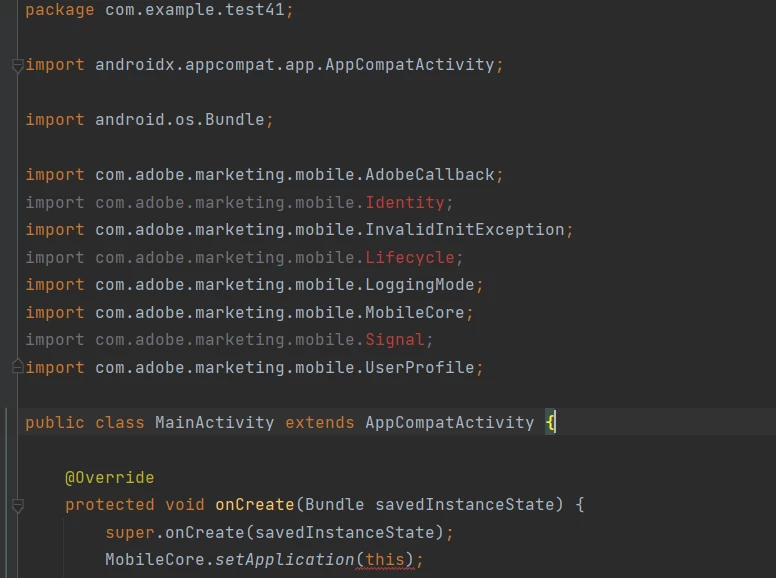
4. Copied and pasted the import code. 


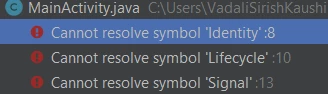
Issue i am facing is the Lifecycle, Signal and few others are showing as red when trying to import, and error says cannot resolve symbol. 
 

This post is no longer active and is closed to new replies. Need help? Start a new post to ask your question.
Best answer by FarazHusain

Hey, @v_sirish_kaushik, I think this could be a temp issue; I tried a build using my test app with a similar configuration, and I didn't get any errors. Can you check if your file is importing the right BuildConfig class? Sometimes if you have other project libraries or modules, it may import the wrong buildConfig or try - 

Build -> Clean Project;

File -> Invalidate Caches / Restart...

Build -> Rebuild Project

1 reply

FarazHusain
Adobe Employee
FarazHusainAdobe EmployeeAccepted solution
Adobe Employee
January 4, 2023

Hey, @v_sirish_kaushik, I think this could be a temp issue; I tried a build using my test app with a similar configuration, and I didn't get any errors. Can you check if your file is importing the right BuildConfig class? Sometimes if you have other project libraries or modules, it may import the wrong buildConfig or try - 

Build -> Clean Project;

File -> Invalidate Caches / Restart...

Build -> Rebuild Project

Level 2
January 5, 2023

Hi @farazhusain , 
Yeah it did seem like a temporary issue. Invalidating cache and restarting made it work. Thanks 🙂