Mobile App Timed Event Tracking | Adobe Higher Education
Skip to main content
Winston_2022
Level 2
August 4, 2023
解決済み

Mobile App Timed Event Tracking

  • August 4, 2023
  • 1 の返信
  • 1866 ビュー

Hi,

I'm implementing Adobe Anlytics for a mobile app. one of the requirement is to capture the time to completion of a form in the app.

It appears it was possible to track timed actions in legacy mobile services SDK - https://github.com/Adobe-Marketing-Cloud/mobile-services/blob/master/docs/android/analytics-main/timed-actions.md


But, I'm uable to find any documents on how to do it using the AEP SDK (mobile core). is it possible? any suggestions would be of great help.


Thanks.

このトピックへの返信は締め切られました。
ベストアンサー Jennifer_Dungan

I am unaware of an "out of the box" solution, but in theory you could have your developers start a timer in the code when the user starts the form, until the completion... on completion they can send the value in seconds (I will explain why more shortly) as a context variable.


Now, in your processing rules, you can set this value into an eVar (which will store the value as text), or pass it into a numeric event:


(Note: you might want to add a condition here, "If timer(Context Data) is set")


Now, returning to why I said pass the value in seconds...


You can create a calculated metric, pulling in just your event, like so:


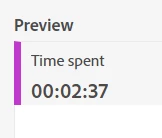
And make sure you set the format to Time:


And then you will be able to see the values like this:


1 の返信

Jennifer_Dungan
Community Advisor and Adobe Champion
August 4, 2023

I am unaware of an "out of the box" solution, but in theory you could have your developers start a timer in the code when the user starts the form, until the completion... on completion they can send the value in seconds (I will explain why more shortly) as a context variable.


Now, in your processing rules, you can set this value into an eVar (which will store the value as text), or pass it into a numeric event:


(Note: you might want to add a condition here, "If timer(Context Data) is set")


Now, returning to why I said pass the value in seconds...


You can create a calculated metric, pulling in just your event, like so:


And make sure you set the format to Time:


And then you will be able to see the values like this:


Winston_2022
Winston_2022作成者
Level 2
August 4, 2023

Hey Jennifer,

Thank you for your response. I did try your suggestion.

The issue is that when setting the "duration" as a numeric event for the contextdata varible that is a string doesnt seem to output the required value/data.


Event Config

Raw Event Metric Value

So when converting the Raw Event to friendly Time format, it's not going to quite work as expected.

it also appears, that contextdata variable values can not be anything other than a string.


So I'm currently exploring other options.


Thanks.


Jennifer_Dungan
Community Advisor and Adobe Champion
August 4, 2023

Or it's being treated like a "total" value for all users?


I've not actually tried this, this is all "in theory"....


You could also try having your developers set it to the event directly??

cdata.put("&&events", "event1=157");