Marketing Channels & Internal Filters (data wildly changing from Organic/Natural search to Internal) | Community
Skip to main content
Level 2
March 29, 2022
Solved

Marketing Channels & Internal Filters (data wildly changing from Organic/Natural search to Internal)

  • March 29, 2022
  • 3 replies
  • 3414 views

Hi Community, 


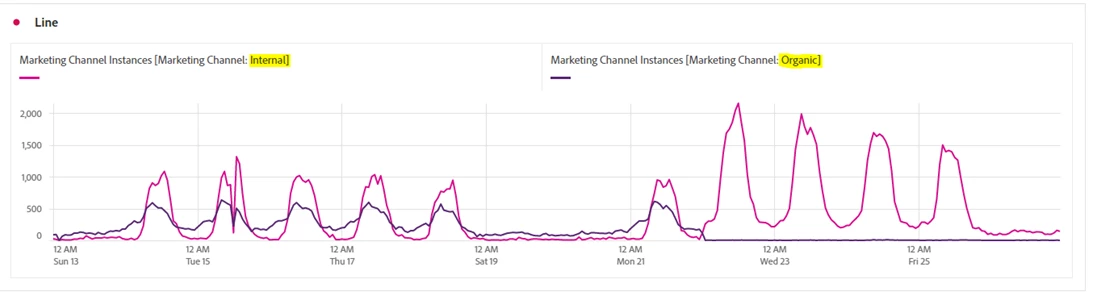
Fairly new to AA and had an agency setup our marketing channels & internal URL filters back in 2020.  Running into an issue right now where our Report Suites are suddenly dropping significantly for Organic (Natural Search) to Internal over the last week.   the only thing we changed was updating the internal URL filters to remove some staging sites....but that was back in late Nov, early Dec 2021.   

Can someone weigh in on the potential issue here?  Thinking us using the period (.) default value as well as the value of the sites we are tracking in the report suite may be conflicting and causing issues.     And maybe the delay in seeing the change is a result of the Visitor timeout to be 30 days (default setting for Channel expiration) 


Example of the data we are seeing (Organic drops to nothing, Internal spikes) 
 

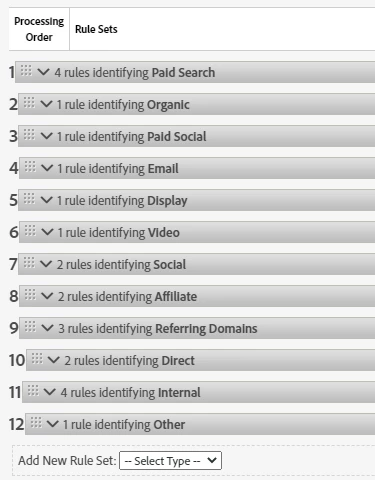
Processing Rules 
 

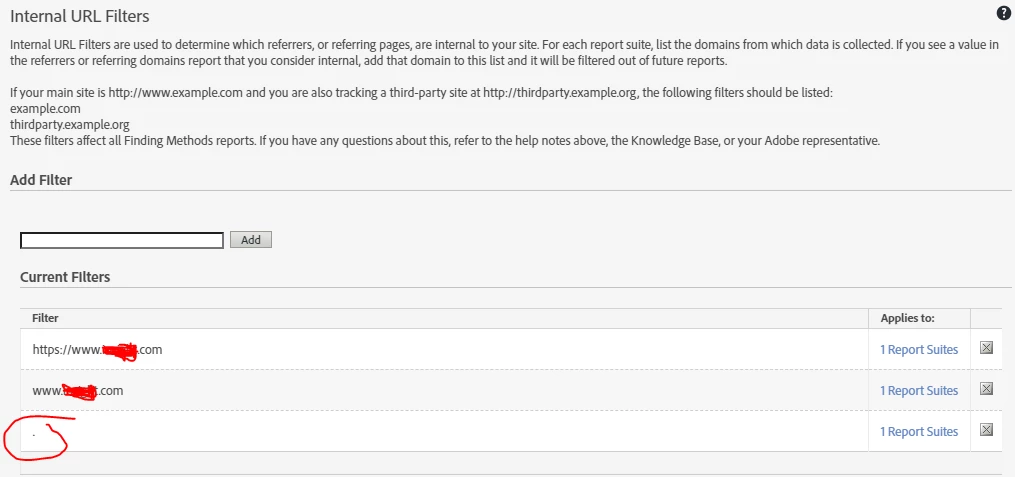
Example of Internal URL filter setup (I think this is where the problem is) 
In this example, the Report suite is only capturing www.mysite.com .  maybe the listings for the same site (no difference, no separate subdomains) as well as the default period (.) is causing it? 
 

Also, if I were to fix this then do an "Expire All" on the Marketing Channel reset, what are the implications there?  

My biggest concern is that we are losing visibility on Organic traffic and being overrun with "Internal" traffic counts...that clearly are not right. 

Appreciate any help! 



This post is no longer active and is closed to new replies. Need help? Start a new post to ask your question.
Best answer by PratheepArunRaj

Dear md2420,

If there are no changes to the Marketing Channels Processing rules or Internal Domain Filters recently, then there is something to do with the new redirections for your website (Server-side mostly). Check with your Content Management/IT Team to make sure that no new redirections are introduced because of the domain shifts.

Aside, period (.) is not correct too. Just remove it please, I remember that when you copy a report suite, this will be added by default so, please remove it. And just add domains without protocols (https://) and sub-domains (www). Example: mysite.com.

"Expire All" on the Marketing Channel will definitely reset the expiration and if you do you would see some increase in 'Direct' or 'Internal' because of the fact that they were not enabled for variable override earlier, but this is significant only for default metrics like Page Views, Visits, Unique Visitors, etc. If you are just thinking about the conversion metrics, even if you reset, attribution IQ can help you with the different lookback periods.

For the rest of the Marketing Channel best practices, there are plenty of documents available online.

Thank You, Pratheep Arun Raj B (Arun) | NextRow DigitalTerryn Winter Analytics

3 replies

PratheepArunRaj
Community Advisor and Adobe Champion
PratheepArunRajCommunity Advisor and Adobe ChampionAccepted solution
Community Advisor and Adobe Champion
March 29, 2022

Dear md2420,

If there are no changes to the Marketing Channels Processing rules or Internal Domain Filters recently, then there is something to do with the new redirections for your website (Server-side mostly). Check with your Content Management/IT Team to make sure that no new redirections are introduced because of the domain shifts.

Aside, period (.) is not correct too. Just remove it please, I remember that when you copy a report suite, this will be added by default so, please remove it. And just add domains without protocols (https://) and sub-domains (www). Example: mysite.com.

"Expire All" on the Marketing Channel will definitely reset the expiration and if you do you would see some increase in 'Direct' or 'Internal' because of the fact that they were not enabled for variable override earlier, but this is significant only for default metrics like Page Views, Visits, Unique Visitors, etc. If you are just thinking about the conversion metrics, even if you reset, attribution IQ can help you with the different lookback periods.

For the rest of the Marketing Channel best practices, there are plenty of documents available online.

Thank You, Pratheep Arun Raj B (Arun) | NextRow DigitalTerryn Winter Analytics

Thank You, Pratheep Arun Raj B (Arun) | Xerago | Terryn Winter Analytics
md2420Author
Level 2
March 29, 2022

Thank you @pratheeparunraj   I will check with IT, but doubt there were any changes last week as we've been in EOQ lockdown prior to that. 

I can (and will) remove the period and protocols.   How do I deal with sub-domains?  for example, our sites are all geo'd by subdomains.  so United States site would be us.mysite.com  and Canada would be ca.mysite.com.   Each have their own report suite.   Do you still suggest just using "mysite.com" as the Internal URL for all report suites regardless of sub-domain?  

Hyder_Ziaee
Adobe Employee
Adobe Employee
March 29, 2022

Whether to put the sub domain or not depends on your business setup. answer the following question:


"A user goes to us.mysite.com and clicks a link to jump over to ca.mysite.com"


Does the above user qualify as an internal user to your site or referral? If you answer Internal, then put "mysite.com" in IUF, else put in "ca.mysite.com"

md2420Author
Level 2
March 29, 2022

Also, is there a best practice for channel expiration? Ours is currently set to 30 days 


PratheepArunRaj
Community Advisor and Adobe Champion
March 30, 2022

Dear 

30 days is fine, however, said earlier, after Attribution IQ, there are revised best practices. Check out the link here.

Thank You, Pratheep Arun Raj B (Arun) | NextRow DigitalTerryn Winter Analytics

Thank You, Pratheep Arun Raj B (Arun) | Xerago | Terryn Winter Analytics
md2420Author
Level 2
March 30, 2022

So I believe I resolved it and it was the settings in the Internal URL section.   


  • Removed extraneous sub-domains and protocols
  • Removed the single period entry (default value)
    • I think this was the actual issue.
  • Added just the domain with a preceding period to avoid issues with other domains that may include partial domain name.   
    • e.g.   .mysite.com  to avoid capturing  thisismysite.com as an internal URL.


Now I am seeing Organic data again as well as our Internal channel is coming down. 

Appreciate the help everyone.  Now to go look at my Admin logs and find out "who" changed the settings  🙂