Marketing Channel Processing Rule Setup - Please Verify | Community
Skip to main content
Level 3
May 4, 2018
Solved

Marketing Channel Processing Rule Setup - Please Verify

  • May 4, 2018
  • 32 replies
  • 19512 views

Hi Guys,

I've followed the below steps for Marketing Channel Processing Rules setup.

Kindly review the below steps.

  1. Click on Admin --> Report Suites
  2. Selected the 'report suite id' for creating marketing channel
  3. Edit Settings --> Marketing Channels --> Marketing Channel Manager
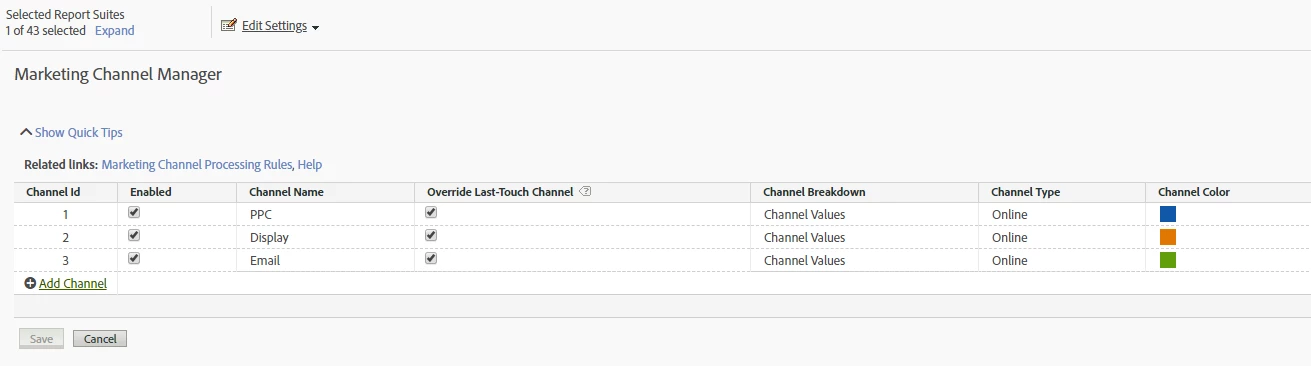
  4. Name the channel as below

5. Clicked on Related Links and configured rules for the below URLs as:

http://www.mysite.com/?utm_source=google&utm_medium=ppc&utm_campaign=motor_2018

http://www.mysite.com/?utm_source=RTB&utm_medium=display&utm_campaign=motor_remarketing&utm_content=add_2

http://www.mysite.com/?utm_source=CRM&utm_medium=email&utm_campaign=motor&utm_content=winback

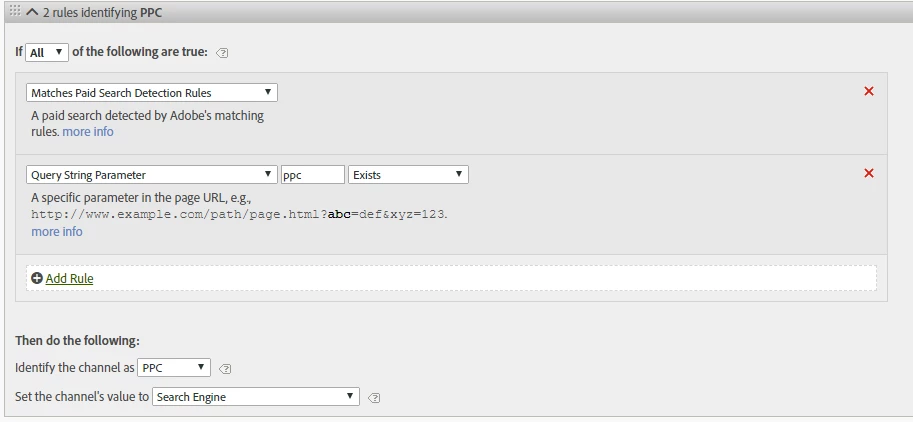
PPC - Processing Rules:
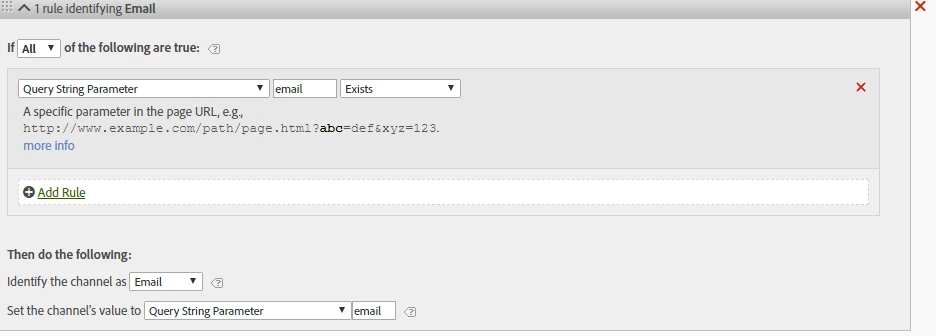
Email - Processing Rules:
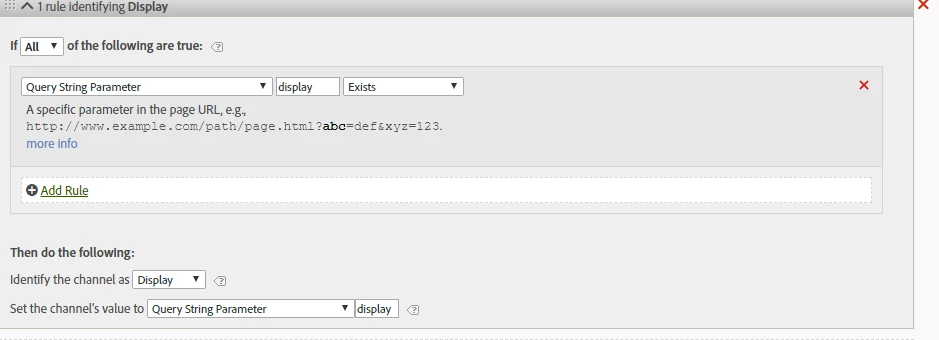
Display - Processing Rules:
This post is no longer active and is closed to new replies. Need help? Start a new post to ask your question.
Best answer by Urs_Boller
  • the main problem with the rules provided as screenshots are: you mixed up „query string parameter“ and „value of the parameter“

let me explain: given the url

mysite.com/landingpage.html?utm_source=google&utm_medium=ppc&utm_campaign=motor_2018

your parameters is eg. „utm_source“ and the value is „google“ (i marked the parameters)

in your rules, you need to check for the „parameters“ (not the values). looking at the pcc-rule you need to change the following:

  • conditions: change it to „query string parameter (utm_medium) equals (ppc)“ (change from „exists“ to „contains“
  • set channel value: change to „query string parameter (utm_medium)“

the same needs to be done with the other rules in a similar way...

i hope that helps

32 replies

Urs_Boller
Community Advisor
Community Advisor
September 20, 2019

this is strange - I assumed it would work...

can you please provide the following information so we can have a closer look at:

- original URL and Referrer you would expect the user to come to your side

- processing rules that might affect the data

- marketing channel classification rules both conditions and "details set to" code...

prathiv23Author
Level 3
September 27, 2019

Issue was dot (.) added in internel URL filter causing no channels reported under Marketing Channel report.

We have removed the dot (.) from internel URL filter.

Now, we can notice data is flowing now :-)

Thanks ursulab50161321​ for your help.

Cheers,

PV