Marketing Channel Processing Rule Setup - Please Verify | Community
Skip to main content
Level 3
May 4, 2018
Solved

Marketing Channel Processing Rule Setup - Please Verify

  • May 4, 2018
  • 32 replies
  • 19512 views

Hi Guys,

I've followed the below steps for Marketing Channel Processing Rules setup.

Kindly review the below steps.

  1. Click on Admin --> Report Suites
  2. Selected the 'report suite id' for creating marketing channel
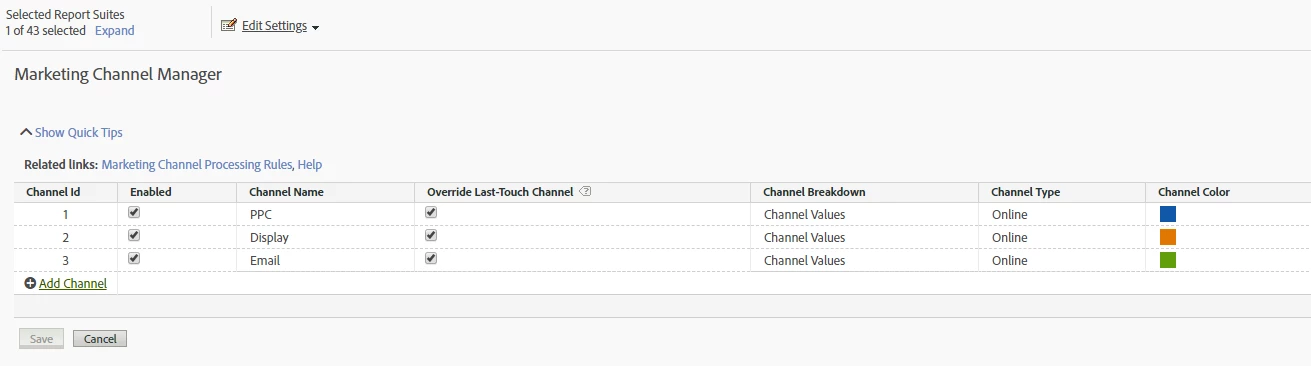
  3. Edit Settings --> Marketing Channels --> Marketing Channel Manager
  4. Name the channel as below

5. Clicked on Related Links and configured rules for the below URLs as:

http://www.mysite.com/?utm_source=google&utm_medium=ppc&utm_campaign=motor_2018

http://www.mysite.com/?utm_source=RTB&utm_medium=display&utm_campaign=motor_remarketing&utm_content=add_2

http://www.mysite.com/?utm_source=CRM&utm_medium=email&utm_campaign=motor&utm_content=winback

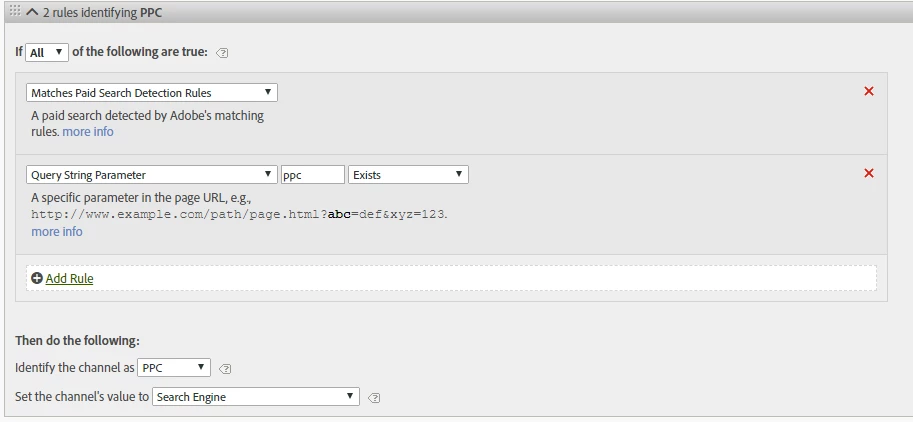
PPC - Processing Rules:
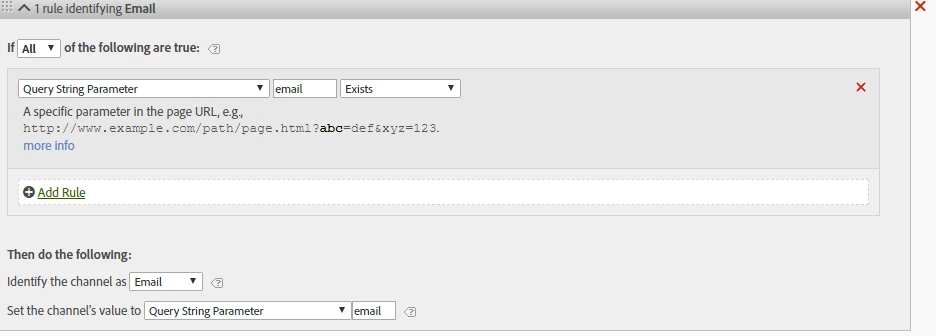
Email - Processing Rules:
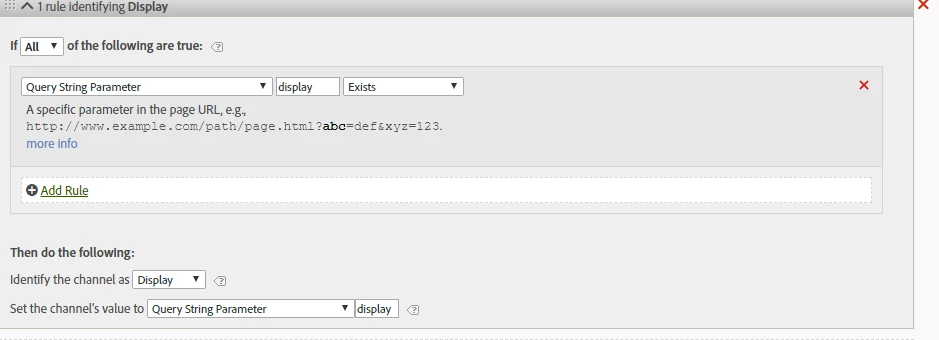
Display - Processing Rules:
This post is no longer active and is closed to new replies. Need help? Start a new post to ask your question.
Best answer by Urs_Boller
  • the main problem with the rules provided as screenshots are: you mixed up „query string parameter“ and „value of the parameter“

let me explain: given the url

mysite.com/landingpage.html?utm_source=google&utm_medium=ppc&utm_campaign=motor_2018

your parameters is eg. „utm_source“ and the value is „google“ (i marked the parameters)

in your rules, you need to check for the „parameters“ (not the values). looking at the pcc-rule you need to change the following:

  • conditions: change it to „query string parameter (utm_medium) equals (ppc)“ (change from „exists“ to „contains“
  • set channel value: change to „query string parameter (utm_medium)“

the same needs to be done with the other rules in a similar way...

i hope that helps

32 replies

Urs_Boller
Community Advisor
Community Advisor
August 29, 2019

you can use whatever parameter you like! it's just a matter of your implementation.

but: I recommend either stick to the utm-parameters (because a lot of people know them and a lot of 3rd party publishers work with them) or ho with the Adobe "cid" parameter. It's completely up to you what you decide to implement.

prathiv23Author
Level 3
August 29, 2019

Sure ursulab50161321​. Will implement using d_ parameter. Thanks for your inputs :-)

Pablo_Childe
Community Advisor
Community Advisor
September 3, 2019

I can second this recommendation by @ursboller.

Add to it the ability to do SAINT associations and imagine converting a URL with 10 UTM parameters, to just one! Then be able to report on any Associated hierarchies(UTM like parameter) and even be able to make adjustments post data capture...

prathiv23Author
Level 3
September 16, 2019

Hi ursulab50161321

The following Adobe Analytics parameters has been set in Processing Rules. (refer attached screenshot)

Please review the below setup for Social Networks - Processing Rules

  • d_src = ig ; fb
  • d_placement = Facebook_Desktop_Feed ; Facebook_Mobile_Feed ;
  • d_creative = creative id e.g 1528752458754
  • d_adgroup = Facebook - Rest of Europe
  • d_campaign = Sign Up - week11

Thanks,

PV

Urs_Boller
Community Advisor
Community Advisor
September 16, 2019

do you still face a problem? the rule looks good as far as I can see out of the screenshot.

prathiv23Author
Level 3
September 19, 2019

ursulab50161321, @pabloc82923542  

Yes, unfortunately there is 'unspecified' value getting reported under Social Networks under Marketing Channel Overview report :-(

Urs_Boller
Community Advisor
Community Advisor
September 19, 2019

are you sure those visitors are really coming from social? can you send a screenshot how your reporting looks like, especially what metrics you are using?

prathiv23Author
Level 3
September 19, 2019

I have modified the Rules into 2 -

  1. Rule 1 - This will have condition with Query Parameter - Exists
  2. Rule 2 - This will have 'Referring Root Domain' - Equals

I believe this might solve this 'unspecified' data issue.

Urs_Boller
Community Advisor
Community Advisor
September 19, 2019

looks great! and yes, for all cases where users come from a social network (without query params) you need the second rule

prathiv23Author
Level 3
September 20, 2019

But unfortunately no data (after 24 hrs) reported under Marketing Channel - Overview report.

Did I miss any steps in processing rules ? :-(

Thanks,

PV