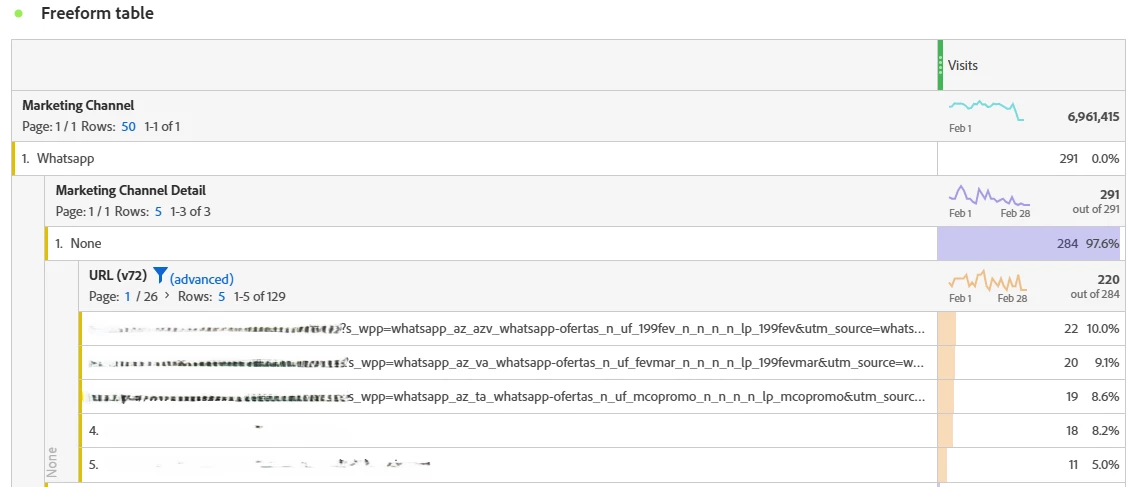
So, my recommendation is to fix your Campaign Tracking (v0)... I do not understand why your developers are setting a cookie value for your campaign tracking (s_v0) that isn't a standard practice... and could be causing some issues with your ability to pull data.
By that I mean, Adobe already has persistence built into it functionality, you don't need to create special behaviours to make this work, and by doing something like this (assuming your developers are reading values from that cookie) could be artificially inflating your campaign data.
Example of a Normal Implementation (assuming you are using CID)
Visit 1
- Page 1 (?cid=something_value_test)
- Tracking Code (s.campaign / s.v0) set to "something_value_test"
- Tracking Code Instance is triggered (because a value has been explicitly set)
- Page 2 (no campaign)
- Tracking Code retains the value "something_value_test" due to 1 week persistence
- Tracking Code Instance is not triggered (because a value has not been explicitly set)
Visit 2 (within a week)
- Page 3 (no campaign)
- Tracking Code retains the value "something_value_test" due to 1 week persistence
- Tracking Code Instance is not triggered (because a value has not been explicitly set)
- Page 4 (new campaign within the visit - ?cid=new_value_test2)
- Tracking Code (s.campaign / s.v0) set to "new_value_test2"
- Tracking Code Instance is triggered (because a value has been explicitly set)
- Page 5 (no campaign)
- Tracking Code retains the value "new_value_test2" due to 1 week persistence
- Tracking Code Instance is not triggered (because a value has not been explicitly set)
Visit 3 (More than a week later)
- Page 6 (no campaign)
- Tracking Code not set to any value as none is passed, and the previous value has expired
- Tracking Code Instance is not triggered
If you need to see the pages where the user explicitly entered the site with a campaign, you can use the metric Tracking Code Instance (this will only match on Pages 1 and 4), if you use standard Page View metric (this will match all the explicitly and persisted value pages, Pages 1, 2, 3, 4, and 5)
I can only assume that if your developers are setting a cookie with your campaign parameters, they are reading from the cookie, setting each use as an Instance (which isn't a good behaviour for proper analysis), but also, if the cookie is set to a week, and your Tracking Code is also set to a week, if you are tracking from the cookie, that data could actually be lasting 2 weeks (tracking the last day of the cookie retention, then Adobe persisting the value for its week).
Now, the cookie behaviour aside, I don't know if you are using CID or concatenating UTMs... if you are using UTMs then there's a logic problem in the code, as those Whats App urls clearly have UTMs in addition to custom s_wpp parameters... However, if your code is looking at only CID, then your developers are going to have to create logic to pull values from the UTMs (and populate an equivalent formatting of data to match your CID and pass it into your campaign tracking.
I am using UTMs in my implementation, and I am concatenating the values as key value pairs (that I use Regex Rules to parse):
Adobe Cloud Debugger:
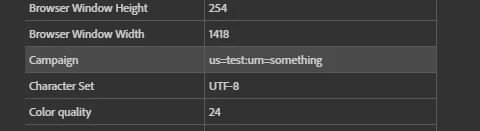
URL (https://www.domain.com/?utm_source=test&utm_medium=something)
You however, look like you are just using _ delimiters to collect data in a specific order... so you will have to work with your developer to ensure that the Tracking Code you want is properly processed and sent to your tracking.
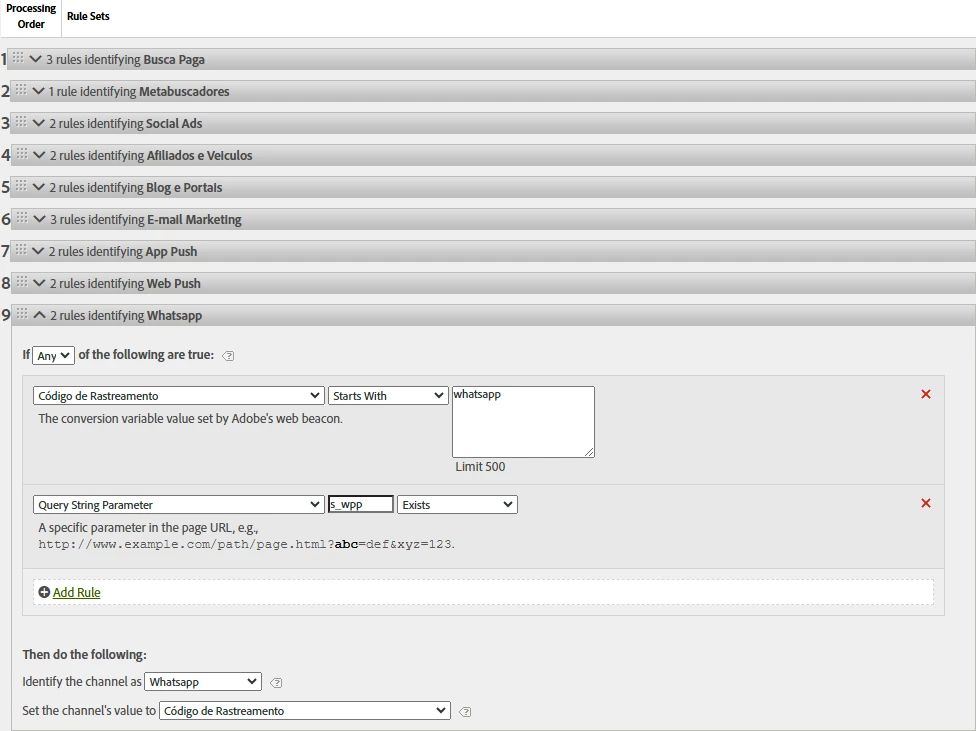
Once you have that, assuming your tracking code starts with "whatsapp" (or maybe change to contains), or your Query Parameter has s_wpp, the Tracking Code value that is tracked on those page views will be used as your "Detail" value... You can also adjust these rules, but the main issue is that you aren't collecting a "Tracking Code" value on those hits, and this is why you don't have data.....