Link Tracking working for some buttons but not all buttons | Community
Skip to main content
February 21, 2025
Solved

Link Tracking working for some buttons but not all buttons

  • February 21, 2025
  • 3 replies
  • 711 views

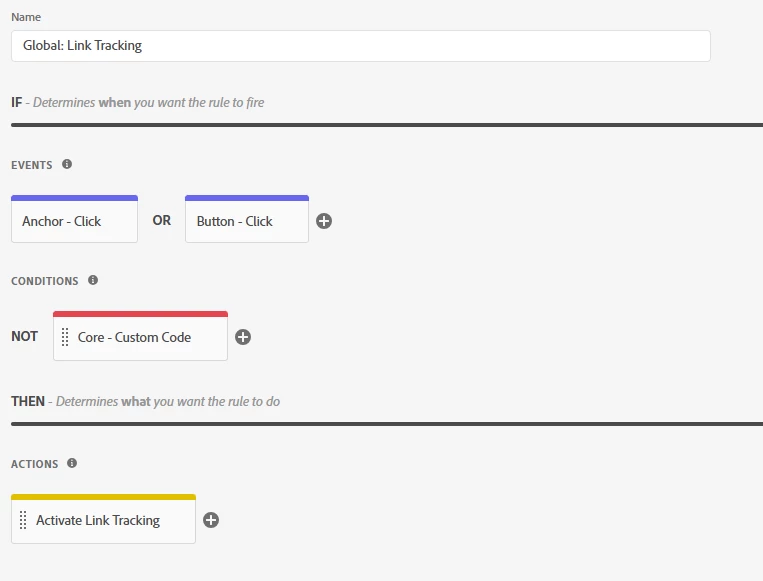
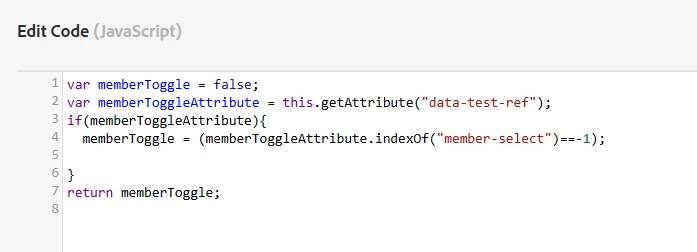
I've been experiencing a problem with our link tracking where certain button clicks don't send a click event to Adobe Analytics. I didn't setup the tracking, but from what I can tell, the configuration is looking for any buttons with CSS selector "button". We have a custom condition as well to ignore buttons with PII as we are not allowed to track users personal information. I've verified that buttons that aren't being sent do not meet the conditions to be excluded. Currently at a loss for how to solve this issue as it is affecting multiple of our button click tracking capabilities.

This is what the setup looks like:

Link tracking setup:
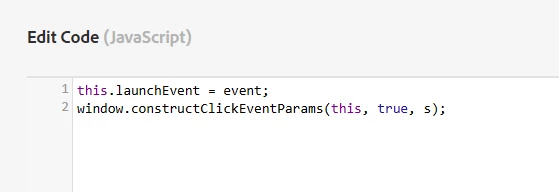
Activate Link Tracking is custom code:


Custom code for excluding user data (in the NOT condition):
 

Best answer by Jennifer_Dungan

Have you enabled Satellite Debugging to see if the rule is triggering or not? And are you seeing any JS errors?


First, in you console enable the debugging:

_satellite.setDebug(true); // Turn Debugger On _satellite.setDebug(false); // Turn Debugger Off


Also, make sure that your console is set to "Preserve Log" (so that as the buttons navigate you to other pages, you can see what happened before the navigation.


When you are testing your button, you should see something like:

Rule "Global Link Tracking" fired.

(If the rule passed all the conditions and was triggered)


Or


Condition "Core - Custom Code" for rule "Global Link Tracking" was not met.

(if the rule didn't meet your conditions)


If you don't see anything for the rule at all, then the trigger isn't being met for some reason.


If the rule is firing, and still isn't tracking, then something in the custom code isn't working. I'm not quite sure what that code is doing, and why you aren't just setting the variables and sending the beacon on this rule... It's also possible that the code, due to having to go though multiple steps is just getting cancelled as the user is navigated away from the page (i.e. all the steps needed to trigger tracking haven't completed by the time the page is no longer available)

3 replies

Jennifer_Dungan
Community Advisor and Adobe Champion
Jennifer_DunganCommunity Advisor and Adobe ChampionAccepted solution
Community Advisor and Adobe Champion
February 22, 2025

Have you enabled Satellite Debugging to see if the rule is triggering or not? And are you seeing any JS errors?


First, in you console enable the debugging:

_satellite.setDebug(true); // Turn Debugger On _satellite.setDebug(false); // Turn Debugger Off


Also, make sure that your console is set to "Preserve Log" (so that as the buttons navigate you to other pages, you can see what happened before the navigation.


When you are testing your button, you should see something like:

Rule "Global Link Tracking" fired.

(If the rule passed all the conditions and was triggered)


Or


Condition "Core - Custom Code" for rule "Global Link Tracking" was not met.

(if the rule didn't meet your conditions)


If you don't see anything for the rule at all, then the trigger isn't being met for some reason.


If the rule is firing, and still isn't tracking, then something in the custom code isn't working. I'm not quite sure what that code is doing, and why you aren't just setting the variables and sending the beacon on this rule... It's also possible that the code, due to having to go though multiple steps is just getting cancelled as the user is navigated away from the page (i.e. all the steps needed to trigger tracking haven't completed by the time the page is no longer available)

Harveer_SinghGi1
Community Advisor
Community Advisor
February 22, 2025

Hi @jonathancastillo ,

I agree with @jennifer_dungan , you need to use elimination process to get to the root cause, follow these steps,

  • Enable satellite debugging and check for "rule fired" or "condition not met" messages,
    • If you get any of these, it means your rule trigger/event is working and condition was met as well
    • If you don't see any of these, there is an issue with your rule trigger/event
    • If you get "condition not met" message, there is an issue with rule condition
  • If rule is triggering fine, there is an issue with rule action. Add checkpoints to your window.constructClickEventParams() function to identify at what point the logic of this function is breaking

Eliminating the rule components one by one and using checkpoints will help you narrow down the root cause which you can then fix to resolve the issue.

Cheers!

manojsingh-tech
Level 2
February 24, 2025

@jonathancastillo  can you try to run this and check if the button click is actually working or not 

document.querySelector("button").addEventListener("click", () => console.log("Button Clicked!"));

And if this is working then go with the solution mention by @jennifer_dungan