If we delete a library in adobe launch will it delete rules in it? | Community
Skip to main content
Level 5
May 18, 2023
Solved

If we delete a library in adobe launch will it delete rules in it?

  • May 18, 2023
  • 1 reply
  • 832 views

If we delete a library in adobe launch will it delete rules, data elements and extensions in it?

This post is no longer active and is closed to new replies. Need help? Start a new post to ask your question.
Best answer by Jennifer_Dungan

Just to be sure, when you say "library", you are talking about within the Publishing Flow?


Think of this Library more like a configuration file... it lists all the components you want to create a build for and which revision of those components are to be used...


The components themselves contain their own revision numbers regardless of the library....


Let's say that you have a Data Element "Var X" and it has 5 Revisions.... If your latest Dev library build is using Revision 5, and you delete the library, "Var X" still has all 5 code revisions within it. The same with all your Rules and Extensions.


Extensions are a bit tricky... you cannot choose a past revision of an Extension... it will always be the latest versions.... (that is assuming you publish the latest version)...

If your upstream resources are using "Adobe Analytics" Version 1.8, and you upgrade your Extension to Version 1.9.... if you don't add that version into any builds that go to production, your live code will continue to use v1.8.... 


Rules and Data Elements on the other hand, you can see the Revision History, and compare revisions... 
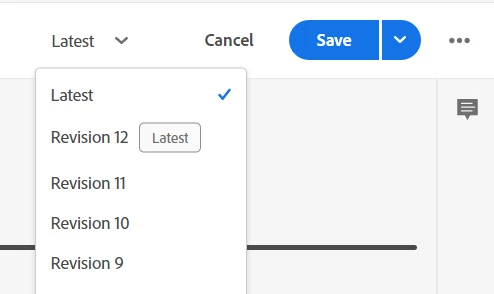


If for some reason, you made a change that you want to revert, when you are in your library, you can select an older revision... you will be presented with this message:


Now, in my example "Latest" and "Revision 4" are identical, and this message just means that a new Revision will be made (Revision 5) and it will become the "Latest" Version... I can still go back to my current Revision 4, later by selecting it and building it as Revision 6....


Basically every component maintains its own Revision History... Deleting a Library only essentially deletes a configuration of what elements and revisions are to be bundled in the build.

1 reply

Jennifer_Dungan
Community Advisor and Adobe Champion
Jennifer_DunganCommunity Advisor and Adobe ChampionAccepted solution
Community Advisor and Adobe Champion
May 19, 2023

Just to be sure, when you say "library", you are talking about within the Publishing Flow?


Think of this Library more like a configuration file... it lists all the components you want to create a build for and which revision of those components are to be used...


The components themselves contain their own revision numbers regardless of the library....


Let's say that you have a Data Element "Var X" and it has 5 Revisions.... If your latest Dev library build is using Revision 5, and you delete the library, "Var X" still has all 5 code revisions within it. The same with all your Rules and Extensions.


Extensions are a bit tricky... you cannot choose a past revision of an Extension... it will always be the latest versions.... (that is assuming you publish the latest version)...

If your upstream resources are using "Adobe Analytics" Version 1.8, and you upgrade your Extension to Version 1.9.... if you don't add that version into any builds that go to production, your live code will continue to use v1.8.... 


Rules and Data Elements on the other hand, you can see the Revision History, and compare revisions... 
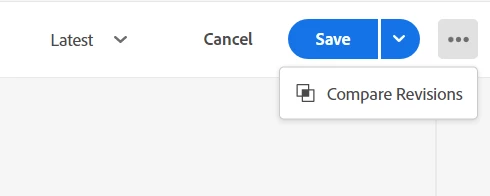


If for some reason, you made a change that you want to revert, when you are in your library, you can select an older revision... you will be presented with this message:
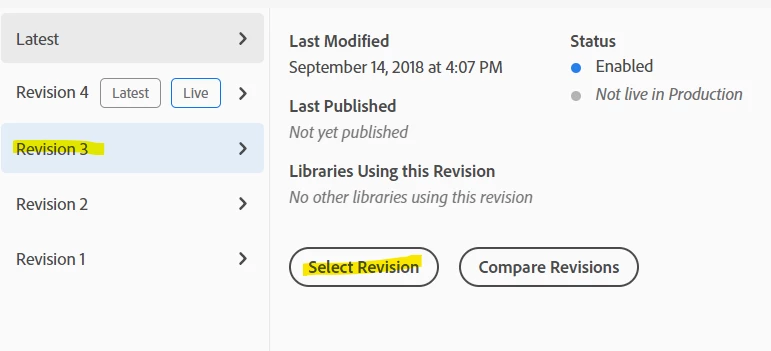
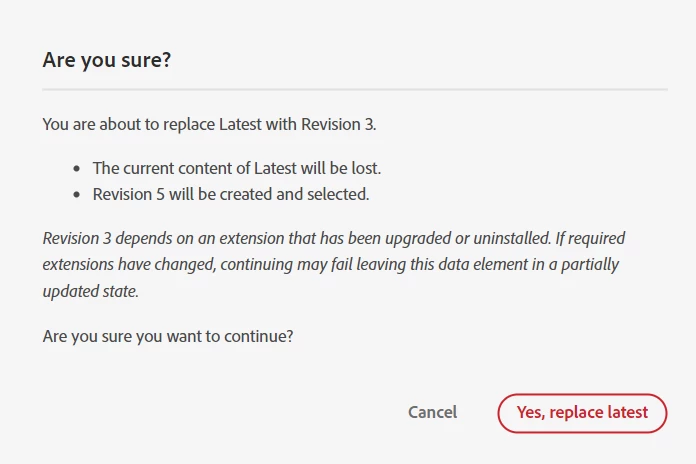


Now, in my example "Latest" and "Revision 4" are identical, and this message just means that a new Revision will be made (Revision 5) and it will become the "Latest" Version... I can still go back to my current Revision 4, later by selecting it and building it as Revision 6....


Basically every component maintains its own Revision History... Deleting a Library only essentially deletes a configuration of what elements and revisions are to be bundled in the build.