@yuhuisg @jennifer_dungan So both deployments likely had an impact, and both deployments were only for custom links, and nothing seems to make sense.
We see one sample user (slightly different scenario than my first example, this is Paid Search switching to Natural Search), who entered via a Google SEM link, the Entry URL shows the 'cid' parameter with the same value that is populated in Tracking Code.
For their first 8 hits, they were properly bucketed into the Paid Search channel.
- Tracking Code shows the CID
- Search Engine - Paid = Google
- Search Engine - Natural = unspecified
Then on the 9th hit, a custom link, it switches to Natural Search
- Tracking Code shows the CID
- Search Engine - Natural = Google
- Search Engine - Paid = unspecified
The custom link did not pass a new Tracking Code and did not contain an external referrer, and occurred within a minute of the previous hit, a page view.
Then when the user ultimately converted, LTC for the conversion is set to Natural Search.
We're seeing this happen for about 10% of our visitors, who are about 75% mobile vs desktop, and even distribution between Chrome and Safari.
Processing rules, also the Tracking Code that is logged for the visit begins with 'SEM-'
Any thoughts are appreciated!
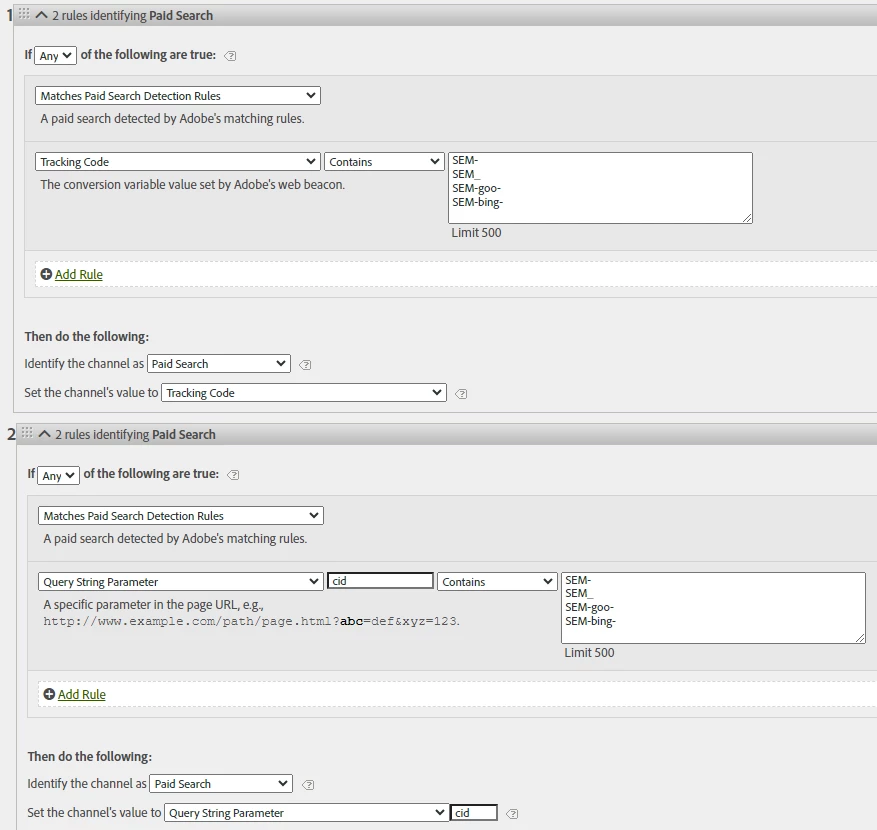
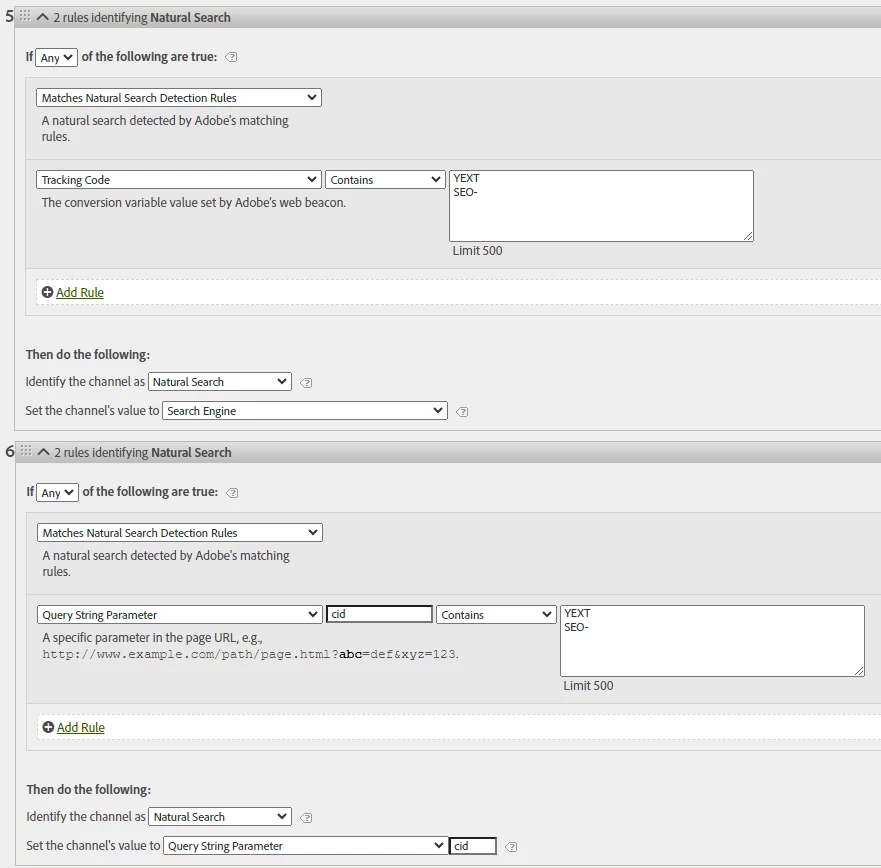
Tracking Code generally has a different attribution than Marketing Channel (tracking code defaults to 7 days, Marketing Channel default to 30 Days)
Is your Tracking Code just based on CID? If so, you don't need both rules... I would just use the CID variant to avoid potentially attribution conflicts....
Also, Natural Search shouldn't have any CID values on it... I would expect you are missing a lot of Natural Search values by specifying that it must have a CID value.... Natural Search are pages that Google crawls from your site and links to... they shouldn't ever have cid values.... The fact that you have any traffic to Natural Search tells me that Google is indexing non-canonical URLs, which is bad, because you will have multiple versions of the same URL with different parameters fighting for relevancy against themselves.... Paid Campaigns, because they are specifically designated in your Google Ads Account, shouldn't have issues.. but Natural Search is a different beast.... (ah quick update here.. you have "ANY" not "ALL" rules in your screenshot, that is how your Natural Search is working.. but again, you shouldn't have CID on Natural Search at all, so you should consider setting your Channel value to something like "Search Engine" as your Marketing Channel detail for Natural Search will be mostly no value ever)
But in your Scenario:
- Hit 1
- Tracking Code shows the CID
- Search Engine - Paid = Google
- Search Engine - Natural = unspecified
- Resulting in your Tracking Code picking up your campaign, and your Marketing Channel picking up Paid Search
- Note that your Marketing Channel Detail should also contain your Tracking Code values (because you have "set the Channel's value to Tracking Code")
- Multiple Hits will happen
- User either backs out to Google, or does a second Google Search, this time clicking on a non-paid result
- Natural Search overrides Paid Search (this is now the last touch)
- Tracking Code shows the CID, yes, because Tracking Code has a 7 Day attribution (and you are still technically in the same Visit)... a value of "" does not override the previously set value... if it did, your Tracking Code would never be able to properly maintain it's attribution, as the next hit where it's not set would override it
- Search Engine - Natural = Google (also correct, this is last touch Marketing Channel)
- Search Engine - Paid = unspecified
- In this case, your Marketing Channel is overwritten by Natural Search as the last touched channel....
- Tracking Code will NOT override, as no value has been set to that dimension to override with, and it shouldn't.. since Natural Search does not have tracking code values
- This is why you should be pairing your Marketing Channel with Marketing Channel Detail.... this is the "Channel Value" that you are setting in your rules... it follows the same attribution rules
Basically you are running into scenarios with different attribution and trying to mix them, and that is going to cause data mis-matches and cause confusion.