Hit attribute : Query string parameter | Community
Skip to main content
Level 3
March 26, 2025
Solved

Hit attribute : Query string parameter

  • March 26, 2025
  • 1 reply
  • 1105 views

Hi,

We are feeding Adobe Analytics from a datastream in AEP. This datastream is not fed by Adobe SDK but by a homemade API.

I want to understand which destination field should be mapped in this datastream to populate the hit attribute 'Query string parameter'.
This one is used in the marketing channel processing rule:
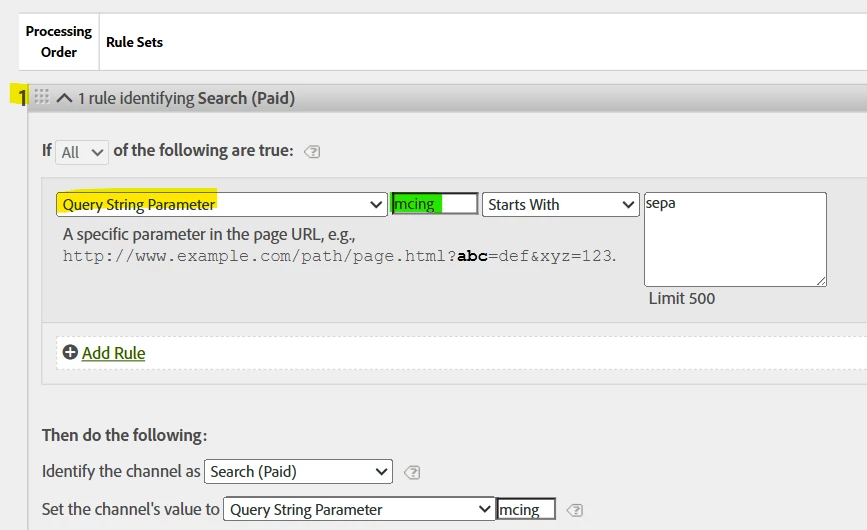


So logic this rule number 1 is to check if an url parameter mcing exists and starts with sepa_

This query string parameter is mapped like this in the datastream:
- to populate what will be used by Adobe Analytics to defined the hit attribute Query String Parameter (from what I found from the doc but not 100% sure of this)

 

- I also used the context data (in blue) to populate another field: prop60

 

I see in my result in Adobe Analytics that the marketing is not always attributed the correct way:
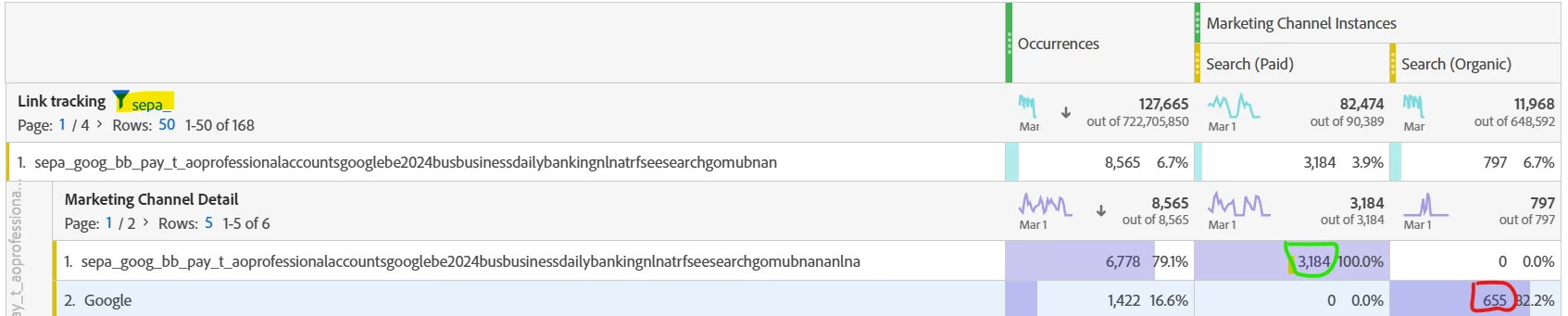


So, the link_tracking is the prop60 mapped above.
The marketing channel, even if the URL parameter mcing starts with sepa is not always linked to Search Paid.
To me, it should be the case because:

- this is the rule number 1 => priority on the other one

- the hit attribute 'Query string parameter' used the same input as the linck tracking (prop60) and so should be the same


Do you have any idea what can explain this difference?
Do I have to use a different field in the target destination field of my datastream than 'web.webPageDetails.URL' ?

Don't hesitate if my explanation in not clear enough.

Thanks in Advance


Robin



This post is no longer active and is closed to new replies. Need help? Start a new post to ask your question.
Best answer by robinl39529461

Hi, I received the following question of the Adobe support:

Hi Robin,


Thanks a lot for your patience. I was out-of-office yesterday, hence couldn't provide an update sooner.


I reviewed multiple user journeys to identify the reason for Marketing Channel Instance not being set, even when the Query String Parameter had the appropriate value.


A key behavior, that I also confirmed with the Product Engineering team, is that, when in the same visit, let's say, Hit 1 : Marketing Channel (va_closer_id) was Paid Search and Marketing Channel Detail (va_closer_detail) was sepa_goog_mass_pay_d_boostminorsgooglepmaxfrperformancemax. Now, if the consecutive hits, have the same va_closer_id and the same va_closer_detail, then in those cases, the Marketing channel will be considered to persist, i.e., Marketing Channel instances (va_instance_event) won't be incremented.


Now, among the visitor journeys I analyzed, here are a few of them - 

  • Notice that in the hit number '5' of the 2nd visit, i.e., the 6th record, the va_closer_id and the va_closer_detail are the same as in 1st hit of 2nd Visit, hence the va_instance_event was not incremented.
     
  • Similarly, see the below user journey - 

    To conclude, this scenario is working as expected, and you may expect the marketing channel values to persist. From the implementation perspective, the Page URL and marketing channel rules are seem to be setup correctly.


Hope this is helpful. Please let me know if you have any questions or if you'd like to discuss this over a call.


It explains the logic and answers to my question.
Thanks for your help

Robin

1 reply

Josh Stephens
Community Advisor
Community Advisor
March 26, 2025

Have you made any recent changes to your marketing channel processing rules?  It's hard to tell but it looks like the sparkline on the organic search has dropped off recently.  In AA, updates to the rules aren't retroactive.

Level 3
March 27, 2025

Hi Josh,
You are right: I took the wrong period.
I first forgot to add this mapping in my datastream:

So the marketing processing rules was checking the hit attribute 'Query string parameter' that was empty and jump to the 2nd rule that doesn't check that field.

But after fixing this by updating the mapping, I have strange result:

So the same input (data.fullPageURL) is mapped to :
- web.webPageDetails.URL : it will feed the hit attribute 'Query string parameter' (without any filtering) in Analytics used by marketing the processing rules

- _experience.analytics.customDimensions.props.prop60 : it will extract the parameter mcing only (thanks to the function get_url_query_str(lower(get_url_decoded(data.fullPageURL)),"append")["mcing"]) and feed the prop60 called Link Tracking
So if an URL parameter is about mcing, both dimensions should be populated with this value.

What I see in Analytics is that the prop60 is populated but is not always giving a Marketing Channel. The calls receiving a marketing channel receive the correct value (in green) but not all of them receive a value. 

I was expecting that the figure in yellow and in pink will be aligned.

Hope my explanation is not confusing.
Thanks in advance

Robin


Josh Stephens
Community Advisor
Community Advisor
March 27, 2025

Hi @robinl39529461  - the occurrences in yellow include persistence.  But when you filter for just instances (hits where the marketing channel is set vs. where it persisted), you've got a perfect match!  (The delta between the two would be the impact of persistence.)
