Freeform Table Functionality - Downgrade in how multi-select and drag & drop work
Following an update a few months back, one of the most convenient quality of life features with freeform tables stopped working. After opening a support ticket recently I’ve been advised that this was deliberate and won’t be fixed, however I think this is a big miss and it would be great if it could be revisited.
The below demonstrates this shortcut, and it involves the use of CTRL / Shift + Left Click to select multiple values within a table. When doing this previously, if I dragged a new component into the table to go above the existing values, it would place one instance of the component above all of my selected columns. However, since the update this now instead adds in multiple instances of the same component.

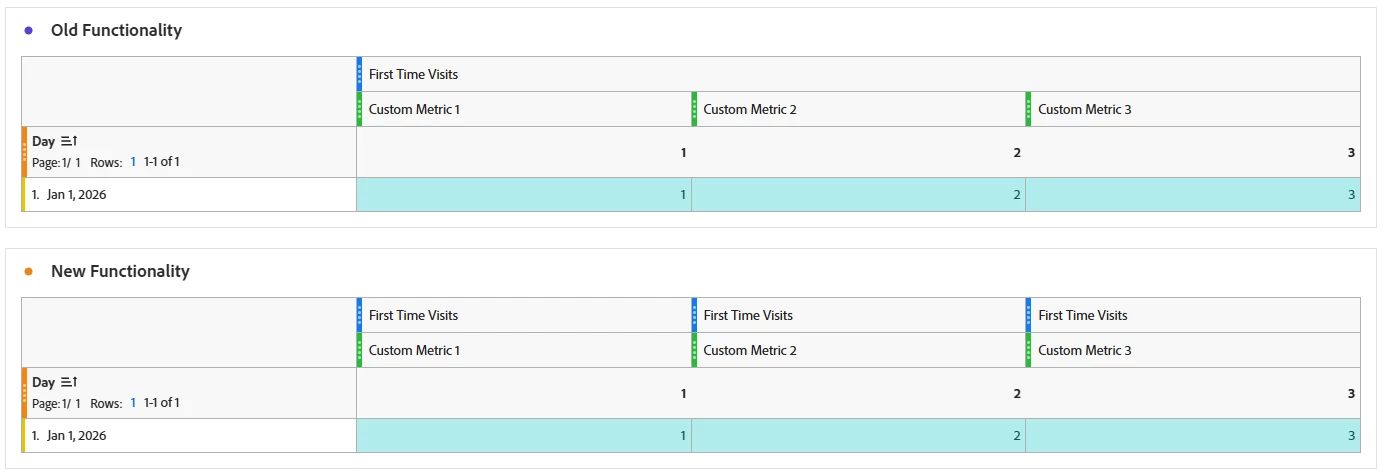
Not only does this look messier, it creates a number of additional clicks to drag and drop values into the ‘right’ place if you want to tidy things up. Fine if it’s a simple table, but the more complex it is, the longer and more painful this process becomes to move things about.
A couple of other little shortcuts were recently fixed off the back of my ticket which is great - for e.g. when dragging components from one table to another, any formatting changes now stick and follow again. But, this is (was) probably the most useful one of these types of tricks.
As such, it would be great to hear from others who may like this fixed and see if there’s a chance this decision can be reconsidered?
(Apologies if there have been other topics on a similar theme, aware it’s been a while since this changed! Believe it was when enhancements to table sorting were made, back in Feb or March.)