Filtering date type components in CJA? | Community
Skip to main content
Level 2
May 6, 2025
Solved

Filtering date type components in CJA?

  • May 6, 2025
  • 2 replies
  • 534 views

Hi folks,


Wondering if anyone has found a way around filtering components with a Date schema data type in CJA? Both within the Workspace e.g. filtering the dimension's date values in a Freeform table, but also within a Segment.....when using a Date type component in a Segment it only allows me to choose a date "equals 5/30", rather than define a date range in the criteria  "greater than/less than 5/1".
Best answer by Harveer_SinghGi1

Hi @janiceak ,

You can achieve this in CJA by creating multiple components for Day, Month, Year etc. based on the Date Type field that you are interested in.

So for example, if you have a Date type field named "Event Timestamp", you can create different components like below in the components list as below,

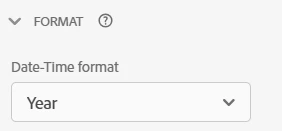
1. Add "Event Timestamp" to dimensions list, rename it as "Event Year" and set the format to Year in component settings,

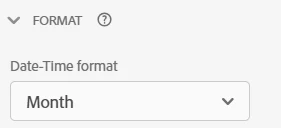
2. Add "Event Timestamp" to dimensions list, rename it as "Event Month" and set the format to Month in component settings,

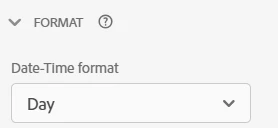
3. Add "Event Timestamp" to dimensions list, rename it as "Event Day" and set the format to Day in component settings,

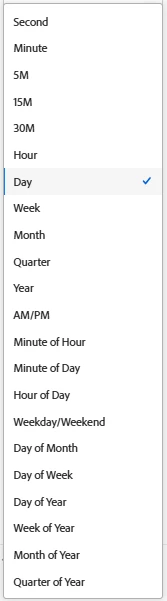
Similarly you can create multiple components with below format options,

Once you have these components created, you can use them in different combinations to filter for specific periods.

Cheers!

2 replies

Jennifer_Dungan
Community Advisor and Adobe Champion
May 6, 2025

Hmm that is interesting.. I just checked a CJA sandbox, and you are right, it doesn't seem to be available....


One of the tricks I use in AA is to split values to Month, Day and Year values, then build our logic to bound the range...


So if I am doing full months, like Feb - Apr 2025 (so Feb, March and April)


I do something like:


Hit [

    Year equals 2025

    AND

    Hit Container [

         Month equals February

         OR

         Month equals March

         OR

         Month equals April

    ]

]


(you can also use "equals any of"... I find this more readable and easier to edit later)


If you need partial month data, like Feb 14 - April 3rd, it's a little more complicated:


Hit [

    Year equals 2025

    AND

    Hit Container [

         Hit Container [

             Month equals February

             AND

             Day equals any of 14,15,16,17,18,19,20,21,22,23,24,25,26,27,28

         ]

         OR

         Hit Container [

             Month equals March

         ]

         OR

          Hit Container [

             Month equals April

             AND

             Day equals any of 01,02,03

         ]

    ]

]


Not the easiest, not the prettiest.... but it gets the job done.... 

Harveer_SinghGi1
Community Advisor
Harveer_SinghGi1Community AdvisorAccepted solution
Community Advisor
May 7, 2025

Hi @janiceak ,

You can achieve this in CJA by creating multiple components for Day, Month, Year etc. based on the Date Type field that you are interested in.

So for example, if you have a Date type field named "Event Timestamp", you can create different components like below in the components list as below,

1. Add "Event Timestamp" to dimensions list, rename it as "Event Year" and set the format to Year in component settings,

2. Add "Event Timestamp" to dimensions list, rename it as "Event Month" and set the format to Month in component settings,

3. Add "Event Timestamp" to dimensions list, rename it as "Event Day" and set the format to Day in component settings,

Similarly you can create multiple components with below format options,

Once you have these components created, you can use them in different combinations to filter for specific periods.

Cheers!