Data warehouse extract ERROR | Community
Skip to main content
Level 3
October 23, 2024
Question

Data warehouse extract ERROR

  • October 23, 2024
  • 4 replies
  • 1325 views

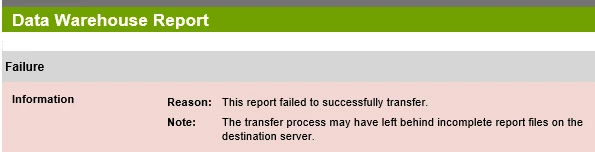
I'm re-querying the existing job w/ destination being GCP bucket, but for some reason it says "Error - Failure To Send" and the email notification received tells the below error. Could someone help what does this err mean and how we could tackle it? 
 

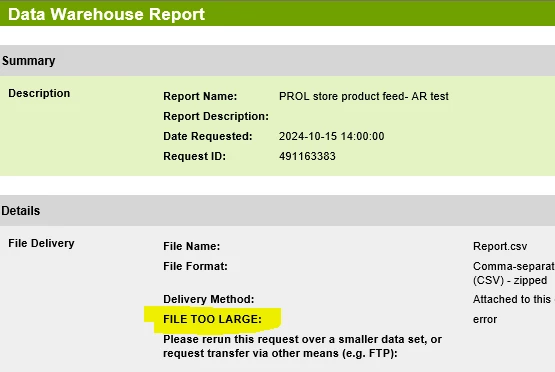
As an alternate when I tried emailing the report myself, the email notification stated FILE TOO LARGE for email. Wonder what the above err means!  
@jennifer_dungan

This post is no longer active and is closed to new replies. Need help? Start a new post to ask your question.

4 replies

Level 2
October 24, 2024

Hi @abhijithra1,


There is a 10mb limit via the email delivery method, you may have to use an alternative delivery method like Amazon S3 bucket or Azure, etc. I personally use S3 bucket and it's pretty easy to get it set up. 


Cheers

Level 3
October 24, 2024

hi@vernon_h 


thanks though. It seems you have missed the GCP bucket mentioned, email was an alternate approach.

leocwlau
Community Advisor and Adobe Champion
October 24, 2024

@abhijithra1, not familiar with GCP and wondering if there is any chance of a disk space limitation issue as well. As the original error message suggested, are you able to find any incomplete file transfer on GCP?

Two things I may try to test out

  • a smaller data warehouse request with the same GCP location, to test the location configuration and connection are all good.
  • same request to an old-school FTP location, to test if the data warehouse request itself and output data file size
Level 3
October 24, 2024

@leocwlau Appreciate your consideration/response here.


YES, check GCS bucket and no file posted; neither incomplete nor empty(I had chosen this option when no data for any day).


Tried smaller and then regular window and both worked in another bucket. But the same time, I have received many files to the bucket where is erroring now, so something really strange. I'd be worried if this happens in Production randomly.


And, FTP was our regular/past state and GCP is current/future state in works due to Org's FTP limitation. Thanks again

FarazHusain
Adobe Employee
Adobe Employee
October 24, 2024

If this is still not resolved, please log a ticket to Adobe Customer Support, and please do mention the Legacy Request ID.

Level 3
October 24, 2024

@farazhusain are you referring to the Request ID in the green ribbon in my screenshot attached in this thread?


And I didn't get the "Legacy" prefix. Thanks much

FarazHusain
Adobe Employee
Adobe Employee
October 24, 2024

Yes, you can share the same screenshot when logging a ticket. We can then check and share more details on this.

Jennifer_Dungan
Community Advisor and Adobe Champion
October 26, 2024

Like the others, I am have not used the GCP bucket, but the initial error looks like there is some authentication issue... the error indicated that the file completed on the Adobe side, but wasn't able to transfer it.


As others said the file is too large to email, so that isn't a workaround for you.


Have you tried connecting to GCP Bucket using the credentials you provided in the Warehouse settings to confirm they are working?


@farazhusain is right, if you contact Client Care, they may be able to run additional tests from the servers to try and test the connection to GCP Bucket.