Yes this is how it is configured.
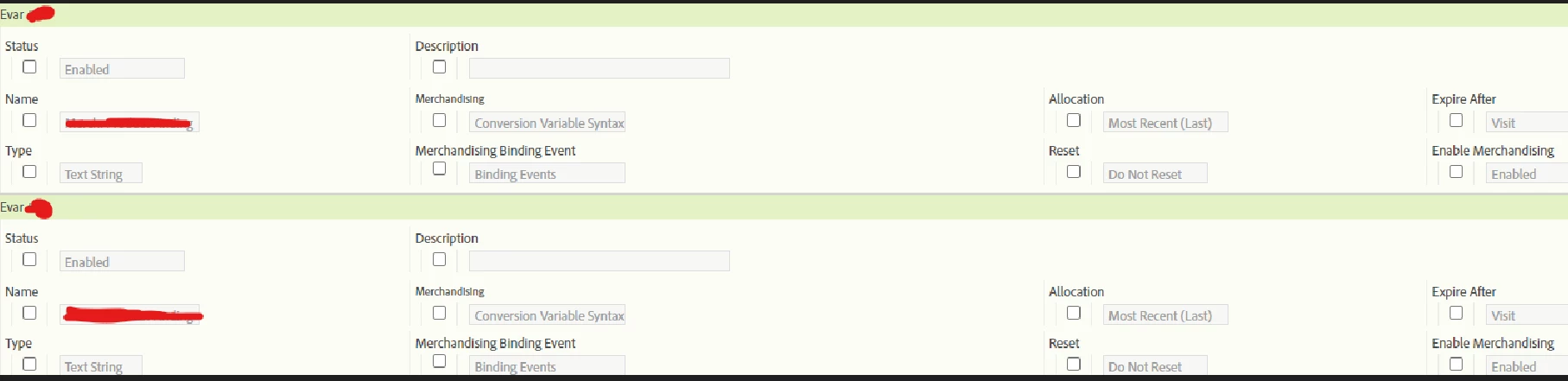
Ok, so you are using "conversion variable syntax", which according to the documentation:
Conversion Variable Syntax is used when the eVar value is not available to set in the products variable. This scenario typically means that your page has no context of the merchandising channel or finding method. In these cases you set the merchandising variable before you arrive at the product page, and the value persists until the binding event occurs.
When the binding event selected during configuration occurs, the persisted value of the eVar is associated with the product. For example, if prodView is specified as the binding event, the merchandising category is tied to the current product list only at the time the event occurs. Only subsequent binding events can update a merchandising eVar that has already been assigned to a product.
The value "Aviary" for eVar1 is assigned to the product "Canary". All subsequent success events that involve this product are credited to "Canary". Additionally, the current value of the merchandising variable is tied to all subsequent products until one of the following conditions is met:
- The eVar expires (based on the ‘Expire After’ setting)
- The merchandising eVar is overwritten with a new value.
This says to me that the value is set, but is basically just "held" until the binding event is triggered (then it's used).... I've not used "Conversion Syntax" before, I will try and set up a test in a dev environment to test this out.
You can only see the binding event(s) by "editing" that field... check the box, and the dropdown will appear.. but I suspect that this is being bound by a specific event, and thus when the values are set, this context is not part of the binding.
