Counter event not showing against product finding method values | Community
Skip to main content
gkrish12345
Level 2
February 15, 2023
Solved

Counter event not showing against product finding method values

  • February 15, 2023
  • 1 reply
  • 3359 views

Counter event not showing against product finding method values. Whenever user clicks on drop down filter, click event gets triggered with custom link name "filter click" and  event named "search result filter (event100)" which is basically a counter event and evar which is enabled for product finding method which collects filter value that was clicked.  Now when I try to use search results filter against the evar which collectes filter value I dont see numbers against respective values but seen as unspecified. Whats the issue here?


This post is no longer active and is closed to new replies. Need help? Start a new post to ask your question.
Best answer by Jennifer_Dungan

Yes this is how it is configured.
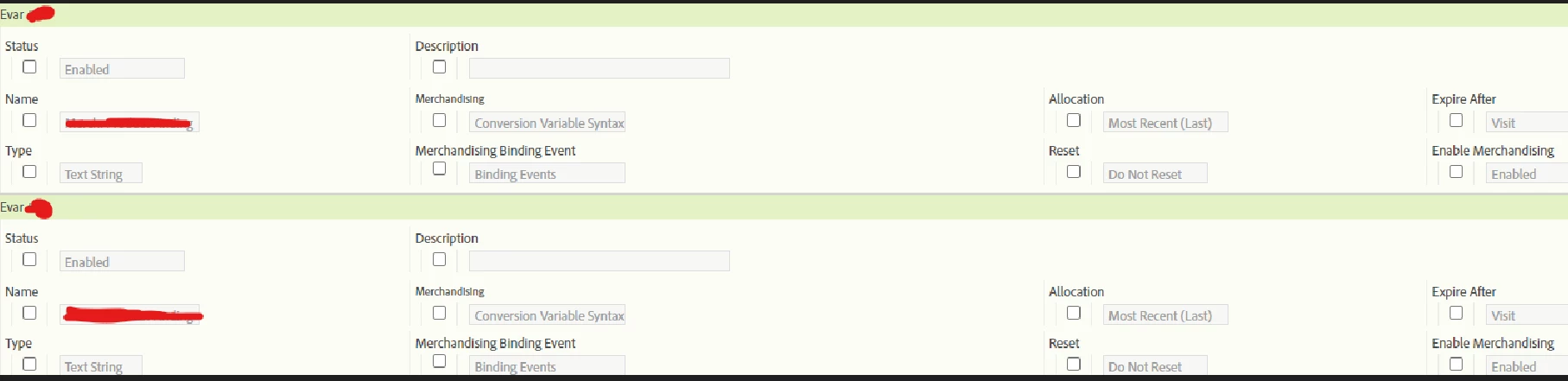


Ok, so you are using "conversion variable syntax", which according to the documentation:

Conversion Variable Syntax is used when the eVar value is not available to set in the products variable. This scenario typically means that your page has no context of the merchandising channel or finding method. In these cases you set the merchandising variable before you arrive at the product page, and the value persists until the binding event occurs.

When the binding event selected during configuration occurs, the persisted value of the eVar is associated with the product. For example, if prodView is specified as the binding event, the merchandising category is tied to the current product list only at the time the event occurs. Only subsequent binding events can update a merchandising eVar that has already been assigned to a product.

// Place on the same or previous page before the binding event:
s.eVar1 = "Aviary";

// Place on the page where the binding event occurs:
s.events = "prodView";
s.products = ";Canary";

The value "Aviary" for eVar1 is assigned to the product "Canary". All subsequent success events that involve this product are credited to "Canary". Additionally, the current value of the merchandising variable is tied to all subsequent products until one of the following conditions is met:

  • The eVar expires (based on the ‘Expire After’ setting)
  • The merchandising eVar is overwritten with a new value.


This says to me that the value is set, but is basically just "held" until the binding event is triggered (then it's used).... I've not used "Conversion Syntax" before, I will try and set up a test in a dev environment to test this out.


You can only see the binding event(s) by "editing" that field... check the box, and the dropdown will appear..  but I suspect that this is being bound by a specific event, and thus when the values are set, this context is not part of the binding.


1 reply

Jennifer_Dungan
Community Advisor and Adobe Champion
February 15, 2023

Without seeing your implementation this could be hard to diagnose... but it looks like the event and the dimension are being captured on different tracking requests based on the behaviour in your report....


It's almost as if the event is being captured when the filter drop down is clicked, but then the selected filter is being tracked either when the specific filter is selected (or maybe on the page view after the results are filtered)....

gkrish12345
Level 2
February 16, 2023


This is what happens when the click event fires. I am trying to use event191 against evar44 and 45 but I dont see the numbers.


Jennifer_Dungan
Community Advisor and Adobe Champion
February 16, 2023

Oh.. I wonder... give the name of the eVar "merch".. are those eVars set up as Merchandising eVars? Merchandising eVars have special binding rules that could be impacting how the data is shown.


Can you see the settings of your eVar configuration? Here is some info about Merchandising eVars:

https://experienceleague.adobe.com/docs/analytics/admin/admin-tools/manage-report-suites/edit-report-suite/conversion-variables/merchandising-evars.html?lang=en


Normally, I use product syntax (will all binding), and usually this means that independently set events will map to my merchandising eVars, but perhaps conversion variable syntax or the specific binding events may be changing how the data correlates.


I suspect that these were set up as merchandising eVars so that they would stitch into your actual product purchases (so that you can correlate the search to your products), but the settings may be preventing you from seeing the values on the search....