Confirmation and Guidance Needed for Job Search Filter Tracking in Adobe Analytics | Community
Skip to main content
Level 4
November 12, 2024
Solved

Confirmation and Guidance Needed for Job Search Filter Tracking in Adobe Analytics

  • November 12, 2024
  • 2 replies
  • 2531 views

Dear Team,

I need to track the search filters, which have various options, and define a data layer structure for this.

Here’s the data layer suggestion we’re considering:


adobeDataLayer.push({
"event": "JobSearchFiltering",
"event_info": {
"searchTerm": "software development", // Value of the search term
"searchResultCount": "2", // Number of search results after applying filters
"searchFilters": "Berlin, Software Engineering, Professional" // User-selected search filters
}
});

For `searchFilters`, I’d like to confirm if this format is appropriate:
- Option 1: `"searchFilters": "Berlin, Software Engineering, Professional"`
- Option 2: `"searchFilters": ["Berlin", "Software Engineering", "Professional"]`

Could you advise which format is more suitable? or both are wrong?

Additionally, I want to capture the filter values in `List eVar1` in Adobe Analytics using Adobe clinet data layer. Could you guide me on setting this up? Thank you!
This post is no longer active and is closed to new replies. Need help? Start a new post to ask your question.
Best answer by bjoern__koth

Thank you for your help so far!

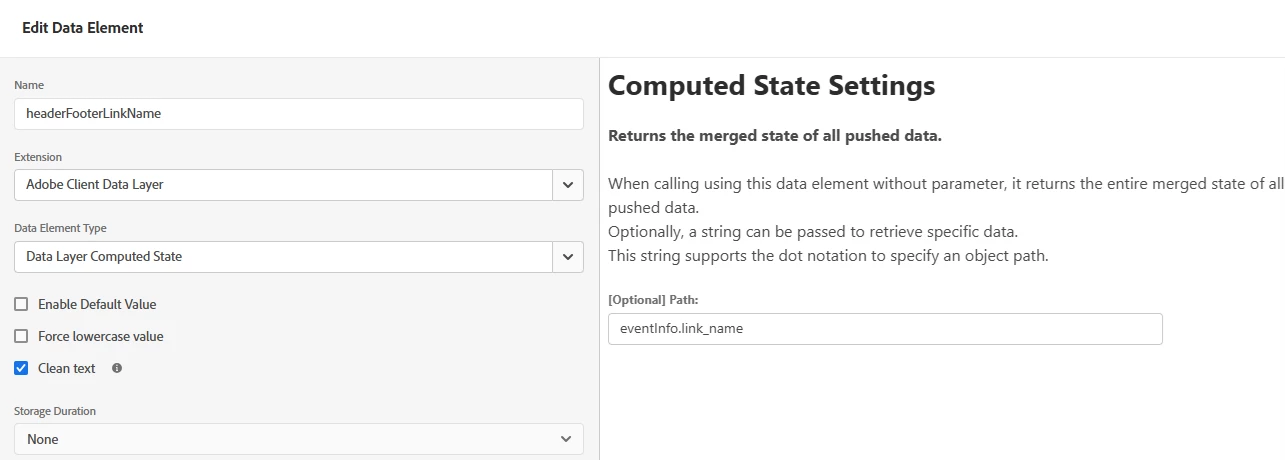
Please find the attached screenshot.


I tried using `event.message.eventInfo.link_name`, but it still isn’t working.
Additionally, `_satellite.getVar("myVar", event);` is also returning undefined.

 Any guidance would be greatly appreciated!


Ah, I see.

So, as explained earlier, the eventInfo is not part of the computed state. This is an issue I previously raised with the developer of the extension that there is no real way to use the extension to access eventInfo data.


instead, use a custom code block and do a (note the ?. construct which is called optional chaining and won't throw an error should this link_name not be set)


return event?.message?.eventInfo?.link_name;


You can also go without dedicated data element and instead use this when you're assigning the eVar in the Analytics action's input field for the value 


%event.message.eventInfo.link_name%

In this case, the ?. construct is not needed since Launch takes care of that the code doesn't fail should it not be set 

2 replies

Jennifer_Dungan
Community Advisor and Adobe Champion
November 12, 2024

While technically you could probably parse either one into a list variable.... it depends on if you want to do any other logic... if you just want to pass this into a list var, and the delimiter is comma, you can use Option 1... though I might ensure that there's no spaces (just in case):


"searchFilters": "Berlin,Software Engineering,Professional"


So you don't have to worry about whitespace in your data....


However, if you might try to add extra logic at a future date, having the data passed as a list will remove a lot of added complexities, as you will be able to read each value separately. It's still easy enough to pass the actual list to Adobe, simply by using a Join():


adobeDataLayer.event_info.searchFilters.join(",")


Personally, I would lean towards option 2... since that gives the greatest future flexibility...  but both would work... it comes down to what you are comfortable with, and where you may want to go with this in the future.


Good Luck!

Level 4
November 13, 2024

Thank you very much for the detailed explanation!

I have one more question about the implementation.

Typically, I create a data element based on the data layer in Adobe Launch and then, within the "Set Variables" rule, I select the appropriate eVar and attach the data element (let's say the data element I created is called "jobFilters").

However, I noticed that list eVars don’t appear in the eVar dropdown.

Does this mean we can only use custom code for list eVars? If so, would the following code be correct for setting it:


s.list1 = _satellite.getVar("jobFilters");

Will this work as expected, or is there a different approach you’d recommend?

Thanks again for your guidance!

Isha Gupta
Community Advisor and Adobe Champion
November 13, 2024

Hi @priyankagupta20 ,

Yes, you can only set a list variables through custom code and there is no dedicated field in the extension. Your code looks correct to me. You can validate by looking at the data element value in developer console on the page in question.


You can refer the help text on this page for more info.


https://experienceleague.adobe.com/en/docs/analytics/implementation/vars/page-vars/list


bjoern__koth
Community Advisor and Adobe Champion
November 13, 2024

Hi @priyankagupta20 

the Adobe Client Data Layer does not support a "event_info" attribute, unless you want to persist this information in the data layer.

Instead, you will have to use "eventInfo" object.


adobeDataLayer.push({ "event": "JobSearchFiltering", "eventInfo": { "searchTerm": "software development", // Value of the search term "searchResultCount": "2", // Number of search results after applying filters "searchFilters": "Berlin, Software Engineering, Professional" // User-selected search filters } });


Your "event_info" would be stored in the computed state which will only be accessible for this specific event. This is surely not what you want.

You can validate this by executing


adobeDataLayer.getState()


whereas

Will not persist. The key here is that when you have a page and perform any kind of user interaction on the same page without navigating away, if the data layer data is persisted across tracking calls, it may pollute succeeding calls.

  • call1 (menu interaction without navigation) sets attribute X which gets pulled into prop10
  • call2 (some other interaction to track, potentially with navigation) sets attribute Y which gets pulled into prop11.
    Now, using persisted event_info data, you may end up sending prop10 with call2 as well

Maybe you find some additional insights in this cheat sheet.

Hope that makes it clearer


Cheers from Switzerland!
Jagpreet_Singh_
Community Manager
Community Manager
November 14, 2024

@priyankagupta20 Did you find the suggestion helpful? Please let us know if you require more information. Otherwise, please mark the answer as correct for posterity. If you've discovered a solution yourself, we would appreciate it if you could share it with the community. Thank you!

Jagpreet Singh