
Click Thru Rate Calculation | Community
Skip to main content
JayGr
Level 3
August 13, 2025
Solved

Click Thru Rate Calculation

  • August 13, 2025
  • 2 replies
  • 915 views

I'm attempting to create a click thru rate calculation for our Home Page team with the calculation created as the below with HP Click Visits defined as a visit with an event category prefix of RE: (our indicator of a link click).
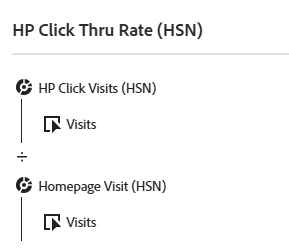
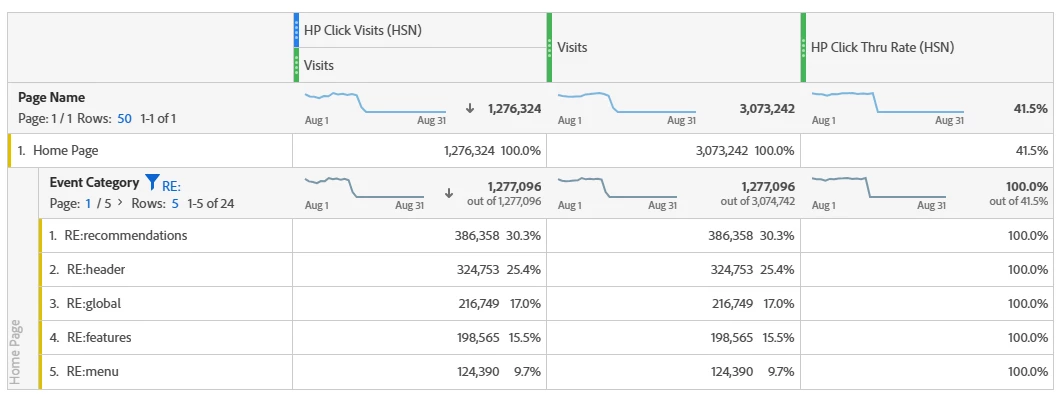
You'll notice that this works great at the Page Name level, but once you do a breakdown on specific link click values, the segmented click visits and the visits become the same.


Is there a way to lock the reference on the breakdown to the total?


So instead of recommendations being 386K click visits / 386K visits and thus always 100%, that it retains the total amount so the calculation would be 386K click visits / 3.0M home page visits.


This post is no longer active and is closed to new replies. Need help? Start a new post to ask your question.
Best answer by Jennifer_Dungan

Thanks for your response. That's what I suspected, but wanted to verify before I gave up too easily.


Oh, I think I found a way... 


I did a proxy in my own data looking at my home page, and menu clicks.


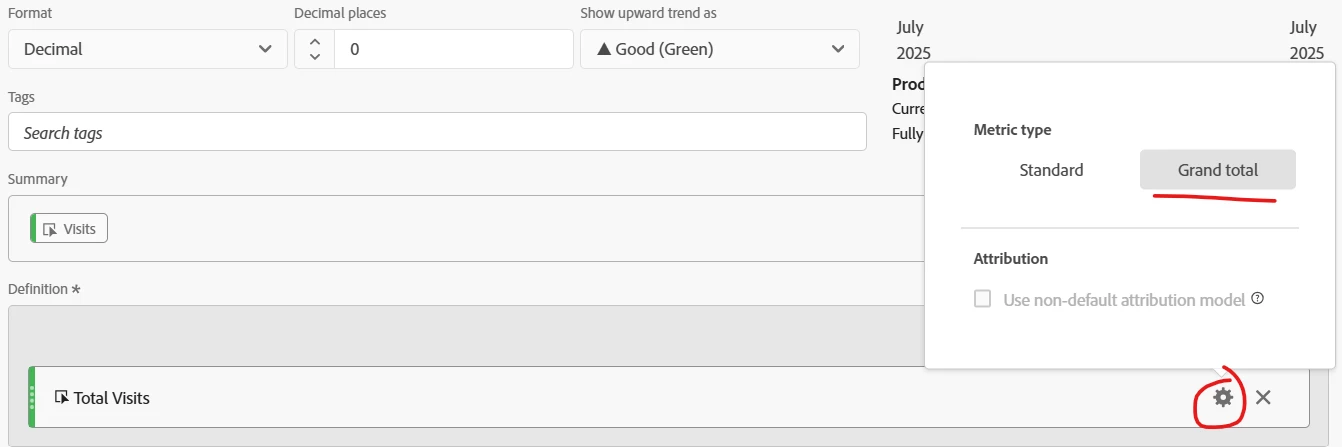
If you create a custom metric for Visits, where you set it to Grand Total:


This will get you the total Visits... I wasn't sure if this would take the grand total of all pages, but it actually does appear to be constrained by "Home Page"


You should be able to do the math based on that


2 replies

EurosIMS
Level 3
August 13, 2025

Hi @jaygr,

The value next to the Visits is the percentage of sessions (visits) where that item existed on the Homepage. If you click the cog for the metric, & remove the 'Numbers' you'll be left with % value. As far as I can see, that might be all you need?


Based on some numbers I ran, that should match up & give you the correct value? You should even be able to create a metric that's just visits, then re-name it for your report to 'Click-Through Rate'.


JayGr
JayGrAuthor
Level 3
August 13, 2025

As you can see from my chart, the values are identical in both of the first two columns so changing the presentation of the columns won't affect the calculation in the third column. For my third column calculation to work, I essentially need to know the # of times each item was clicked (column 1 row level) divided by total visits to the page (column 2 total level). So basically the second column needs to be the total 3M all the way down.


Jennifer_Dungan
Community Advisor and Adobe Champion
August 13, 2025

What is the definition of your segments... I suspect you have a scope issue.


You said:


HP Click Visits defined as a visit with an event category prefix of RE:

If your segment is "visit" scoped, that will be your problem.


Honestly, I don't even think that using the Visit metric here makes sense... if you are trying to get a Click Through Rate, that should all be based on Hits... 


HP "RE" Clicks / HP Page Views


If you are pulling Visit based for you calculations you are really messing up your numbers and your rate.


Starting with the HP... using Visits to the page will make your divisor smaller than it should be.... Users could be hitting the HP once, twice, 20 times, etc during a visit... using "VISITS" will reduce this count to 1... already this is cause for concern on the impact to a CTR.


Next, the bigger issue... if your segment is VISIT scoped, this will return every hit in the visit where the user clicked on any of the links... many of these clicks will be in the same visit, and thus the value will include more than just the hits you are looking for... 


So now you have an inflated numerator, and a reduced denominator...  this won't result in any sort of realistic number.


I am guessing your segment looks something like:


VISIT

      Event Category contains RE:


You can't have a click on a HP link (RE:) without also having a visit to the HP... so, those numbers will always match.... 

JayGr
JayGrAuthor
Level 3
August 13, 2025

Hi Jennifer,


Yes I totally understand that this is a click visit (and not a distinct click). 


I also recognize that I can't have a click on the HP link without visiting the HP.


But you can have a visit to the HP without a click on the HP, thus why this visit-level click thru rate works on the page name dimension, but falls apart once you get to the breakdown by specific categories.


I was just trying to understand if there was any way to update the click thru rate calculation so that the context for the denominator (home page visits) stays locked at the total page level's visits and not the visits where the breakdown category occurred.


Of course I could create a hundred calculations with the numerator being a specific category and the denominator being the total and then I would get the right result, but...  


Jennifer_Dungan
Community Advisor and Adobe Champion
August 13, 2025

You are right, you can have a visit to your HP without having a click... but then you can't use those click categories as a breakdown, as they will only show the visits to the HP where there was also a click on that category.


And no, there is no way to "lock" the value to the total HP Visits inside that breakdown.. the whole point of a breakdown is to show you the relevant content based on the value...


If you want to do something like that, then you would be better off taking the data out of Adobe... like using Report Builder to get the total Visits to your HP (first request), then pulling in your Category Clicks by Visits... and use Excel to take the breakdown data, make all rows show the total HP Visits, then do the math in Excel....