Classification Rule Builder - Matching Specific Values in a sub-string | Community
Skip to main content
New Member
March 19, 2025
Solved

Classification Rule Builder - Matching Specific Values in a sub-string

  • March 19, 2025
  • 3 replies
  • 748 views

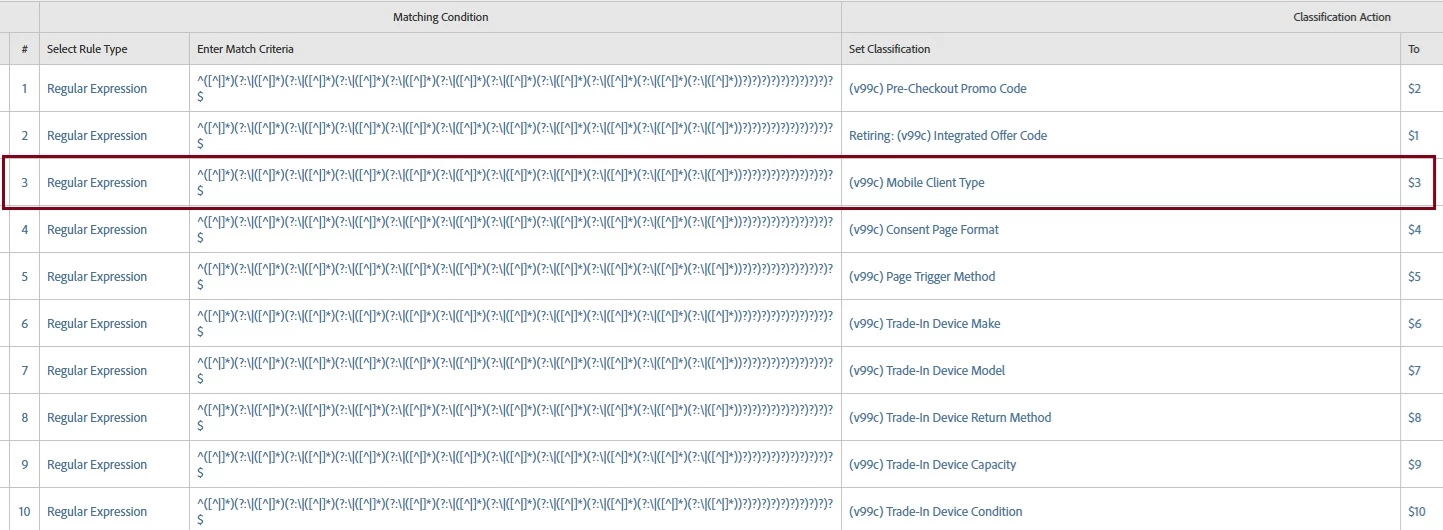
In order to optimize the use of our evars and props, we use pipe-delimiters to string together values and then use the Classification Rule Builder to parse them out into classifications for reporting.  For example, eVar99 might be mapped to 'abc123||1|consent|trigger||||||'. The classification rules below would break those out into our classifications that are named like '(v99c) Mobile Client Type', etc.  


In most cases, we just parse out the value that is mapped and that's all we need to do. However, in this case, on rule 3, we want to say "if positions 3 = 1 then (v99c) Mobile Client Type = 'Native'. Otherwise it equals 'Not Native', while leaving the remaining rules in place.


Does anyone know how to do this? Thanks in advance.
 

This post is no longer active and is closed to new replies. Need help? Start a new post to ask your question.
Best answer by Josh Stephens

Hi @kim_reynolds - I tried this in a sandbox and it worked. 

Set the top rule to RegExp ^[^\|]*\|[^\|]*\|([1])\| v99 as set classification and "Native" (if the 3rd element contains only 1, then it's true and Native will be set)

Set the next rule to RexExp ^[^\|]*\|[^\|]*\|([^1]) v99 as set classification and "Non-Native" (if the 3rd element contains anything other than 1, then it's true and Non-Native will be set

If you need to test or update the logic for the 2nd rule, see this link for regex101.com.


3 replies

bjoern__koth
Community Advisor and Adobe Champion
March 19, 2025

Phew, regexes will never be fun to look at!


Well, since javascript regexes don't support if/else conditions, maybe this post is helpful https://stackoverflow.com/questions/32852857/javascript-conditional-regular-expression-if-then-else


Stupid question: have you talked to a dev to fix this on the website / data layer? Seems to be the easier approach than introducing conditions into regexes.


Cheers from Switzerland!
New Member
March 19, 2025

Thank you, Bjoern! I'll take a look at that post. I wondered about whether I'd be able to do what I wanted. I can go get the value changed. I was hoping I could get around it for the sake of history.

Cheers from Southern USA!

Josh Stephens
Community Advisor
Josh StephensCommunity AdvisorAccepted solution
Community Advisor
March 25, 2025

Hi @kim_reynolds - I tried this in a sandbox and it worked. 

Set the top rule to RegExp ^[^\|]*\|[^\|]*\|([1])\| v99 as set classification and "Native" (if the 3rd element contains only 1, then it's true and Native will be set)

Set the next rule to RexExp ^[^\|]*\|[^\|]*\|([^1]) v99 as set classification and "Non-Native" (if the 3rd element contains anything other than 1, then it's true and Non-Native will be set

If you need to test or update the logic for the 2nd rule, see this link for regex101.com.


Sukrity_Wadhwa
Community Manager
Community Manager
April 2, 2025

Hi @kim_reynolds,

Were you able to resolve this query with the help of the provided solutions, or do you still need further assistance? Please let us know. If any of the answers were helpful in moving you closer to a resolution, even partially, we encourage you to mark the one that helped the most as the 'Correct Reply.'
Thank you!

Sukrity Wadhwa
