CJA - Limiting Freeform Table to X Number of Items | Community
Skip to main content
Level 2
September 30, 2025
Solved

CJA - Limiting Freeform Table to X Number of Items

  • September 30, 2025
  • 1 reply
  • 367 views

Hello, is there a way to limit a freeform table such that only the first 10 (or 25, or 50--basically, any number you define) shows? I'm not talking about clicking on the number that controls the number of rows shown. Is there any sort of filter I can create such that *only* the top 10 ranked results of a given dimension are displayed? And no...I do not want to manually filter the top items I'd like to display since this dimension changes a lot from day-to-day.


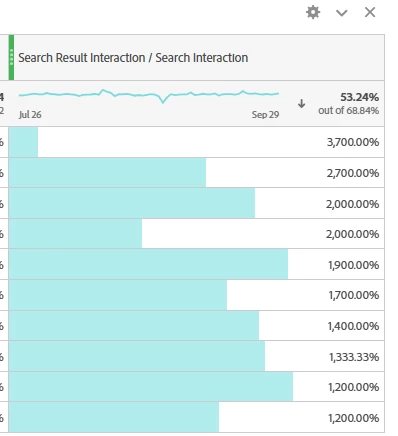
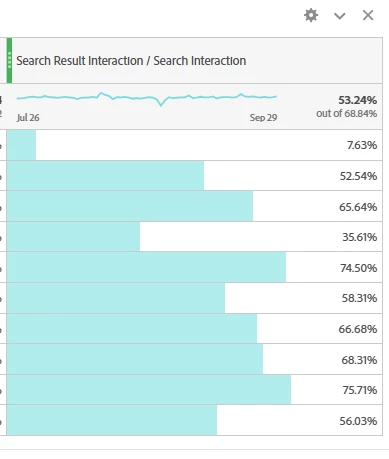
I ask because I want to create a horizontal bar chart where the metrics for the Top 10 are listed in descending order. But when I sort the metric by highest to lowest, it returns the last item (the table has 150K+ rows).


The first screenshot shows what I want to include in the bar chart, but in descending order. The second screenshot show what happens when I sort by descending order. 
Best answer by Jennifer_Dungan

There is no true filter... I have an idea posted for AA (https://experienceleaguecommunities.adobe.com/t5/adobe-analytics-ideas/add-the-ability-to-filter-freeform-table-rows-dynamically-based/idi-p/615677)


That said, there are ways to use Calculated Metrics to do some filtering, based on the value... but there are two drawbacks in your situation... 

1. You can't specify the number of rows, it would be based on values only (metric greater than X)

2. The totals will be messed up... but if you care more about showing the top items, you can always hide the totals


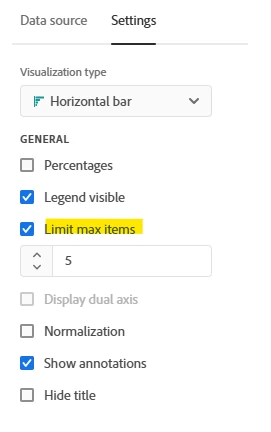
Can I ask why you aren't just using a true Horizontal Bar Chart for this, and limiting the Max Items?


This might be your best option for now... 


1 reply

Jennifer_Dungan
Community Advisor and Adobe Champion
Jennifer_DunganCommunity Advisor and Adobe ChampionAccepted solution
Community Advisor and Adobe Champion
September 30, 2025

There is no true filter... I have an idea posted for AA (https://experienceleaguecommunities.adobe.com/t5/adobe-analytics-ideas/add-the-ability-to-filter-freeform-table-rows-dynamically-based/idi-p/615677)


That said, there are ways to use Calculated Metrics to do some filtering, based on the value... but there are two drawbacks in your situation... 

1. You can't specify the number of rows, it would be based on values only (metric greater than X)

2. The totals will be messed up... but if you care more about showing the top items, you can always hide the totals


Can I ask why you aren't just using a true Horizontal Bar Chart for this, and limiting the Max Items?


This might be your best option for now...