Build a segment to find visits where a link was not clicked and two pages were viewed. | Community
Skip to main content
Level 2
February 28, 2024
Solved

Build a segment to find visits where a link was not clicked and two pages were viewed.

  • February 28, 2024
  • 1 reply
  • 1051 views

Hello, new to adobe! Appreciate the help.

I'd like to build a segment that finds visits where: (1) a link was NOT clicked and (2) there was a page view to 1 of 2 pages.


So far I've created a segment that looks like the below, but its not returning any results. I know there should be results included.


Main Container: Visit

> Sub Container: Visit > link tracking 'does not contain' link name

AND

> Sub Container: Visit > Page Name 'equals' Page Name 1 OR Page Name 'equals' Page Name 2


Has anyone ran into this before? Thanks!

This post is no longer active and is closed to new replies. Need help? Start a new post to ask your question.
Best answer by MandyGeorge

Segments get a bit interesting when you're trying to exclude stuff. There are two ways of doing this - using "does not contain/equal" or creating an "excludes" container.

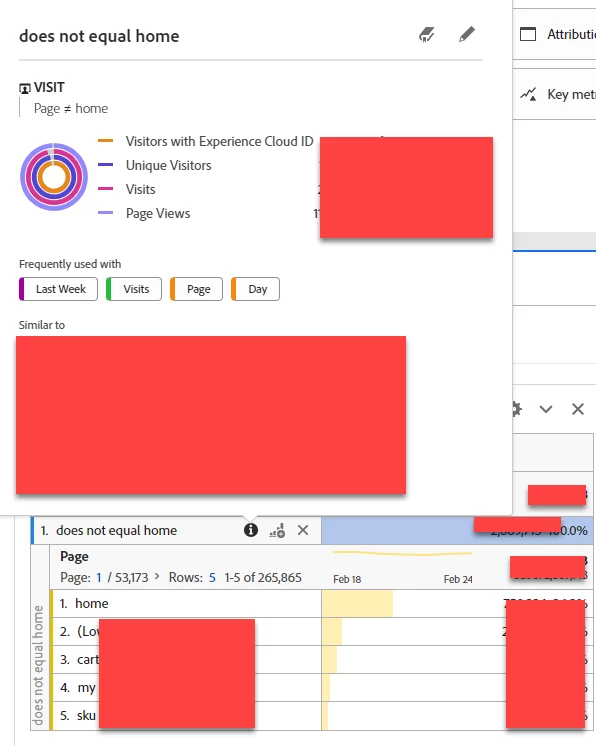
What you're doing right now is the first one, using does not contain. Stuff like this works better at a hit level than at a visit level. Basically, this segment is saying "show me a visit where there is a hit that does not contain the link name". So if someone has two hits in their visit, one with the link name and one without the link name, because there is one hit that matches the criteria it includes it. But there is also a hit that doesn't meet the criteria. I created a sample segment to demonstrate. For mine I just used a basic "page doesn't equal home". But when I put that in my table against visits and break it down by page, there are still home page views appearing. Basically, the way segments work is, if it meets the conditions specified, it returns all the information at that level. This segment is saying there is a page that doesn't equal home. Then you return the entire visit. And if they say a home page and a not-home page, it will return all the pages in the visit, including the home ones.


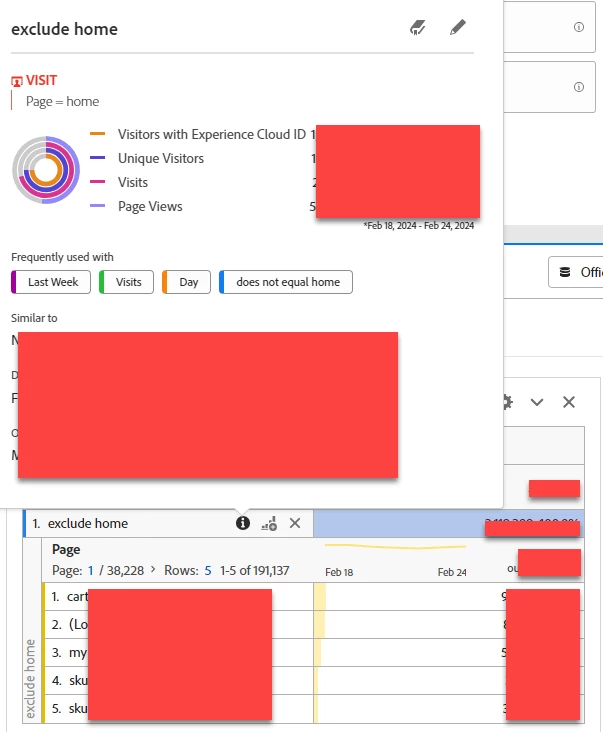
What you want to do instead is use an "exclude". Change "does not contain" to "contains", and then click the settings gear at the right hand side and select "exclude". You should see a red line on the left side of that sub-container. This basically says, if the condition is met, exclude all of this information. You want it to be at a visit level. So "exclude visit where link tracking contains link name". And you can see in my sample table, there are now no home page visits at all. 


1 reply

MandyGeorge
Community Advisor and Adobe Champion
MandyGeorgeCommunity Advisor and Adobe ChampionAccepted solution
Community Advisor and Adobe Champion
February 28, 2024

Segments get a bit interesting when you're trying to exclude stuff. There are two ways of doing this - using "does not contain/equal" or creating an "excludes" container.

What you're doing right now is the first one, using does not contain. Stuff like this works better at a hit level than at a visit level. Basically, this segment is saying "show me a visit where there is a hit that does not contain the link name". So if someone has two hits in their visit, one with the link name and one without the link name, because there is one hit that matches the criteria it includes it. But there is also a hit that doesn't meet the criteria. I created a sample segment to demonstrate. For mine I just used a basic "page doesn't equal home". But when I put that in my table against visits and break it down by page, there are still home page views appearing. Basically, the way segments work is, if it meets the conditions specified, it returns all the information at that level. This segment is saying there is a page that doesn't equal home. Then you return the entire visit. And if they say a home page and a not-home page, it will return all the pages in the visit, including the home ones.


What you want to do instead is use an "exclude". Change "does not contain" to "contains", and then click the settings gear at the right hand side and select "exclude". You should see a red line on the left side of that sub-container. This basically says, if the condition is met, exclude all of this information. You want it to be at a visit level. So "exclude visit where link tracking contains link name". And you can see in my sample table, there are now no home page visits at all. 


NikesterAuthor
Level 2
February 28, 2024

Thank you! This worked! I really appreciate you walking me through that and the example. I can now finish the report I was working on for my business partners AND I learned more about the segment builder.


I'm sending you all of the good internet karma I've got!