
Block unwanted, unidentified automatic internal traffic (probably load testing) | Community
Skip to main content
bjoern__koth
Community Advisor and Adobe Champion
June 12, 2024
Solved

Block unwanted, unidentified automatic internal traffic (probably load testing)

  • June 12, 2024
  • 2 replies
  • 1128 views

Hi champs,

one of my clients is experiencing a high load of automatic traffic on their non-prod environment / report suite which we cannot put a finger on it where it is coming from. i.e., it is seemingly not coming from the standard page tracking and does not have any props/evars set. Not sure whether this is even being sent through our WebSDK at all.


The "Browser" dimension is set to "None" which I assume is coming from Adobe Analytics? 


The only indicator we see on this traffic is a pageName/Page that is set to "Other".
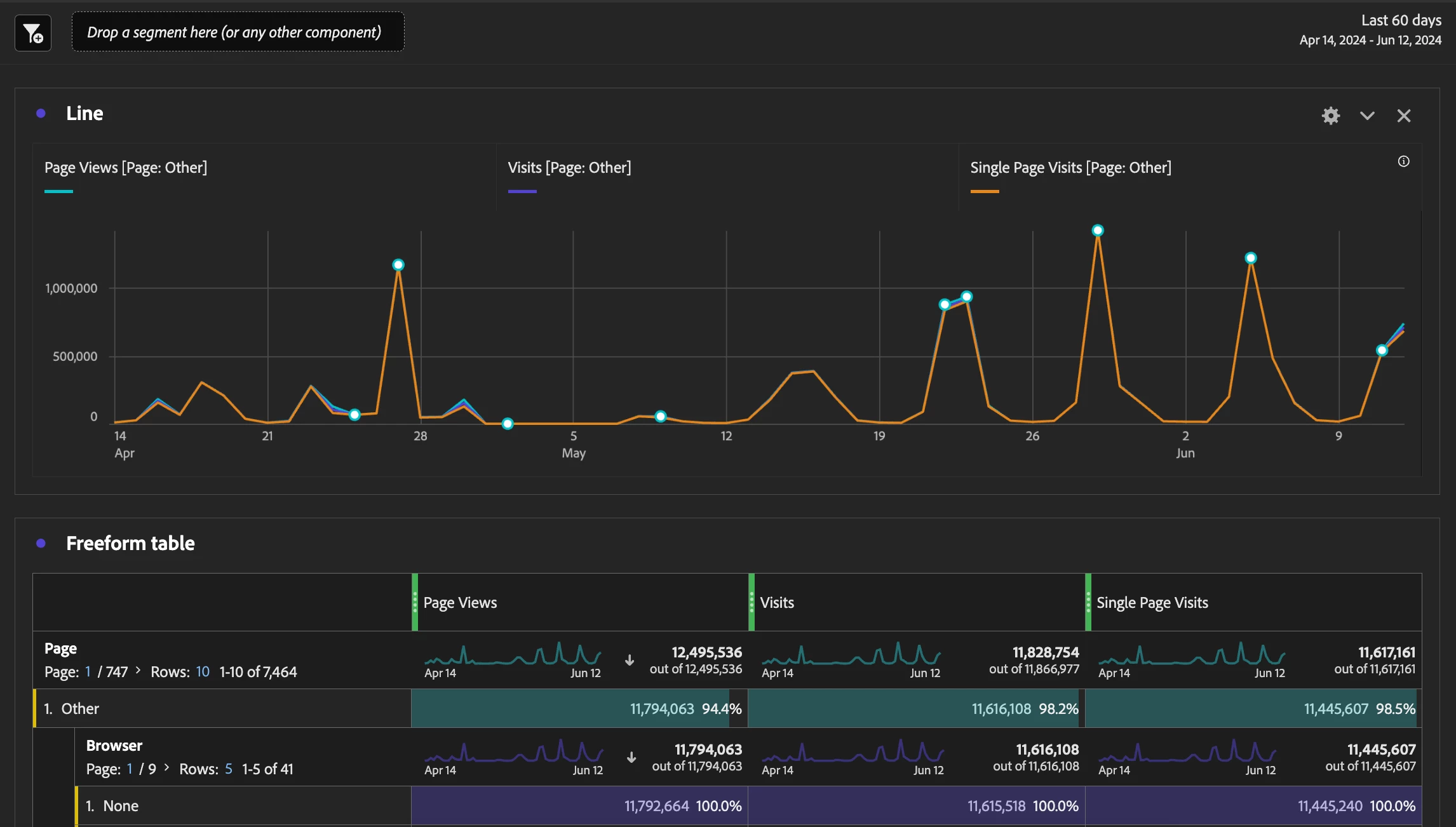


Now the question: any ideas how to abort/block this traffic before it hits the report suite?

  • WebSDK: to be checked, I will see if I can just for fun add a abort condition in the "on before event send" callback. Yet again, I am not even sure whether this traffic is coming through the website at all.
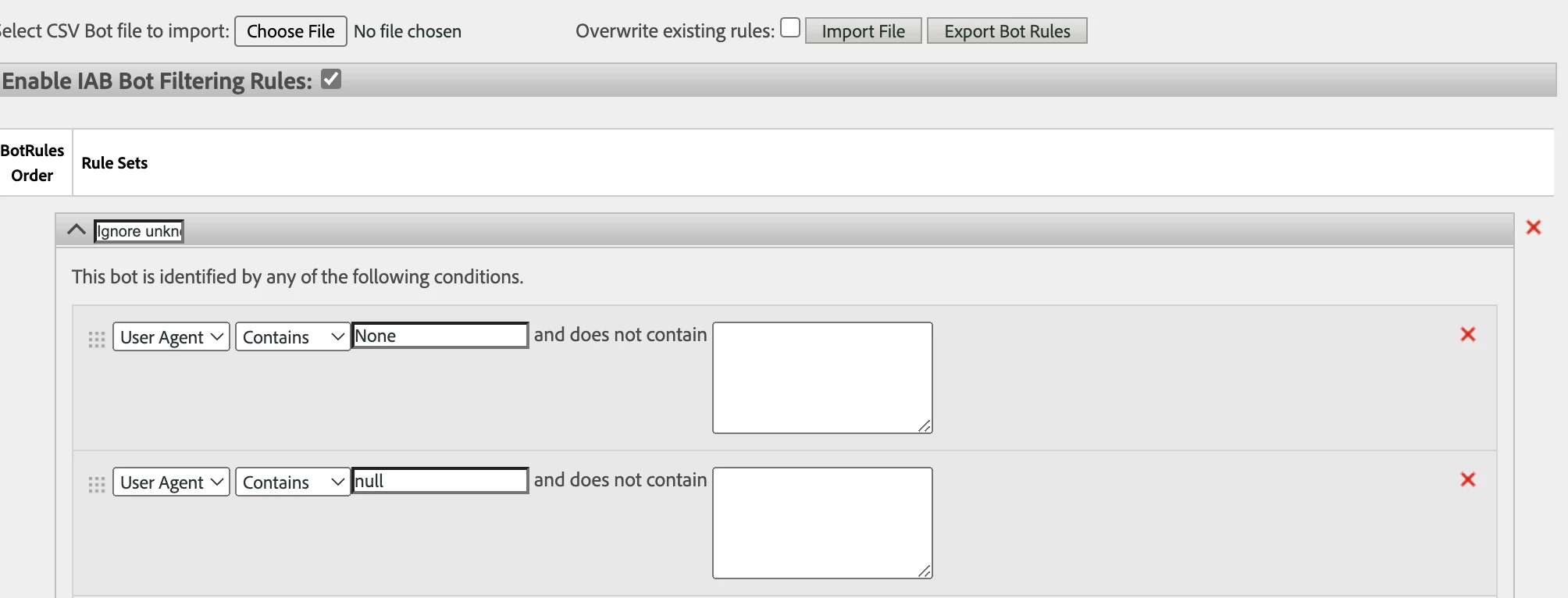
  • Bot rules: would it work to just block "None" or is this value set after the Bot rules are applied?
  • Processing Rules: is there any way to ABORT/drop a request when it is coming through the processing rules and a dimension is set? Like "pageName" equals "Other"

But yeah, any other ideas from your end are highly appreciated!


[UPDATE]


could narrow the traffic down by breaking it down by domain. It is a pattern that happens every 6h, with the same domains involved to almost exactly the same percentage
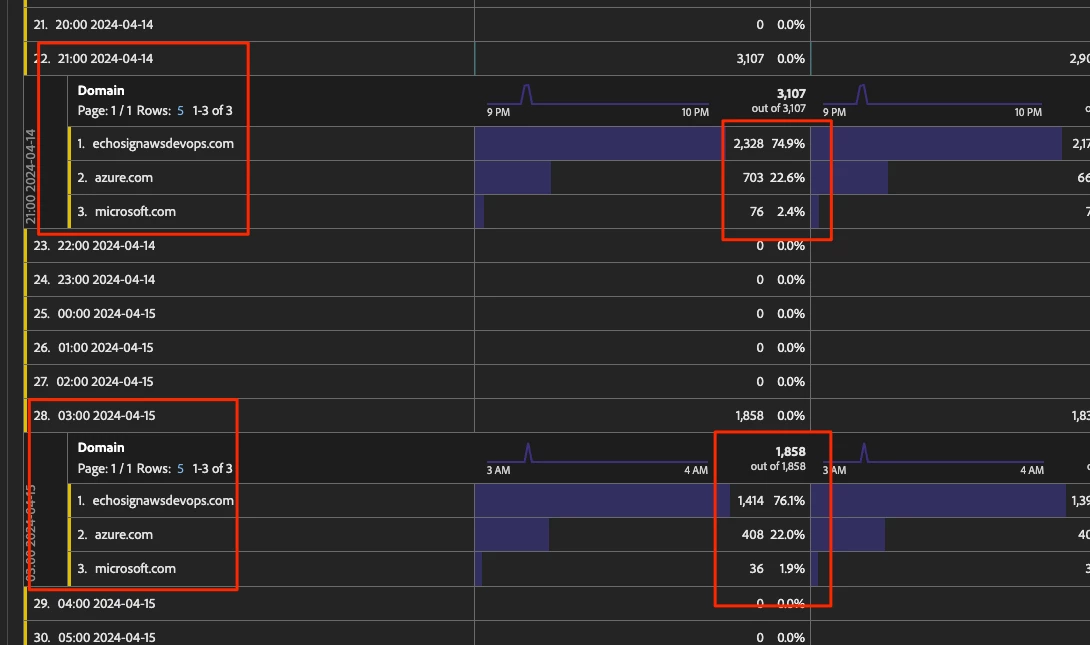
  1. echosignawsdevops.com ~75%
  2. azure.com ~22.5%
  3. microsoft.com ~2.5%


Also found this documentation stating on "Other"
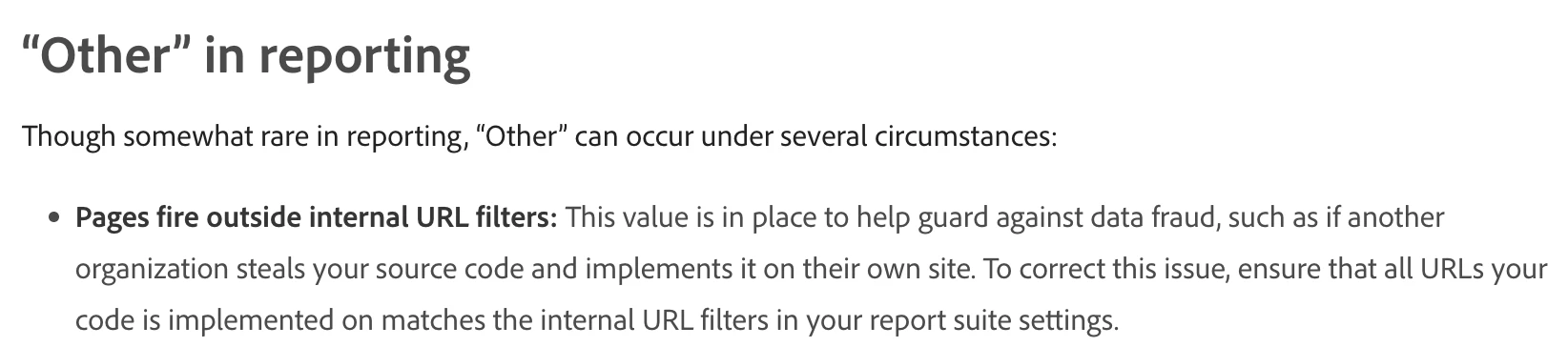
 

So, this would make sense in combination with the Browser set to "None", when there is a request towards the Adobe backend being made as a e.g., cURL on a console without user agent, directly hitting the Adobe servers without opening the actual website that should send the request.


Now how to get rid of them is the question.

Will try to tweak the Bot rules and see whether this makes a difference.


To be continued.


Cheers

This post is no longer active and is closed to new replies. Need help? Start a new post to ask your question.
Best answer by bjoern__koth

[UPDATE] With help of Adobe support, we figured out that my client's new marketing automation implementation is using the Bulk Data Insertion API to send vast masses of data, setting the wrong fields, and hence creating these numbers of visits, unique visitors and single page visits.


Closing this one and will have to sit down with somebody to talk about why and how we can fix this mess.

2 replies

Jennifer_Dungan
Community Advisor and Adobe Champion
June 12, 2024

Looks like you might be on your way to a solution... while you can create a segment to "clean up" this data after the fact, excluding it as a bot is a really good idea...


You may need to track the User Agent string to see if the rules that you have put into place are accurately addressing the issue... (you can do this via a processing rule, to set the User Agent into an eVar)... or you can explore your Raw Data feeds which should have the user agent available as well.


Good Luck!

bjoern__koth
Community Advisor and Adobe Champion
June 13, 2024

Hey @jennifer_dungan 

no success with the user agent. As mentioned, I do not think the requests are coming through the actual website, at least not through any of the known tracking APIs.

The bot adaptations have not yet shown any effect yet. Will check with support as well.


It goest up to 600k requests in a single hour. Insane. I would love to know who's generating these requests to yell at them 😄  


UPDATE: added "echosignawsdevops.com" to the Internal URL Filters of the non-prod report suite. Maybe this gives us more context.

Cheers from Switzerland!
bjoern__koth
Community Advisor and Adobe Champion
bjoern__kothCommunity Advisor and Adobe ChampionAuthorAccepted solution
Community Advisor and Adobe Champion
June 13, 2024

[UPDATE] With help of Adobe support, we figured out that my client's new marketing automation implementation is using the Bulk Data Insertion API to send vast masses of data, setting the wrong fields, and hence creating these numbers of visits, unique visitors and single page visits.


Closing this one and will have to sit down with somebody to talk about why and how we can fix this mess.

Cheers from Switzerland!
Jennifer_Dungan
Community Advisor and Adobe Champion
June 13, 2024

Ouch, glad you figured that one out... I was going to suggest exporting a day's worth of data using Data Feeds and reviewing it manually.. there's a lot of "deep" data you can see there that you can't see any other place.


For now, you might want to create a segment to apply to your reports to clean them until you get that mess resolved....