Average Time on Site | Community
Skip to main content
skatofiabah
January 29, 2025
Solved

Average Time on Site

  • January 29, 2025
  • 1 reply
  • 2369 views

Hi,


How do I look at for a given page (for both visits to it and strictly visits where an entry happened to it) how do I look at the Average Time on Site for each page (both visits to them total and separately look at only entries to those pages for the time on site (Whole visit)?


Thanks!

Best answer by kayawalton

Hi @kayawalton,


I have to have them as a segment to get it at the visit level and also because I have multiple old and new urls that count as the same page, so I can't use just the dimension prop or evar item. In that case, which is the one I should use? Both given completely different values and I don't understand the difference. Time Spent per Visit (Seconds) seems incredibly higher compared to Average Time Spent on Site (Seconds).

cc @jennifer_dungan 


Got it. So let me walk back a couple of things I've said (I love time metrics in Adobe Analytics, but sometimes they require a bit of thought process):

I would use Time Spent per Visit on your table. It captures most of the session duration because it calculates the difference between the timestamp of the visit's first hit and the timestamp of the visit's last hit (Total seconds spent) AND divides the total time by the number of visits (minus bounces) that apply to that segment. 

The Average Time on Site is a bit of a misnomer because it uses unbroken sequences as the denominator. Depending on your visitor flow, there could be more than one sequences triggered by the dimensions in your segment during one visit, which is why the Average Time on Site is lower than Time Spent per Visit. 

Adobe considers these two metrics similar, but I think their intended use is very different. Time Spent per Visit is meant to look at complete sessions (like in your case), while Average Time on Site is more for when you are looking for more granular time data (such as specific times spent on a particular page or dimension).

Phew, hope that clarifies the difference!

1 reply

kayawalton
Community Advisor and Adobe Champion
January 29, 2025

Hi @skatofiabah --

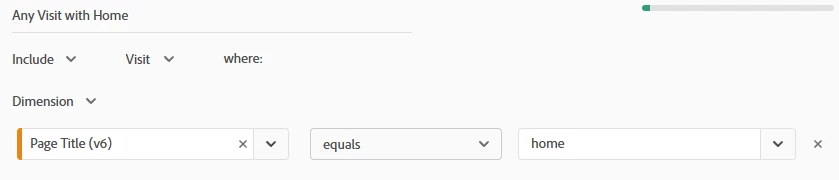
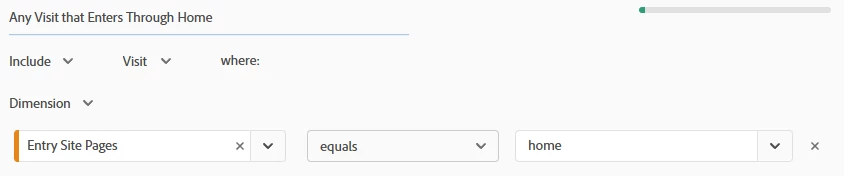
If I understand your question correctly, you are looking for the Average Time on Site for any visit that touches a particular page (let's call it "home") and the Average Time on Site for any visit the entered through the same page. 

You will have to create two segments. The first one will be a visit-level segment that includes home. The second one will be another visit-level segment where the entry page is home.

Segment A:

Segment B:

I usually create a freeform table with a time dimension (such as Day, Week, Month; except for Minute and Hour) as rows and Average Time on Site as a column. If you want to compare, you can drop the segments under the Average Time on Site metric.

I do not recommend using these segments as dimensions/rows because that will calculate Average Time on Site as a function of any dimension you use within the segment. (It is how Adobe Analytics calculates time spent.) Applying these segments as dimensions will only calculate for the total time spent on home AND the number of unbroken sequences within that session as opposed to the entire session itself.

skatofiabah
January 29, 2025

Hi @kayawalton,


Wait. So I can't just put a visit and entry visit segment on dimensions/row and average time on site on column? How can I get that?

skatofiabah
January 29, 2025

Better yet, how can I get it so I have each segment as a different page (each row) and column to average time on site (or average session duration) for each page?