Attribution Issues in Marketing Channels | Community
Skip to main content
June 14, 2024
Question

Attribution Issues in Marketing Channels

  • June 14, 2024
  • 1 reply
  • 1350 views

Hello Adobe Community!

I've been trying to solve this issue for months since we switched from the old report suite to the new one.


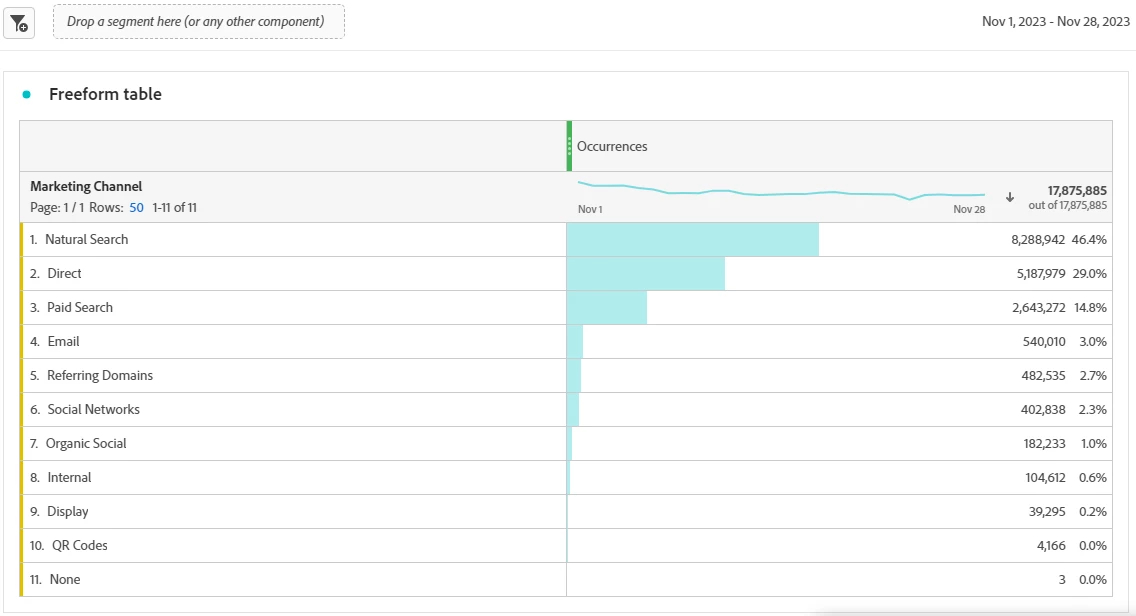
As you can see in the old report suit, this is the traffic we used to receive, with more specific channels like paid search, email or QR Codes.


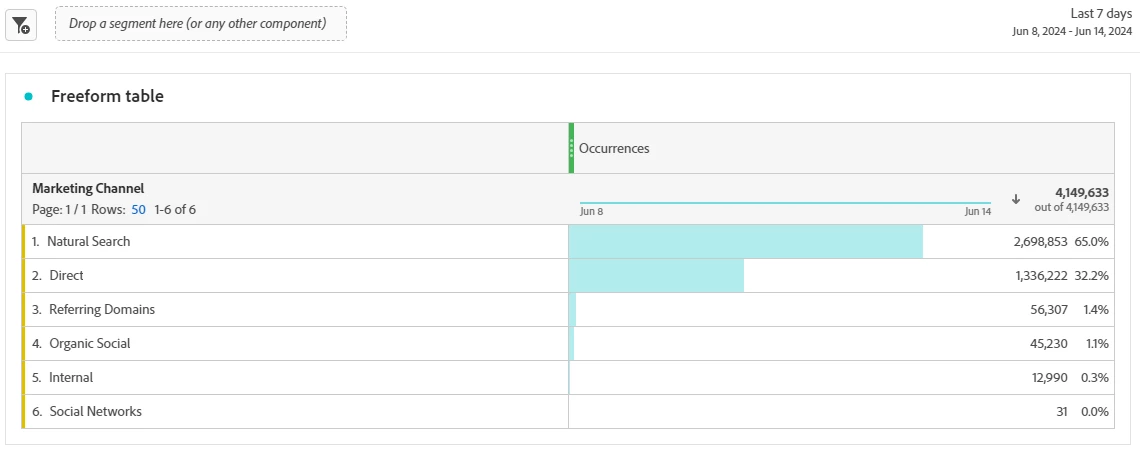
On the other hand, here is the new graph with the new report suite.


So, here is the order in which the marketing channels are configured:
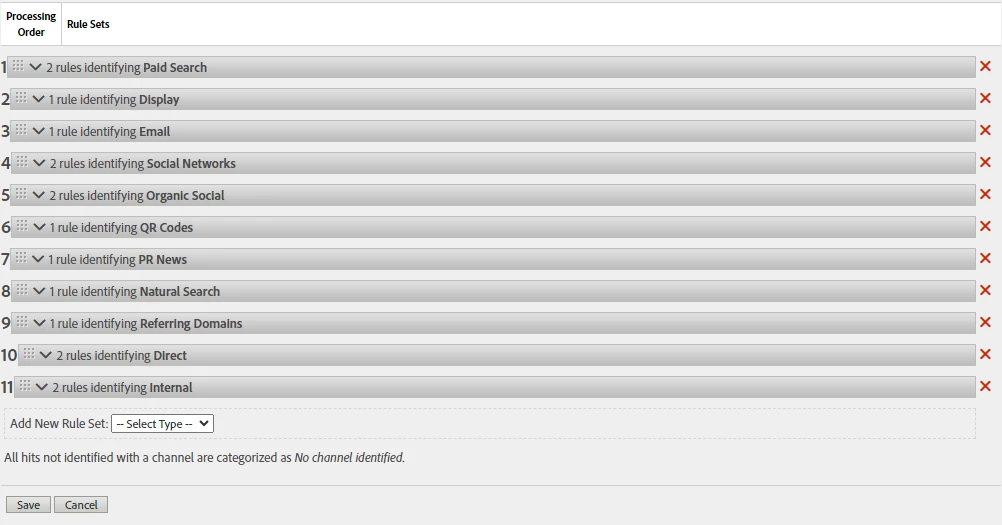

It's important to clarify that the same configuration we have in the old report suite is what we have in the new one we switched to.


finally, here are examples about how we used to configure some channels like paid search.
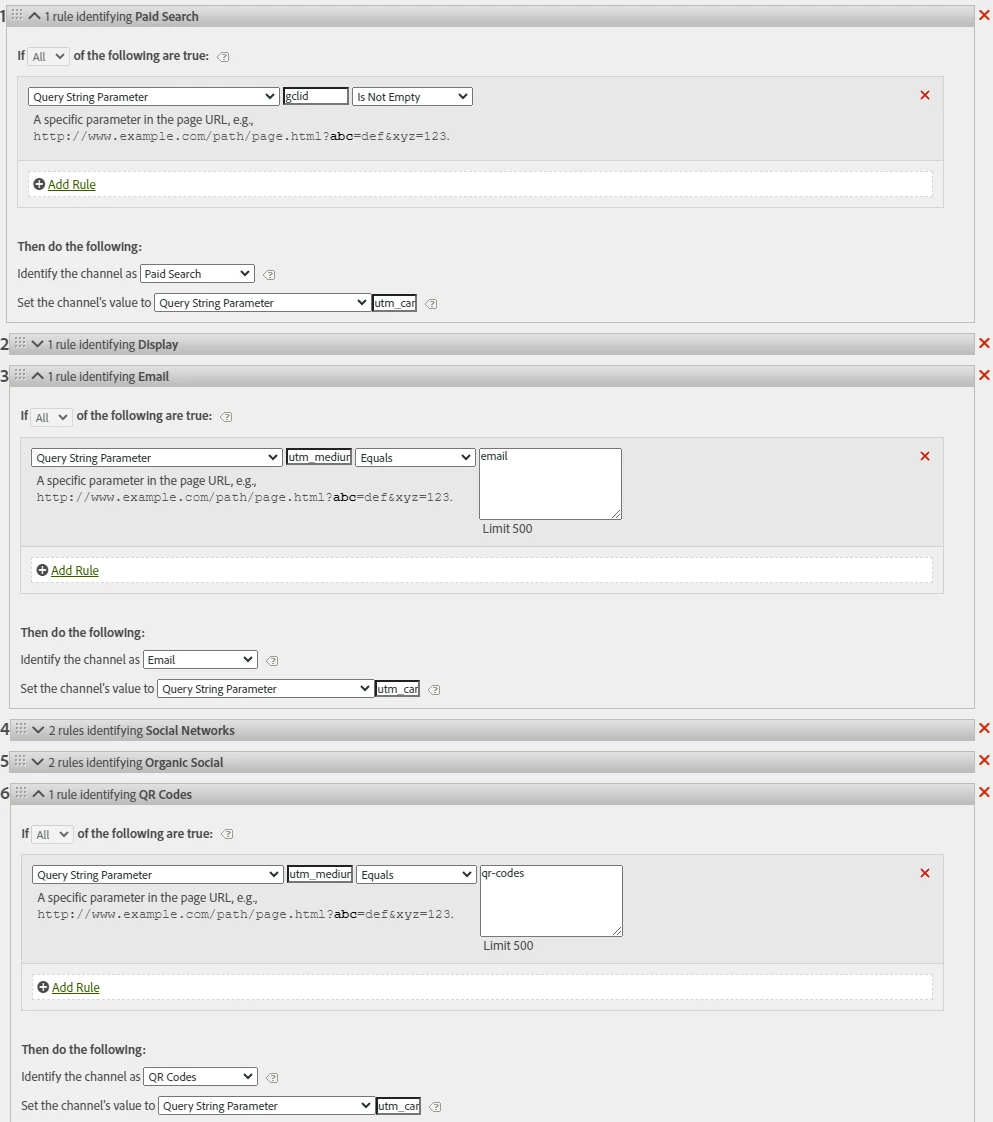


So my question is about whether you know of any generic filter that could potentially help me configure the channels (at least paid search, email, QR).

Is it possible that the campaigns we are trying to attribute do not match the filters and are attributed to more general channels like direct, internal, natural search, or referring domains?


What could be a good approach to solve this problem?


Do you think that monitoring campaigns being generated and filtering by their query parameters could be the key to assigning the channels?


This post is no longer active and is closed to new replies. Need help? Start a new post to ask your question.

1 reply

Jennifer_Dungan
Community Advisor and Adobe Champion
June 14, 2024

Hmm this may require some investigation... 


Have you tried looking at your Marketing Channels (using the Marketing Channel Instance as the metric to not let attribution get in the way), and break down the Channel by your Marketing Channel Detail.


Since you will be using the Marketing Channel Instance as the metric, you should be able to correlate other dimensions without as much worry about different attributions (the Instance should lock it down to just the hit where the Channel was set), so you can look at things like Referrer or Page, etc....


The more you can figure out what is happening can help determine how to fix it.... 

tomasha2Author
June 18, 2024

Thanks for the quick reply!

As you mentioned, I used to filter channels like paid search with "marketing channels detail." However, in my personal opinion, I don't consider that metric to provide any useful information. For example, in the case of natural search, it seems like the details are only search engines like Google, and it ends up being empty.


If we go into direct we get:

others:


Could there be any other metric that might give me more clarity about the attributed campaigns?

I somewhat support the theory that the campaigns have changed and are no longer being attributed as they used to be, which is why they are not being captured.


Jennifer_Dungan
Community Advisor and Adobe Champion
June 18, 2024

Your Marketing Channel Detail is configurable.. it would appear that what yours is configured to is not optimal.


For each rule, the Detail can be changed...


For instance, on items where my rule is based on campaign codes (we use UTMs, but this could apply to CID, or any customization), I will pass our Tracking Code as the detail:


In my case, I have my Paid Search Detection configured for specific query params (and then it's also limited to known Search Engines), then I set "Tracking Code" as my detail (Tracking Code is a concatenation of all our UTMs in a format that allows me to separate out by Regex Classifications)...  while this may seem like a duplication, this accounts for different attributions.


Here is another example using Paid Social:


However, for something like Natural Search, where there is no tracking code, I will set that to the "Search Engine", like so:


Basically, I make sure that I am using the best option for my Detail as possible. I then have Classifications on my Detail, that if Tracking Code is used, I can split the values to each individual UTM (but you don't have to go that far if you don't need it...).


As for the "Search Engine" details you currently have ("n:Google:::empty::"), this is a result of using "Search Engine + Search Keyword(s)":


But Search Engines stopped sending Keywords as part of the referrer back in 2013.... so even when I am doing Organic Search, I don't use that option, since you are correct... it's not helpful... not anymore.


Now, in your case, since making changes right now won't help you investigate the current issues, this is why I was suggesting the use of the Marketing Channel Instance as your metric... this will only show you the hits where the channel is set, not the 7 day / 30 day / whatever attribution period you have set, which will make diagnosing the issue easier.


Just to put this into perspective, here is an example of visits (assuming default Marketing Channel of 30 days and Tracking Code of 7)


Visit 1 (Paid Social Media)

  • Page 1
    • Marketing Channel set to "Paid Social Media"
    • Marketing Channel Detail set to "X"
    • Instance of Marketing Channel triggered (since the values are set)
    • Tracking Code set to "X"
    • Instance of Tracking Code triggered (since the values are set)
  • Page 2
    • Marketing Channel remains "Paid Social Media" (due to 30 day attribution)
    • Marketing Channel Detail remains "X" (due to 30 day attribution)
    • Instance of Marketing Channel not triggered (since the values are not explicitly set)
    • Tracking Code remains "X" (due to 7 day attribution)
    • Instance of Tracking Code not triggered (since the values are not explicitly set)
  • Page 3
    • Marketing Channel remains "Paid Social Media" (due to 30 day attribution)
    • Marketing Channel Detail remains "X" (due to 30 day attribution)
    • Instance of Marketing Channel not triggered (since the values are not explicitly set)
    • Tracking Code remains "X" (due to 7 day attribution)
    • Instance of Tracking Code not triggered (since the values are not explicitly set)


Visit 2 (Direct) - 5 Days after Visit 1

  • Page 4
    • Marketing Channel remains "Paid Social Media" (due to 30 day attribution, and Direct does not overwrite existing Channels)
    • Marketing Channel Detail remains "X" (due to 30 day attribution)
    • Instance of Marketing Channel not triggered (since the values are not explicitly set)
    • Tracking Code remains "X" (due to 7 day attribution)
    • Instance of Tracking Code not triggered (since the values are not explicitly set)
  • Page 5
    • Marketing Channel remains "Paid Social Media" (due to 30 day attribution)
    • Marketing Channel Detail remains "X" (due to 30 day attribution)
    • Instance of Marketing Channel not triggered (since the values are not explicitly set)
    • Tracking Code remains "X" (due to 7 day attribution)
    • Instance of Tracking Code not triggered (since the values are not explicitly set)


Visit 3 (Direct) - 18 Days after Visit 1

  • Page 6
    • Marketing Channel remains "Paid Social Media" (due to 30 day attribution, and Direct does not overwrite existing Channels)
    • Marketing Channel Detail remains "X" (due to 30 day attribution)
    • Instance of Marketing Channel not triggered (since the values are not explicitly set)
    • Tracking Code set to nothing "" (7 day attribution has passed)
    • Instance of Tracking Code not triggered (since the values are not explicitly set)


Now, if you were to look occurrences, all 6 of those pages will come up under "Paid Social Media", but you will have a mix of Tracking Code "X" and "" (nothing) due to the Tracking Code expiring before the Marketing Channel detail...


But if you use "Marketing Channel Instance" as your metric, you will only get Page 1 back, allowing you to do a lot of correlation into other dimensions you might be capturing like Full URL, or Referrer, etc... isolating the exact pages where the Marketing Channel is set.


I hope that helps.