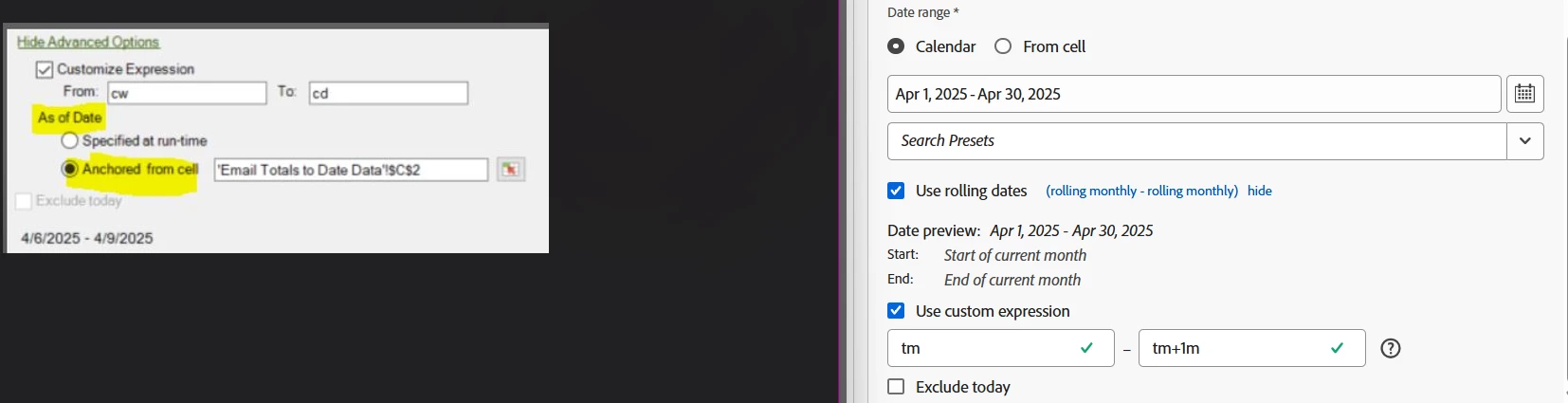
"As of date" anchored from cell in new version of Report Builder
- April 10, 2025
- 2 replies
- 556 views
I was attempting to update my legacy Report Builder workbooks to the newer version of Report Builder. However, I've come across what I think is a huge miss in functionality with the new version that would prevent me from being able to use it, and I'm wondering if it's an actual miss on Adobe, or just user error on my part.
The functionality miss that I think exists and am wondering if there's a work around for is being able to anchor the "as of date" to a cell (see screenshot for the option I'm referencing from the legacy report builder). My reports are scheduled to send early in the morning, with reporting through previous day. Our Adobe instance is set up to use our fiscal calendar, and I use fiscal dates for reporting. The issue I have would be when the report is run on day that's the first day of a new fiscal period because I would want this report to actually run the data for the fiscal period that just ended. For example, our weeks start on Sunday. When the report is run on Sunday, I want my WTD reporting to be for the previous Sunday-Saturday. With new report builder, if I just have my weekly data requests set to be current week-current day, the Sunday sends of the report would just show partial data for the current day instead of showing the full previous week. With legacy report builder, I use a cell with a date formula of today-1 and use that as my anchor. So, with legacy report builder referencing that cell as the current day instead of using the day of when the report is running, when the report runs on Sundays, it thinks the current day is actually the previous day, Saturday. So then, a current week-current day setup would result in the previous Sunday-Saturday when the report is ran on Sundays. Is there a way to do this with the new version of Report Builder?