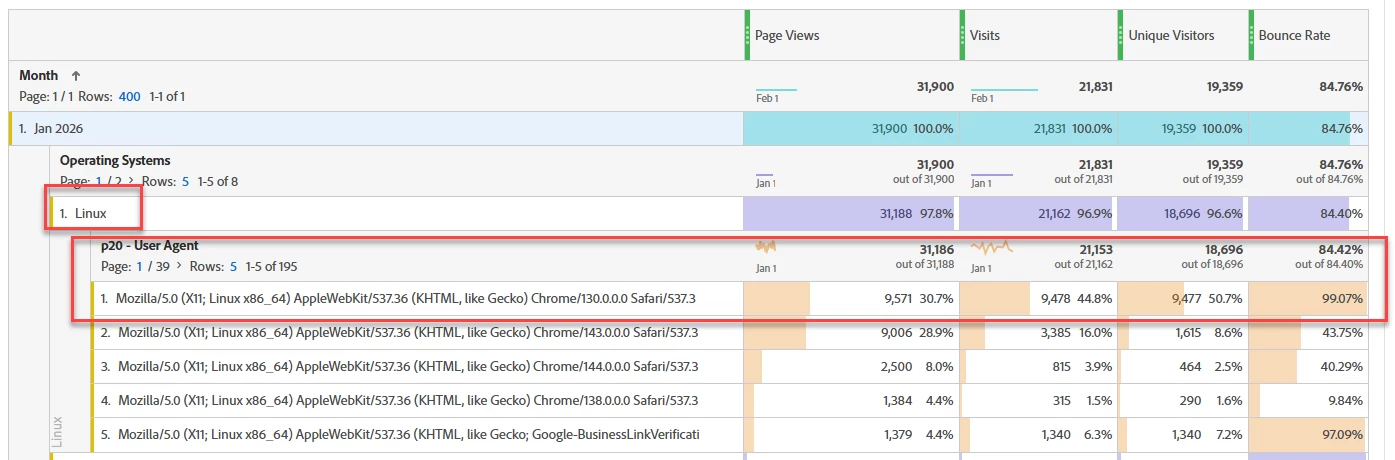
I made a report in Workspace and noticed hits from Linux. I broke it down by User Agent and most of the traffic were from Mozilla/5.0 (X11; Linux x86_64) AppleWebKit/537.36 (KHTML, like Gecko) Chrome/130.0.0.0 Safari/537.3. It’s also interesting that the Bounce Rate from these visits are very high, 99%. Are these from bots? If so, is the best way to handle it by making a Processing Rule (in Admin)?
Best answer by Jennifer_Dungan
It can be hard to tell from the User Agent alone….
Those are Linux running various versions of Chrome (the one you mentioned specifically is Chrome 130) which is older, but not so old that it raises immediate flags… this might be coming from an IT controlled computer that doesn’t allow users to update their own browser 🤷
That said, if the behaviour seems suspicious, I would also try to look at the Geo Location data, what referrers is potentially driving the traffic… I would also try to pull out the data in the Data Warehouse so that you can look at the IP address.
Also, what type of content/page is being viewed… is it something that makes sense to come in, read, then leave the site?
There are multiple ways to deal with this, if you determine this data to be a “bad bot”.
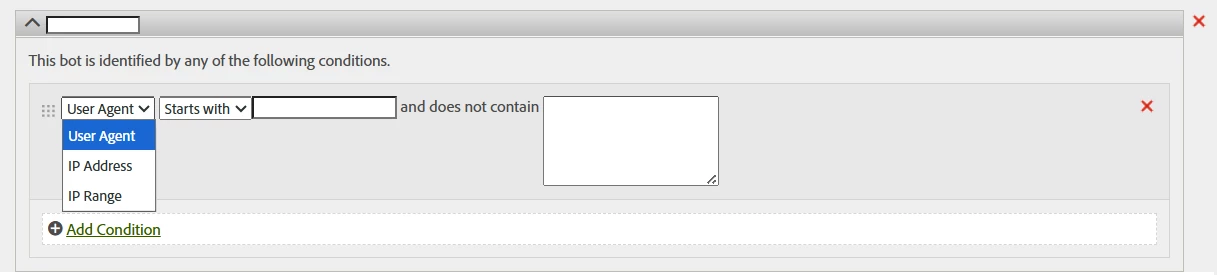
You could create an actual Bot Rule, that will collect basic info about this as a bot (so you can monitor it in your bot report):
If you care about monitoring what bots are doing, this would probably be your best option.
Other methods would be to do something with a processing rule (i.e. set a flag in a dedicated dimension to indicate a potential bot), then create a segment to remove “bot” traffic from your reports (but you need to make sure that segment is used everywhere - or build it into a Virtual Report Suite, and that all reports use that VRS)
Or you could attempt to create rules in your tracking to not trigger for certain User Agents.
All of these require some level of management… but as I said, using the actual “Bot Rules” is the traditional way to handle this…
It can be hard to tell from the User Agent alone….
Those are Linux running various versions of Chrome (the one you mentioned specifically is Chrome 130) which is older, but not so old that it raises immediate flags… this might be coming from an IT controlled computer that doesn’t allow users to update their own browser 🤷
That said, if the behaviour seems suspicious, I would also try to look at the Geo Location data, what referrers is potentially driving the traffic… I would also try to pull out the data in the Data Warehouse so that you can look at the IP address.
Also, what type of content/page is being viewed… is it something that makes sense to come in, read, then leave the site?
There are multiple ways to deal with this, if you determine this data to be a “bad bot”.
You could create an actual Bot Rule, that will collect basic info about this as a bot (so you can monitor it in your bot report):
If you care about monitoring what bots are doing, this would probably be your best option.
Other methods would be to do something with a processing rule (i.e. set a flag in a dedicated dimension to indicate a potential bot), then create a segment to remove “bot” traffic from your reports (but you need to make sure that segment is used everywhere - or build it into a Virtual Report Suite, and that all reports use that VRS)
Or you could attempt to create rules in your tracking to not trigger for certain User Agents.
All of these require some level of management… but as I said, using the actual “Bot Rules” is the traditional way to handle this…
I have found that MFA (made for advertising) sites, high bounce rate, and in some cases odd user agents go hand in hand.
Create a segment for the high bounce rate browsers and look at the referring domains. When you visit those domains you will find which are MFA’s enabling the creation of an MFA filter. The obvious tip is to start looking at .ai domains as well as all those “new” ones like .xyz etc.
Note: there are domains that are simple “referring domain spammers” which double as security threats.
Depending on your site, high bounce rate can be an indicator… but remember, that some sites are more prone to bounces… I work on Newspapers… we have, and will always have, a high bounce rate on our articles… people are interested in reading about something big happening in the news, but aren’t interested in other content…
Understanding your site and the nature of how people use your site is a big factor in determining bot traffic. In our case, a lot of our bot traffic aren’t bounces, they are the opposite… they crawl through our content scraping it…