Add "time spent per visit (seconds)" to Report Builder | Community
Skip to main content
Level 2
May 17, 2023
Solved

Add "time spent per visit (seconds)" to Report Builder

  • May 17, 2023
  • 1 reply
  • 1267 views

Is it possible to add "time spent per visit (seconds)" metrics to Report Builder? 

When I tried, it was only possible when it was used as dimension or total seconds spent 😞 


And if it's not possible, I would like to use a formula to calculate it. 

According to Adobe Analytics, the formula of time spent per visit (seconds) is "total seconds spent/(visits-bounces)", but the calculated metric using this formula was not exactly the same as the metrics that Adobe provides in the picture below T-T 


This post is no longer active and is closed to new replies. Need help? Start a new post to ask your question.
Best answer by Jennifer_Dungan

When dealing with time spent, there are a couple of caveats to keep in mind:


1. The last page of the visit (and subsequently visits that consist of a single page view) aren't counted in the time spent...


This is because Adobe is not a heartbeat system, the way that the time spent is calculated is basically finding the difference between the page view time stamps


Page A (12:04:38) > Page B (12:05:15) > Page C (12:07:41) > Left the Site

  • The time spent on Page A is 12:05:15 - 12:04:38 (27 seconds)
  • The time spent on Page B is 12:07:41 - 12:05:15 (146 seconds)
  • The time spent on Page C is unknown (there is no timestamp to subtract from)


2. Given the above, this also means that the values, depending on how they round, could be slightly off.... even your own calculation could round slightly differently resulting in a slightly different value.... 


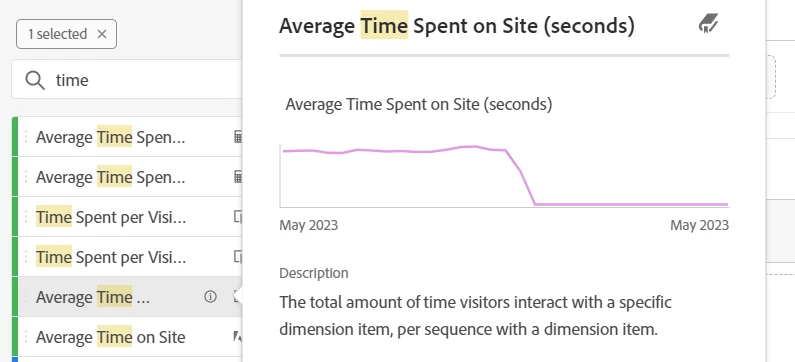
That said, Average Time Spent on Site (seconds) is available in workspace.... if you aren't seeing it, it's possible that your account hasn't been granted permission to that metric, or the entire metrics hasn't been added to the suite permissions....


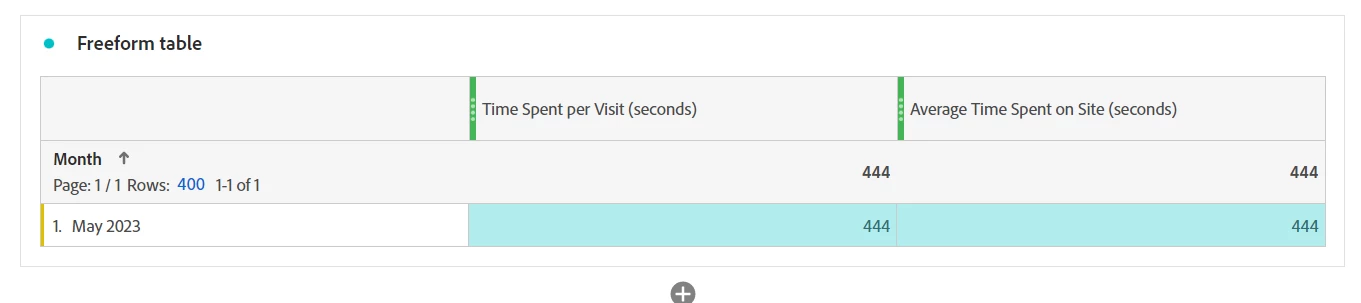
But, the Time Spent per Visit (seconds) that you are showing in your screenshot should return the same average time spent... 


I did help on a question earlier this year where the Average Time Spent on Site (seconds), I guess just due to minor changes in the calculation, was failing to work with custom date ranges... but the Time Spent per Visit (Seconds) worked just fine....


https://experienceleaguecommunities.adobe.com/t5/adobe-analytics-questions/custom-date-range-doesn-t-work-with-average-time-on-site/m-p/586632


These values should all be relatively similar, they just have minor variations in the calculation....


But if you are looking for accuracy, neither Adobe, not Google, nor any other tracking system that does a simple timestamp calculation will give really accurate values..... they should be used as a basic trend / health check... are the values going up or down; by how much; etc...


We also use Parse.ly Analytics on our sites.. this is a heartbeat system that handles time spent much more realistically... it takes into consideration when the browser or app is minimized, when the user is active in a different tab... and it sends heartbeats periodically to let the system know the user is actively engaged or not... and when the user leaves the site or closes the window/tab, it sends one final call to the system... so the time is much more accurate.


However, most companies aren't going to buy into a new system just to get more accurate time spent metrics. So my advice is to choose one primary metric, Time Spent per Visit (seconds) is more than sufficient (and if you want to use Custom Date Ranges, we know it works better than the other one), and run all your reports using it.

 

1 reply

Jennifer_Dungan
Community Advisor and Adobe Champion
Jennifer_DunganCommunity Advisor and Adobe ChampionAccepted solution
Community Advisor and Adobe Champion
May 17, 2023

When dealing with time spent, there are a couple of caveats to keep in mind:


1. The last page of the visit (and subsequently visits that consist of a single page view) aren't counted in the time spent...


This is because Adobe is not a heartbeat system, the way that the time spent is calculated is basically finding the difference between the page view time stamps


Page A (12:04:38) > Page B (12:05:15) > Page C (12:07:41) > Left the Site

  • The time spent on Page A is 12:05:15 - 12:04:38 (27 seconds)
  • The time spent on Page B is 12:07:41 - 12:05:15 (146 seconds)
  • The time spent on Page C is unknown (there is no timestamp to subtract from)


2. Given the above, this also means that the values, depending on how they round, could be slightly off.... even your own calculation could round slightly differently resulting in a slightly different value.... 


That said, Average Time Spent on Site (seconds) is available in workspace.... if you aren't seeing it, it's possible that your account hasn't been granted permission to that metric, or the entire metrics hasn't been added to the suite permissions....


But, the Time Spent per Visit (seconds) that you are showing in your screenshot should return the same average time spent... 


I did help on a question earlier this year where the Average Time Spent on Site (seconds), I guess just due to minor changes in the calculation, was failing to work with custom date ranges... but the Time Spent per Visit (Seconds) worked just fine....


https://experienceleaguecommunities.adobe.com/t5/adobe-analytics-questions/custom-date-range-doesn-t-work-with-average-time-on-site/m-p/586632


These values should all be relatively similar, they just have minor variations in the calculation....


But if you are looking for accuracy, neither Adobe, not Google, nor any other tracking system that does a simple timestamp calculation will give really accurate values..... they should be used as a basic trend / health check... are the values going up or down; by how much; etc...


We also use Parse.ly Analytics on our sites.. this is a heartbeat system that handles time spent much more realistically... it takes into consideration when the browser or app is minimized, when the user is active in a different tab... and it sends heartbeats periodically to let the system know the user is actively engaged or not... and when the user leaves the site or closes the window/tab, it sends one final call to the system... so the time is much more accurate.


However, most companies aren't going to buy into a new system just to get more accurate time spent metrics. So my advice is to choose one primary metric, Time Spent per Visit (seconds) is more than sufficient (and if you want to use Custom Date Ranges, we know it works better than the other one), and run all your reports using it.


Jennifer_Dungan
Community Advisor and Adobe Champion
May 17, 2023

Oops I just realized you said "Report Builder" not Workspace....


I see Average Time Spent on Site in my list of metrics in Report Builder... (under Site Metrics option)


The only thing is, it comes out in minutes (in decimal format) - i.e. 6.3 mins - If you need it in seconds, then you can multiply the result by 60 (unfortunately, this is rounded to the tenths, so the values will be slightly different than what Workspace shows... (Workspace for me has 6.2666666666666666666666666667 which when multiplied by 60 gives me 376... but when rounded up to 6.3, the multiplication results in 378)


However, knowing that the time spent isn't fully accurate, this should still be within acceptable parameters....


I do have some calculated metrics based on time... none of them are showing up in Report Builder (at least under the Site Metrics), maybe the metric has to be published to show up... 


But you can try to create a calculated metric, based on the existing:


HyeranAuthor
Level 2
May 17, 2023

Thanks for your kind answer. 


However, I can't find the average time spent on site metrics on the report builder... do you know the reason?