
Why is Can Start = False? | Community
Skip to main content
Lyndsy-Denk
Community Advisor
Community Advisor
April 7, 2025
Solved

Why is Can Start = False?

  • April 7, 2025
  • 3 replies
  • 807 views

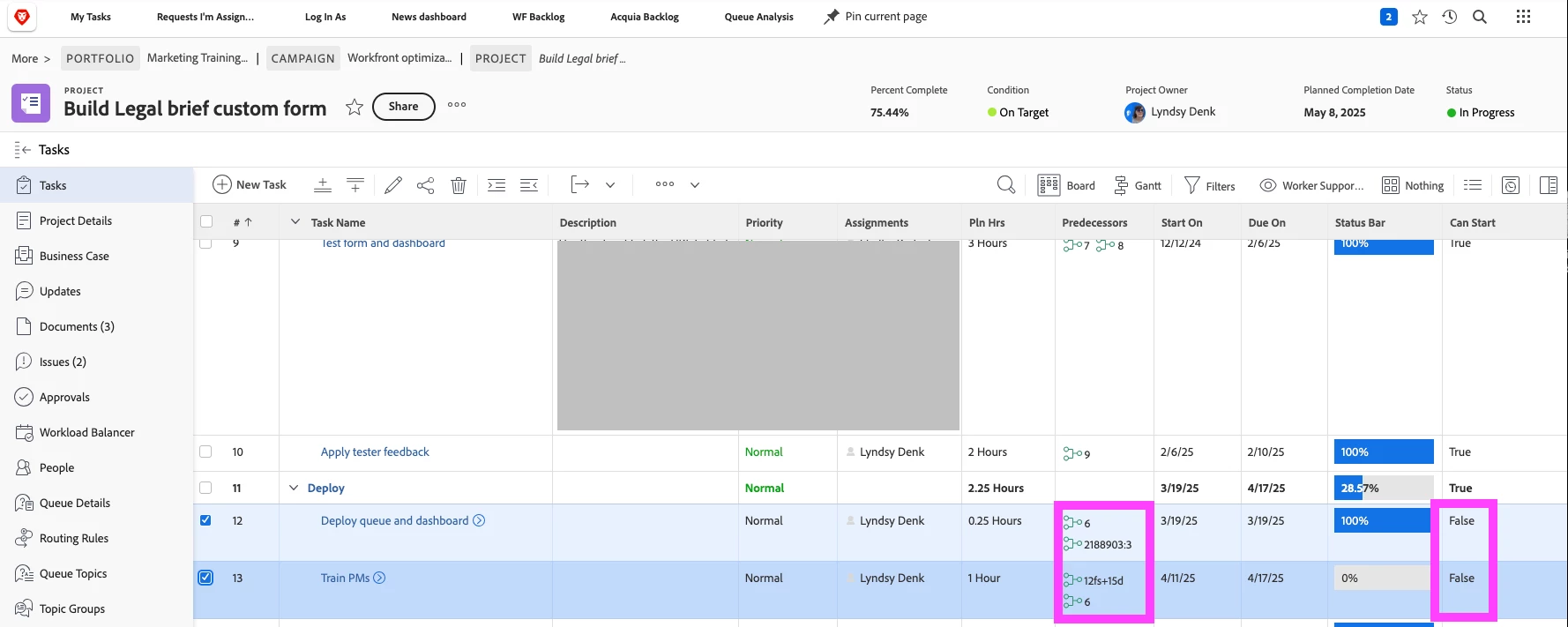
Before I ping support, I thought I would throw this out to the community. I have two tasks in a project with predecessors that have been met, but the Can Start value is False. Why? Is there something hinky going on with that cross-project predecessor?
Best answer by Lyndsy-Denk

No need to apologize!

While preparing my new summary for you, though, I found the culprit: One of the child tasks under task 6 had open issues. This fact was hidden to me because we rely a fair amount on the Percent Complete field, which apparently we can set to 100% and the status will remain In Progress. As a result of this revelation, I have posted an idea for folks to upvote: Disallow 100% Percent Complete if there are open i... - Adobe Experience League Community - 748142

3 replies

Doug_Den_Hoed_AtAppStore
Community Advisor
Community Advisor
April 7, 2025


Hi @lyndsy-denk,


Does Recalculate Timeline resolve it?


Regards,

Doug

Lyndsy-Denk
Community Advisor
Community Advisor
April 8, 2025

Nope. I tried that several times.

Level 3
April 7, 2025

Have you checked the Task Constraint?

Lyndsy-Denk
Community Advisor
Community Advisor
April 8, 2025

Both tasks are set to As Soon As Possible.

Lyndsy-Denk
Community Advisor
Community Advisor
April 8, 2025

Update: I busted my theory that the issue is with the cross-project predecessor. When I removed all predecessors in the problematic tasks, Can Start flipped to True. So I was able to narrow it down the culprit to predecessor 6, which is a parent task. All child tasks under 6 are complete. One child task has a constraint of Start No Earlier Than, but when I changed it to Must Start On or even As Soon As Possible, Can Start still said False.

skyehansen
Community Advisor and Adobe Champion
April 8, 2025

I'm so sorry, can you start over with your explanation? And maybe include a screenshot that shows task 6? I'm just wondering what the status, and maybe other specifics of task 6 is (you've said it's a parent, you've said all children are complete, but you haven't specified if the parent is complete). Also, has this ever worked or are you trying something new and can't get it working?

Lyndsy-Denk
Community Advisor
Lyndsy-DenkCommunity AdvisorAuthorAccepted solution
Community Advisor
April 11, 2025

No need to apologize!

While preparing my new summary for you, though, I found the culprit: One of the child tasks under task 6 had open issues. This fact was hidden to me because we rely a fair amount on the Percent Complete field, which apparently we can set to 100% and the status will remain In Progress. As a result of this revelation, I have posted an idea for folks to upvote: Disallow 100% Percent Complete if there are open i... - Adobe Experience League Community - 748142