
MoniqueEvans
Adobe Champion, Community Advisor, UG Leader
Apr 29, 2021 4:32 PM UTC
Solved

Reporting on Reporting Elements

In a few Braindates yesterday I was asked how to report on the reporting elements (view, filter, grouping) within a report. This can be particularly useful when trying to find a specific report as well as when cleaning up reports and easily identifying duplicates. Here is the code for each column. You can also use Command+F (Control+F) to easily find existing reports that use a specific field.

Pro Tip: Export to Excel to highlight duplicates
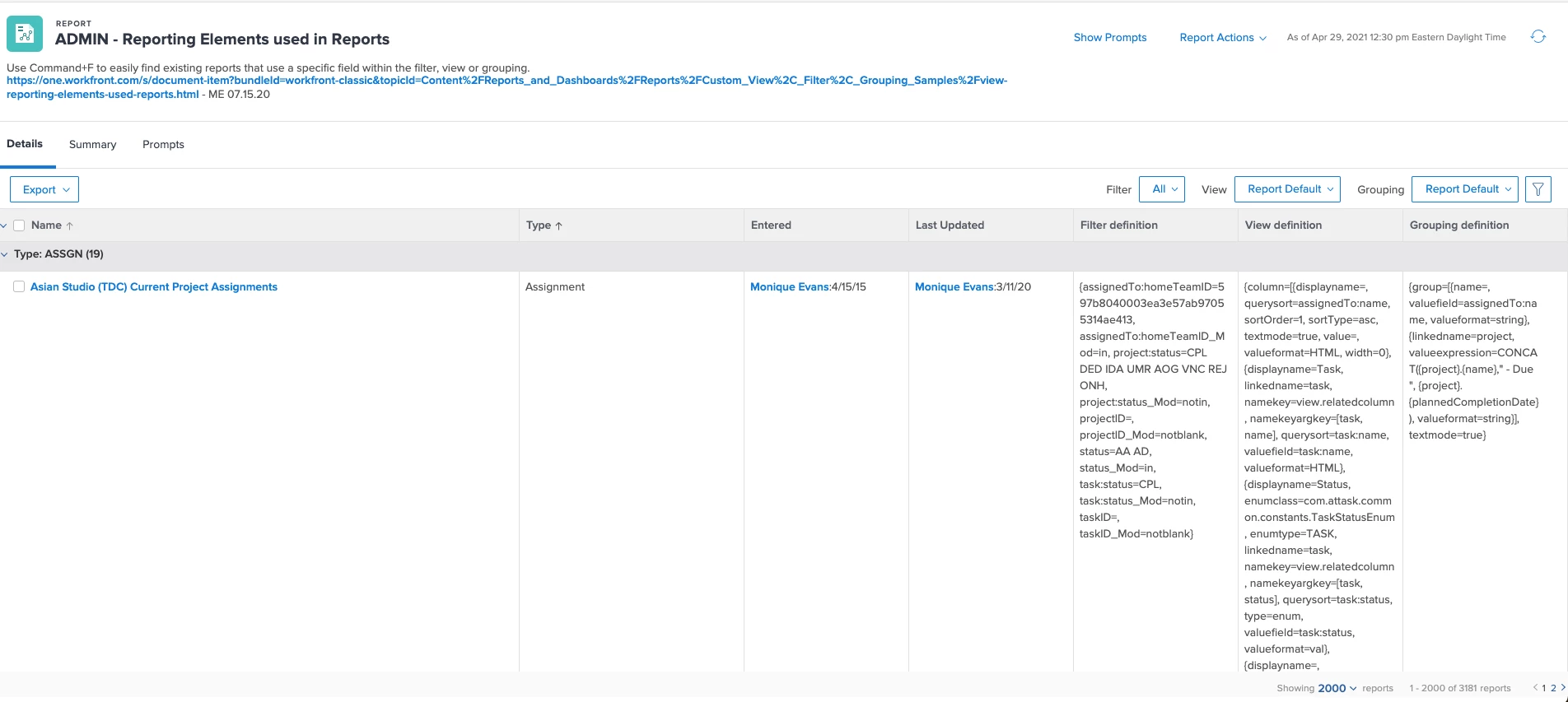
Filter

displayname=Filter definition

textmode=true

valuefield=filter:definition

valueformat=HTML

View

displayname=View definition

textmode=true

valuefield=view:definition

valueformat=HTML

Grouping

displayname=Grouping definition

textmode=true

valuefield=groupBy:definition

valueformat=HTML

MoniqueEvans
MoniqueEvansAccepted solution
Adobe Champion, Community Advisor, UG Leader
Apr 29, 2021 5:01 PM UTC

Another awesome use case I just remembered is when you're updating a custom field and need to know what reports are affected by it. IE has an option as a filter, or grouping by the field, or conditional formatting with that field. This will help you understand the connections and remind you to edit the reports after altering the field.

I typically will let users know the report may be "broken" for a day or two while I work through everything.

11 replies

Level 2
Apr 29, 2021 4:52 PM UTC

Thanks Monique!!!👍

Translate
MoniqueEvans
Adobe Champion, Community Advisor, UG Leader
MoniqueEvansAdobe Champion, Community Advisor, UG LeaderAuthorAccepted solution
Adobe Champion, Community Advisor, UG Leader
Apr 29, 2021 5:01 PM UTC

Another awesome use case I just remembered is when you're updating a custom field and need to know what reports are affected by it. IE has an option as a filter, or grouping by the field, or conditional formatting with that field. This will help you understand the connections and remind you to edit the reports after altering the field.

I typically will let users know the report may be "broken" for a day or two while I work through everything.

Translate
snuzum
Level 3
Apr 29, 2021 10:54 PM UTC

You are a ROCK STAR ⭐️ ⭐️ ⭐️ Monique!!!

Translate
Kundanism
Level 10
Apr 30, 2021 11:40 AM UTC

Thanks lot @Monique Evans‚ for sharing this info. One question can we add a report prompt to filter report type such as project or task or assignment type, etc. I tried to use the field as Report Type, but does shows the list to select type of report as mentioned above.

Mvh

Kundan.

Translate
MoniqueEvans
Adobe Champion, Community Advisor, UG Leader
Apr 30, 2021 12:28 PM UTC

Yes you can add a prompt (my report uses them as well) for Report Type you will need to select equals and type in the Workfront code. For example, a Project Report would be PROJ. Assignment = ASSGN; Task = TASK

Translate
laurence_jayawardane
Level 4
Aug 31, 2022 10:51 PM UTC

I finally implemented this in our instance, which I am so excited to start using! Thanks for sharing this with us @moniqueevans !

Translate
MoniqueEvans
Adobe Champion, Community Advisor, UG Leader
Sep 6, 2024 5:10 PM UTC

@cynthiaboon Found it!

Translate
CynthiaBoon
Adobe Employee
Adobe Employee
Sep 6, 2024 5:15 PM UTC

You are, as always, the BEST!

Translate
Level 2
Sep 3, 2025 5:45 AM UTC

Hi there @moniqueevans! Perhaps this is a silly question, but what report type is this report? Since it's pulling in details from all different report "types" (first column), but WF restricts reporting by report type -- this is going over my head how you even built this. I'm intrigued, though. Seems like a super helpful tool, if I could figure it out. 

Translate
MoniqueEvans
Adobe Champion, Community Advisor, UG Leader
Sep 3, 2025 12:59 PM UTC

Hi Jennifer! Great question and a very important one if you want to be successful. This is a Report Report. No that's not a typo. This is a report that is listing the reports in your system. And to make one you want to go to Reports > New Report > More > SCROLL DOWN to Report


Translate
Level 2
Sep 3, 2025 11:33 PM UTC

@moniqueevans 
I bow to thee... this report is PURE GENIUS!! 

Translate