Issue in setting up Universal Editor local service | Community
Skip to main content
narendragandhi
Community Advisor
Community Advisor
February 26, 2024
Solved

Issue in setting up Universal Editor local service

  • February 26, 2024
  • 2 replies
  • 3558 views

I am following this article to setup the local universal editor - https://experienceleague.adobe.com/docs/experience-manager-cloud-service/content/universal-editor/developing/local-dev.html?lang=en# but it's not working for me.


Can you please let me know what steps I could be missing if anyone has it working in their local?


Thanks

Narendra

This post is no longer active and is closed to new replies. Need help? Start a new post to ask your question.
Best answer by maximilianvoss

Yep, you are right. Was able to see the latest universal-editor-cors library. So, how to use the Universal Editor locally then?


Please see: https://experienceleague.adobe.com/docs/experience-manager-cloud-service/content/implementing/developing/universal-editor/architecture.html?lang=en#building-blocks
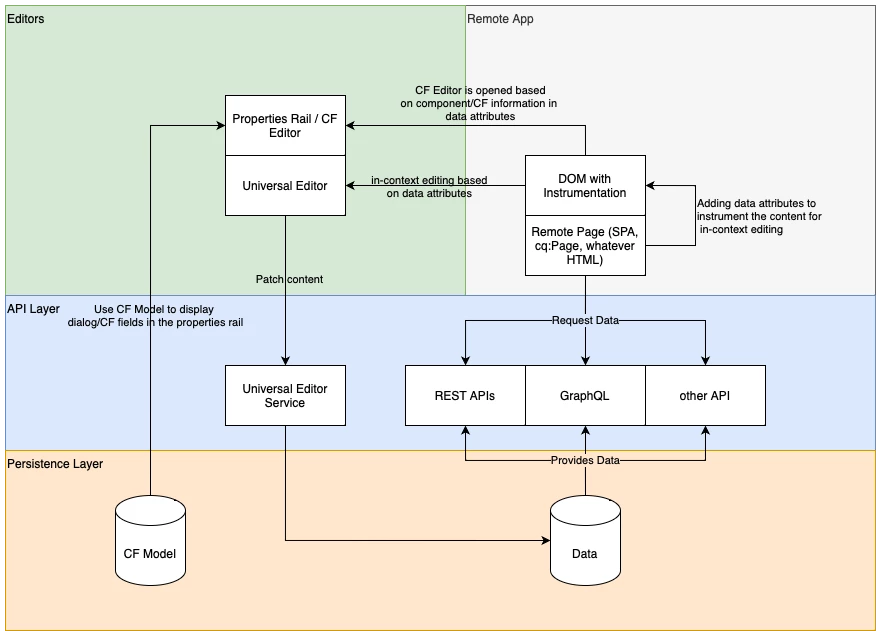


Universal Editor consists of two elements: UI & Service.

The Universal Editor UI is always hosted on https://experience.adobe.com or under AEM domain.

The Universal Editor Service - the part which is persisting changes to your AEM backend - is either centrally hosted by Adobe at https://universal-editor-service.experiencecloud.live or can be self-hosted by you. Use cases for self-hosting are local development or internal restrictions which prevent direct access to the AEM instance from the Internet.

2 replies

kautuk_sahni
Community Manager
Community Manager
February 28, 2024

@narendragandhi can you help us explain what issue are you facing? 


Setting up the local Universal Editor in AEM involves several steps:

Prerequisites:

Steps:

  1. Create a Certificate:

    • Option 1: Use OpenSSL to generate a self-signed certificate for development purposes only.
      openssl req -x509 -newkey rsa:2048 -keyout key.pem -out certificate.pem -days 365 -subj "/C=US/ST=YourState/L=YourCity/O=YourOrganization/CN=localhost"
      
    • Option 2: Alternatively, for a more secure development environment, use a temporary certificate authority like mkcert: https://github.com/FiloSottile/mkcert
  2. Configure the Universal Editor Service:

    • Edit the config.json file located in the Universal Editor Service installation directory.
    • Update the following properties:
      • server.port: Set the port on which the service will run (default: 8000).
      • https.enabled: Set to true to enable HTTPS.
      • https.keyStore: Path to your self-signed certificate keystore file (e.g., key.pem).
      • https.keyStorePassword: Password for the keystore file (leave blank if using OpenSSL).
  3. Run the Universal Editor Service:

    • Open a terminal and navigate to the Universal Editor Service installation directory.
    • Run the command ./universal-editor-service to start the service.
  4. Instrument your AEM page:

  5. Access the Local Universal Editor:

    • Open your browser and navigate to https://localhost:8000/.
    • If using a self-signed certificate: Accept the security warning as it's not trusted by default browsers. (For development only)
    • If using a temporary certificate authority like mkcert: You should be able to access the editor without any warnings.
    • You should now be able to edit your AEM page using the local Universal Editor Service.
Kautuk Sahni
Level 2
February 28, 2024

Followed your steps @kautuk_sahni. The local universal editor is still not working, getting a 404, when I hit the local host https://localhost:8000/


Here is what I did -
1. Followed the steps as documented here to setup the local Universal editor Service.

2. Added an additional config.json, considering the installation directory didn't have one. Still no luck!
3. Note: Downloaded the Universal editor service universal-editor-service.cjs from https://experience.adobe.com/#/downloads/content/software-distribution/en/aemcloud.html

maximilianvoss
Adobe Employee
maximilianvossAdobe EmployeeAccepted solution
Adobe Employee
February 28, 2024

Yep, you are right. Was able to see the latest universal-editor-cors library. So, how to use the Universal Editor locally then?


Please see: https://experienceleague.adobe.com/docs/experience-manager-cloud-service/content/implementing/developing/universal-editor/architecture.html?lang=en#building-blocks


Universal Editor consists of two elements: UI & Service.

The Universal Editor UI is always hosted on https://experience.adobe.com or under AEM domain.

The Universal Editor Service - the part which is persisting changes to your AEM backend - is either centrally hosted by Adobe at https://universal-editor-service.experiencecloud.live or can be self-hosted by you. Use cases for self-hosting are local development or internal restrictions which prevent direct access to the AEM instance from the Internet.

May 23, 2024

For react Apps to enable AUE on the pages:

add the fallowing dependency in package.json  dependency section 

"@adobe/universal-editor-cors": "^2.2.16",

then add the fallowing import in index.js 

import '@adobe/universal-editor-cors';

then instrumentalise the page as mentioned the Here