Headers and Helix Configs in EDS Site created with Edge Delivery Services Template (universal editor , xwalk project) | Community
Skip to main content
josephambrose
Level 3
November 13, 2024
Solved

Headers and Helix Configs in EDS Site created with Edge Delivery Services Template (universal editor , xwalk project)

  • November 13, 2024
  • 2 replies
  • 1927 views

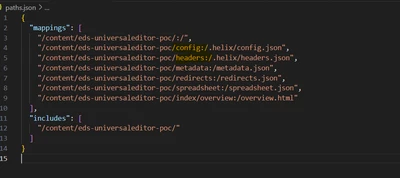
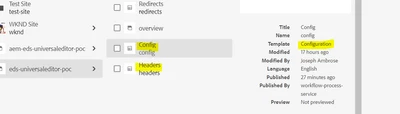
I have created an EDS site using the "AEM Site with Edge Delivery Services Template 0.0.16" and set up configurations and headers within it. The paths JSON file in the repository has the necessary mappings. I can access the Helix config via main--**.aem.page/config. json, but any updates made and republished do not show up in the config JSON. Additionally, when attempting to load headers JSON via main--**.aem.page/headers. json, I receive a 404 error.
 

@arunpatidar 

This post is no longer active and is closed to new replies. Need help? Start a new post to ask your question.
Best answer by arunpatidar

Hi @josephambrose 
I don't think so you should allowed below paths accessible over browser, those are config for the System.

Example if you are going to expose config json, you would endup exposing sensitive data:

https://www.aem.live/docs/configuration 


  • Configuration: /.helix/config.json
  • Headers: /.helix/headers.json

2 replies

arunpatidar
Community Advisor
Community Advisor
November 13, 2024

Hi @josephambrose 

header config file is use to apply custom HTTP response headers to resources, for example to allow CORS.

You can see those headers in the page request.


Please check below for more details

https://www.aem.live/docs/custom-headers 

Arun Patidar
josephambrose
Level 3
November 13, 2024

Hi @arunpatidar 


 Yes. But as per the documentation https://experienceleague.adobe.com/en/docs/experience-manager-cloud-service/content/edge-delivery/wysiwyg-authoring/tabular-data , metadata, config, redirects all can be accessible like ....aem.page/metadata.json, ...aem.page/redirects.json. Because we are doing the path mapping in paths.json.  Likewise, is headers not accessible using this url (....aem.page/headers.json)? 

arunpatidar
Community Advisor
arunpatidarCommunity AdvisorAccepted solution
Community Advisor
November 13, 2024

Hi @josephambrose 
I don't think so you should allowed below paths accessible over browser, those are config for the System.

Example if you are going to expose config json, you would endup exposing sensitive data:

https://www.aem.live/docs/configuration 


  • Configuration: /.helix/config.json
  • Headers: /.helix/headers.json
Arun Patidar
kautuk_sahni
Community Manager
Community Manager
November 25, 2024

@josephambrose Did you find the suggestion helpful? Please let us know if you require more information. Otherwise, please mark the answer as correct for posterity. If you've discovered a solution yourself, we would appreciate it if you could share it with the community. Thank you!

Kautuk Sahni
josephambrose
Level 3
November 26, 2024

Hi @kautuk_sahni @arunpatidar Sorry for late reply. Yes this is the correct answer. We are unable to access configurations and headers directly. I attempted to set cache-control headers for certain pages in my project, but they were not applied. Adobe has confirmed that, due to the product's design and implementation, setting cache-control headers is not supported.