Holding out a control for an experience targeting activity in Adobe Target | Community
Skip to main content
Level 2
May 28, 2021
Solved

Holding out a control for an experience targeting activity in Adobe Target

  • May 28, 2021
  • 1 reply
  • 2368 views

Hello,


I'm looking to create an experience targeting activity within Adobe Target that shows multiple different audiences of visitors personalised webpage experiences. As part of this I want to hold out a control population that I can measure the personalisation against. In the A/B testing activity it is easy to hold a control, but in experience targeting not so much. Can anyone please explain how to best do this in this particular circumstance? 


Thanks!
This post is no longer active and is closed to new replies. Need help? Start a new post to ask your question.
Best answer by Gaurav_Singh_02

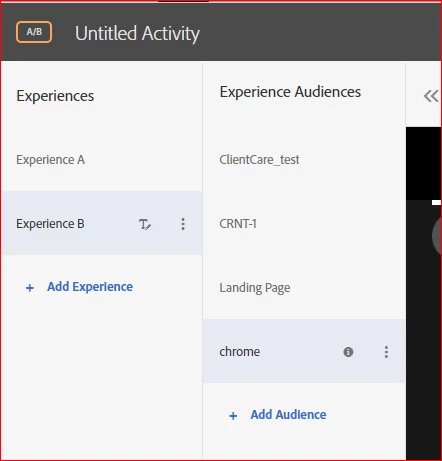
@rhodri2 could you try using the "Multiple audiences" feature for AB test. Using this you may use Experience A with "Default content" and for Experience B you may apply multiple audiences so visitors have different content based upon the qualification criteria . You may refer to this document : https://experienceleague.adobe.com/docs/target/using/activities/abtest/create/target-experience-to-multiple-audiences.html?lang=en 


1 reply

Gaurav_Singh_02Adobe EmployeeAccepted solution
Adobe Employee
June 1, 2021

@rhodri2 could you try using the "Multiple audiences" feature for AB test. Using this you may use Experience A with "Default content" and for Experience B you may apply multiple audiences so visitors have different content based upon the qualification criteria . You may refer to this document : https://experienceleague.adobe.com/docs/target/using/activities/abtest/create/target-experience-to-multiple-audiences.html?lang=en 


Rhodri2Author
Level 2
June 2, 2021

How do you specify an audience to a specific experience exactly though? I get from your above screenshot, that you have created 4 audiences (ClientCare_test, CRNT-1, Landing Page, and chrome), but how do you specify that you only want those 4 audiences to see your experience B, and not A (or a new EXP C if you created one)? Based on what I've done, once I've added a number of audiences it looks like every one of these audiences applies to every one of the experiences I choose to create alongside them. To  further clarify by example.. if you were to create a new experience C above the two you have already created, how could you specify that only CRNT-1 would see the new EXP C, and the remaining 3 audiences would see EXP B?