Getting the following error in my browser console - Errors: field - [qaMode] - Invalid QaMode token; | Community
Skip to main content
Level 2
March 9, 2020
Solved

Getting the following error in my browser console - Errors: field - [qaMode] - Invalid QaMode token;

  • March 9, 2020
  • 10 replies
  • 11790 views

Hi there. I'm wondering if anyone can shed any light as to why I'm getting the following error in my browser console on the Target response (.tt.omtrdc...) payload?

I've copied the QA URL from my activity, and when I paste into the browser, I can't debug the payload, because this is the only message I get.

 

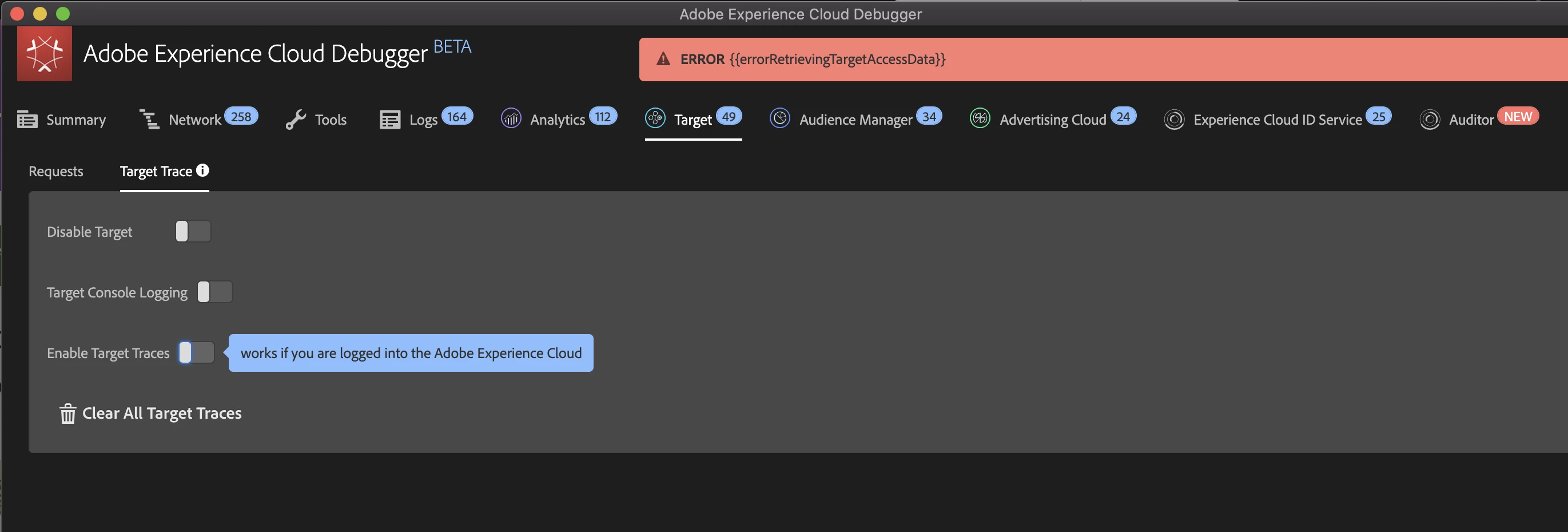
Not sure if related, but the Adobe Experience Cloud Debugger throws me the following error when I try to turn on Target Traces.

ERROR{{errorRetrievingTargetAccessData}}


This post is no longer active and is closed to new replies. Need help? Start a new post to ask your question.
Best answer by justtryingtofindanswers

Did you by any chance make a copy of a previous activity?

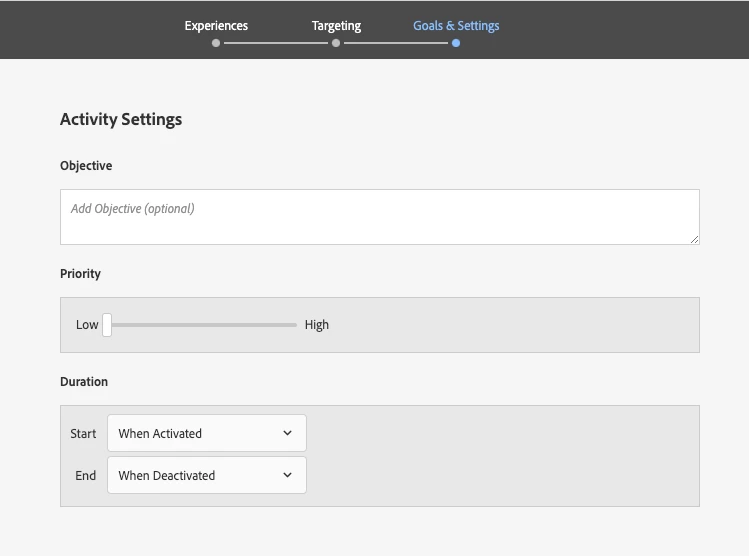
I copied a couple of older/previous activities and made some changes and couldn't QA the test. Turned out on the Goals & Settings page the duration end date was still set to a date in the past. When I changed it to "when deactivated" the QA link worked.


10 replies

March 26, 2020
I'm getting exactly the same problem...
Amelia_Waliany
Adobe Employee
Adobe Employee
April 5, 2020

Check out this link to Target Documentation on Known Issues and Resolved Issues  - hope its helpful!

manojs87260944
April 22, 2020

Hi @amelia_waliany . Could you please be a bit specific on ERROR{{errorRetrievingTargetAccessData}} when trying to do a target trace in the Debugger? Is there an alternative for the moment? Much appreciated, and thank you!
Level 1
October 21, 2020

Is there any further progress on this?


Still getting ERROR{{errorRetrievingTargetAccessData}} when trying to Enable Target Traces in Adobe Experience Cloud Debugger BETA despite being logged into Adobe Target in chrome.


January 14, 2021
I don't suppose you ever solved this did you?
October 30, 2020
Did anyone find the solution for that? It seems like this post has been viewed 4.7k time and Adobe support hasn't provided any solid answer
October 30, 2020

Did anyone find the solution for that? It seems like this post has been viewed 4.7k time and Adobe support hasn't provided any solid answer.

Amelia_Waliany
Adobe Employee
Adobe Employee
April 1, 2021

Hi @darrenb_iv ! Were you able to resolve this issue with the support that was provided? If so, please let us know by marking the helpful response as, "Correct Reply," - otherwise I'd encourage you to follow up👍


Thank you and I hope you are having a wonderful day!


Warmly,

Amelia, Target Community Manager

Level 2
April 21, 2021

I haven't seen this problem in a little while, but then again I had switched to using Firefox to debug once the Debugger was made available to Firefox, and everything seems to work fine there. But I'm not sure whether the problem has resolved in Chrome

April 30, 2021
Still getting this error months later. I am wondering why no one has addressed this
Level 2
August 16, 2021

Have you already found a solution? If not, I've replied my solution to OP. Maybe it'll fix it for your issue too.

justtryingtofindanswersAccepted solution
Level 2
August 16, 2021

Did you by any chance make a copy of a previous activity?

I copied a couple of older/previous activities and made some changes and couldn't QA the test. Turned out on the Goals & Settings page the duration end date was still set to a date in the past. When I changed it to "when deactivated" the QA link worked.


Level 3
October 20, 2021

This is the correct answer. I had the same issue, I deactivated an activity and then tried to make changes to re-launch but couldn't QA it. It was because the "scheduled activation date and time" were in the past. I changed them and everything works as expected now.

Level 2
August 19, 2021

I was confused by this error too. Here's what I found.


This seemed to be caused by an old and apparently now invalid QA activity link.

Example: Adding ?at_preview_token=[your token here...]

Solution:

1. Add ?at_preview_token= with no token value
2. Clear cookies as this value is persisted

The above steps resolved the issue for me.


If this keeps happening to people in your org, they are probably using an old preview link that was provided a while ago and is now invalid for some reason.


At least, that's what I've surmised from troubleshooting it.