
Audience Geo-Targeting Not Working | Community
Skip to main content
bkmills
Level 2
September 21, 2021
Solved

Audience Geo-Targeting Not Working

  • September 21, 2021
  • 2 replies
  • 1622 views

Hello Community,


I'm having trouble getting the geo-targeting rule to work. I thought it was an out-of-the-box solution. Am I wrong?


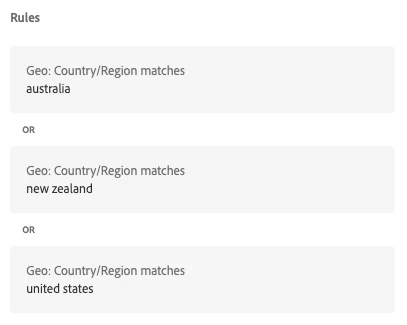
I simply want to set the geo-location for Australia, New Zealand, or United States. To verify I'm using mboxOverride.browserIp and getting IP's by country: https://lite.ip2location.com/ip-address-ranges-by-country but the activity is not loading in the browser. On the other hand, when I use the default All Visitors audience everything works. I created an audience with the following rules...see attached.
 

This post is no longer active and is closed to new replies. Need help? Start a new post to ask your question.
Best answer by Perrin_Ennen

Maybe it will help you to check in which country Target recognizes you. For this you can e.g. create a form based experiment with an HTML offer with: <script>console.log('current country: ${profile.geolocation.country}')</script>

2 replies

Perrin_Ennen
Community Advisor
Perrin_EnnenCommunity AdvisorAccepted solution
Community Advisor
September 22, 2021

Maybe it will help you to check in which country Target recognizes you. For this you can e.g. create a form based experiment with an HTML offer with: <script>console.log('current country: ${profile.geolocation.country}')</script>

Level 3
October 8, 2021

I'm running into similar issues here. Are you using a VPN to validate your audiences? I tried @perrin_ennen suggestion and my locations are not all coming in correctly. I'm using a VPN and validated that those locations are accurate.....wondering if this is an Adobe issue.