View/Manage Schemas Permissions | Community
Skip to main content
January 17, 2025
Question

View/Manage Schemas Permissions

  • January 17, 2025
  • 3 replies
  • 598 views

Hi everyone!

We are having issues giving users permissions to view and manage XDM-schemas. 
We have added relevant users to a product profile on the Adobe Experience Platform Service in the Admin Console, and given all the permissions available to the added users in that profile. We have added the users as both users, admins and developers to that profile but nothing seems to do the trick.

Does anyone have any idea what we could be missing? 

Thank you in advance!
// Nina


This post is no longer active and is closed to new replies. Need help? Start a new post to ask your question.

3 replies

jayakrishnaaparthasarathy
Community Advisor
Community Advisor
January 17, 2025

@jiveni  - Could you also make sure to have a respective role for the users and have them into the same under the "Permission" tab on AEP UI. Please refer the below document for the same. Hopefully after creating role and assigning them in the same will grant a relevant access. 

https://experienceleague.adobe.com/en/docs/experience-platform/access-control/home
https://experienceleague.adobe.com/en/docs/experience-platform/access-control/abac/permissions-ui/browse
https://experienceleague.adobe.com/en/docs/experience-platform/access-control/abac/permissions-ui/permissions

Thank you,
Jayakrishnaa P.

Harveer_SinghGi1
Community Advisor
Community Advisor
January 17, 2025

Hi @jiveni ,

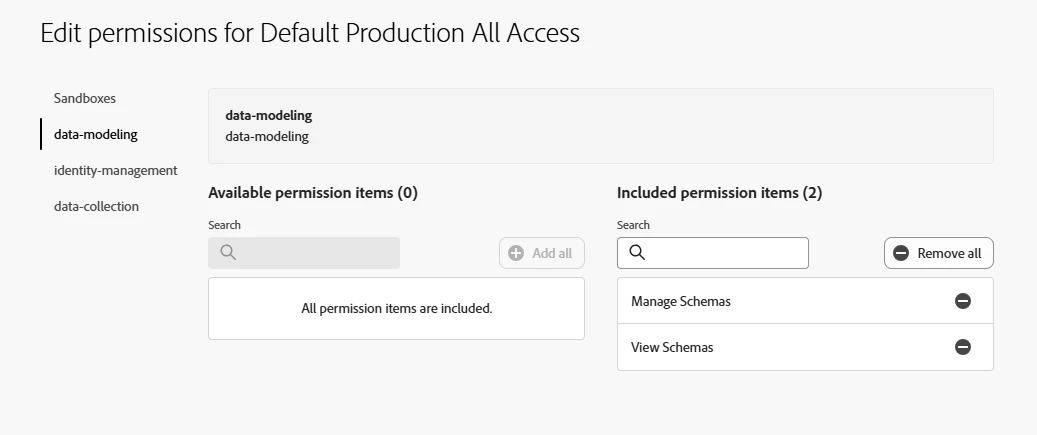
As @jayakrishnaaparthasarathy this is most likely related to insufficient permissions given to the users. To work with XDM schemas a users needs certain permissions in Adobe AEP UI (administration -> permissions) as well and not just Adobe Admin console data collection product profiles . For data collection purposes minimum permissions are as below which are also listed in Permission management for data collection in Experience Platform documentation,

Cheers!

kautuk_sahni
Community Manager
Community Manager
February 17, 2025

@jiveni Did you find the suggestions helpful? Please let us know if you need more information. If a response worked, kindly mark it as correct for posterity; alternatively, if you found a solution yourself, we’d appreciate it if you could share it with the community. Thank you!

Kautuk Sahni