How to use object array in audience rule | Community
Skip to main content
Level 3
March 3, 2025
Solved

How to use object array in audience rule

  • March 3, 2025
  • 4 replies
  • 1289 views

Hi,

I have a filed in one of the field groups defined as an array of objects, like shows in the image below.
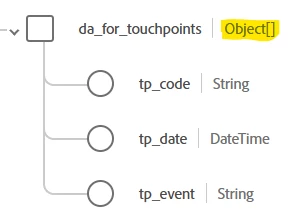
 

The field group was added to a schema, which was enabled for profile.

I would like to use the above field in an audience rule, something like below:

where da_for_touchpoints contains at least one that has (tp_code=XXX and tp_event=12345).
Is that possible? If yes, how would I define the audience criteria?


Thanks.

 

This post is no longer active and is closed to new replies. Need help? Start a new post to ask your question.
Best answer by jayakrishnaaparthasarathy

Hi @gabrielana1  - Hope you are looking to store a multiple values related to the touchpoints. I don't see any odd on the screenshot that you have shared, looks fine. So once you ingest the data, it would look like below on the JOSN view on profile section. 

"da_for_touchpoints": [
{
"tp_code": "546777",
"tp_date": "03-04-2025",
"tp_event": "Community Program"
},
{
"tp_code": "874378",
"tp_date": "03-07-2025",
"tp_event": "Community Discussion"
}
]
Just go to the audience section and look for the folder that named as "da_for_touchpoints" , drag and drop the attributes that require along with the required value and refresh the estimation to see if you get some qualified profiles. Basically, this should get the profiles at least with one array element that match your audience criteria. 
 
Thank you,
Jayakrishnaa P.

4 replies

brekrut
Adobe Employee
Adobe Employee
March 3, 2025

You can define an array within the XDM Individual profile class.  


You would include the array in the audience criteria and include the a count function which is equal to 1 to account for 1 item of the array.


You would then define the attributes of tp_code = foo and tp_event = 12345

RiteshY18
Community Advisor
Community Advisor
March 3, 2025

@gabrielana1  may be try something like the below for the loyalty object 


jayakrishnaaparthasarathy
Community Advisor
jayakrishnaaparthasarathyCommunity AdvisorAccepted solution
Community Advisor
March 4, 2025

Hi @gabrielana1  - Hope you are looking to store a multiple values related to the touchpoints. I don't see any odd on the screenshot that you have shared, looks fine. So once you ingest the data, it would look like below on the JOSN view on profile section. 

"da_for_touchpoints": [
{
"tp_code": "546777",
"tp_date": "03-04-2025",
"tp_event": "Community Program"
},
{
"tp_code": "874378",
"tp_date": "03-07-2025",
"tp_event": "Community Discussion"
}
]
Just go to the audience section and look for the folder that named as "da_for_touchpoints" , drag and drop the attributes that require along with the required value and refresh the estimation to see if you get some qualified profiles. Basically, this should get the profiles at least with one array element that match your audience criteria. 
 
Thank you,
Jayakrishnaa P.

Level 3
March 4, 2025

Yes, thank you, that is what I am looking for. I played around a bit since I posted the question and I think it will work, exactly as you mentioned.

kautuk_sahni
Community Manager
Community Manager
March 7, 2025

@gabrielana1 Did you find the suggestions helpful? Please let us know if you need more information. If a response worked, kindly mark it as correct for posterity; alternatively, if you found a solution yourself, we’d appreciate it if you could share it with the community. Thank you!

Kautuk Sahni